Automate TLS Forestry Analysis - Data Processing Enhanced
Recap and Introduction
In the previous tutorial section, we completed our Python-based TLS forestry analysis workflow, automating the entire processing pipeline from data preparation and ground classification to stem detection, individual tree segmentation, and 3D tree reconstruction.
We also introduced tile-by-tile processing, parallelization, and automated logging, allowing us to analyze larger forest datasets efficiently and reproducibly. The resulting datasets provide detailed information about individual trees, including their positions, dimensions, stem and branch characteristics, wood volume, and biomass estimates.
With the main processing workflow complete, we will now explore what we can do with these results beyond the standard LIS Pro 3D tools.
In this final tutorial section, we will take advantage of the broader Python ecosystem to create additional visualizations and reports. Using libraries such as Matplotlib and Folium, we will turn our forestry analysis results into informative graphs and interactive maps that help us explore, interpret, and communicate the data.
Rather than introducing another major processing step, this tutorial section is intended as a practical extension of the workflow. We will experiment with a few examples to demonstrate how easily LIS Pro 3D results can be combined with other Python tools.
This final step highlights one of the key advantages of a Python-based workflow: once the data have been processed, we can build on the results using a wide range of libraries for visualization, analysis, and reporting.
This tutorial section assumes that you have completed the previous section, Automate TLS Forestry Analysis – Data Processing, and have the resulting tree-level datasets ready for visualization and further analysis.
Install Additional Python Modules
To create graphs and interactive maps from our forestry analysis results, we will use a few additional Python libraries.
Open the Miniforge Prompt
First, open the Miniforge Prompt on your computer.
Activate Your Conda Environment
Activate the Conda environment containing your LIS Pro 3D installation. Replace myenv with the name of your environment.
(base) C:\Users\LiDAR>conda activate myenv

(myenv) C:\Users\LiDAR>
Install the Required Python Libraries
With your Conda environment activated, we will install three additional Python libraries:
numpy: Provides tools for numerical calculations and working with arrays.matplotlib: Allows us to create graphs, charts, and other data visualizations.folium: Allows us to create interactive web maps that can be viewed in a browser.
Install all three libraries using the following command:
(myenv) C:\Users\LiDAR>conda install numpy matplotlib foliumOnce the installation is complete, we are ready to use these libraries alongside LIS Pro 3D to visualize and explore our forestry analysis results.
Install Quarto
Quarto is an open-source scientific and technical publishing system for creating reproducible documents, reports, presentations, websites, and books.
It supports Markdown and integrates with programming languages such as Python, R, and Julia. This allows us to combine code, data analysis, visualizations, and explanatory text in a single document. Quarto can generate output in various formats, including HTML, PDF, and Word, making it a flexible tool for research, data analysis, and scientific communication.
In fact, this entire tutorial series was created using Quarto.
We will now use Quarto to automatically generate an informative report summarizing the results of our TLS-based forest plot analysis.
Visit the Quarto Website
Open the official Quarto website in your browser.

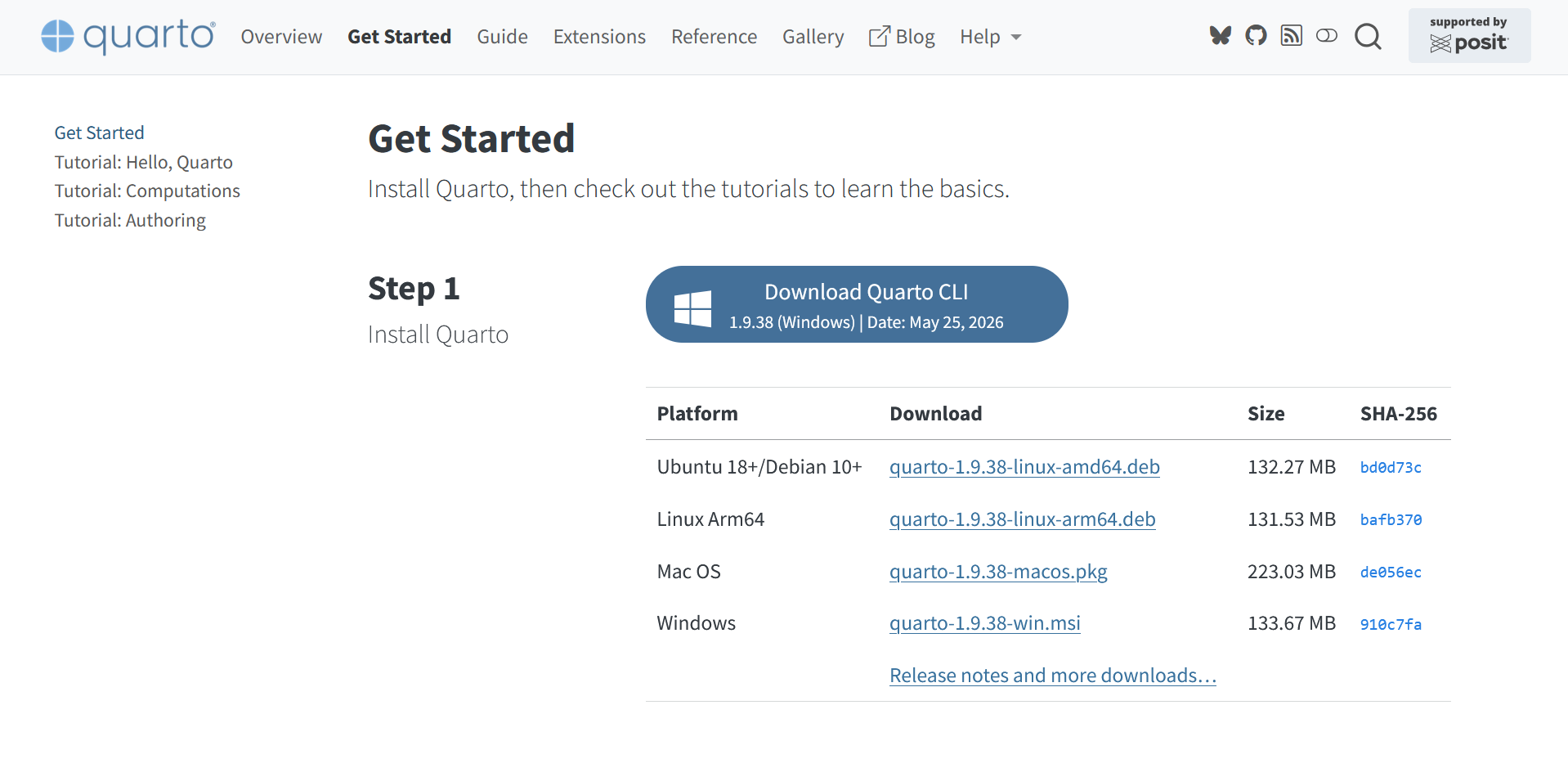
Download and Install Quarto
Navigate to the Get Started section, select Download Quarto CLI, and follow the installation instructions for your operating system.
Install the Quarto VS Code Extension
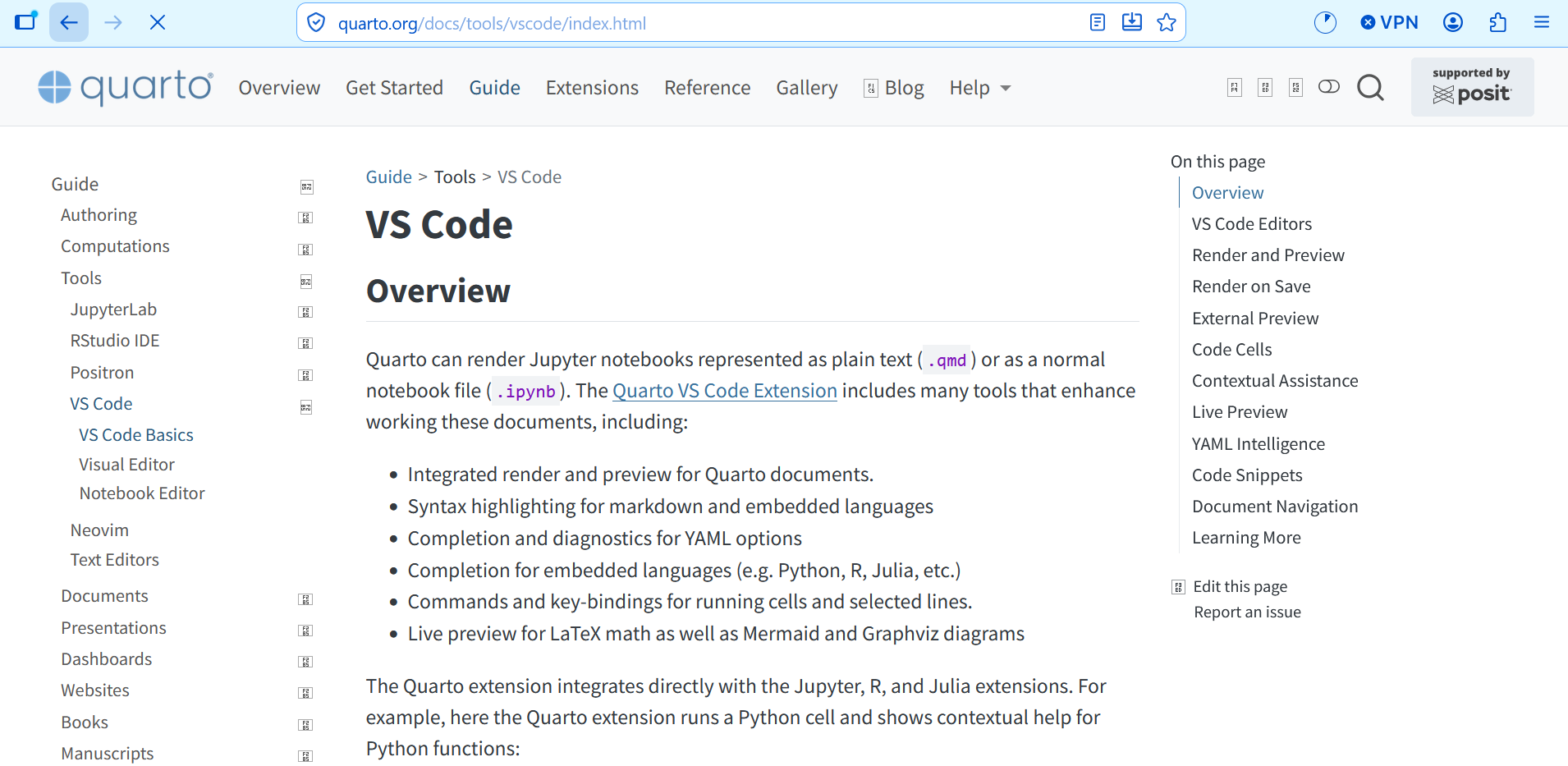
To work with Quarto directly in Visual Studio Code, we will also install the Quarto VS Code Extension.
Visit the Quarto documentation for VS Code and click Quarto VS Code Extension.
On the extension page, click Install.
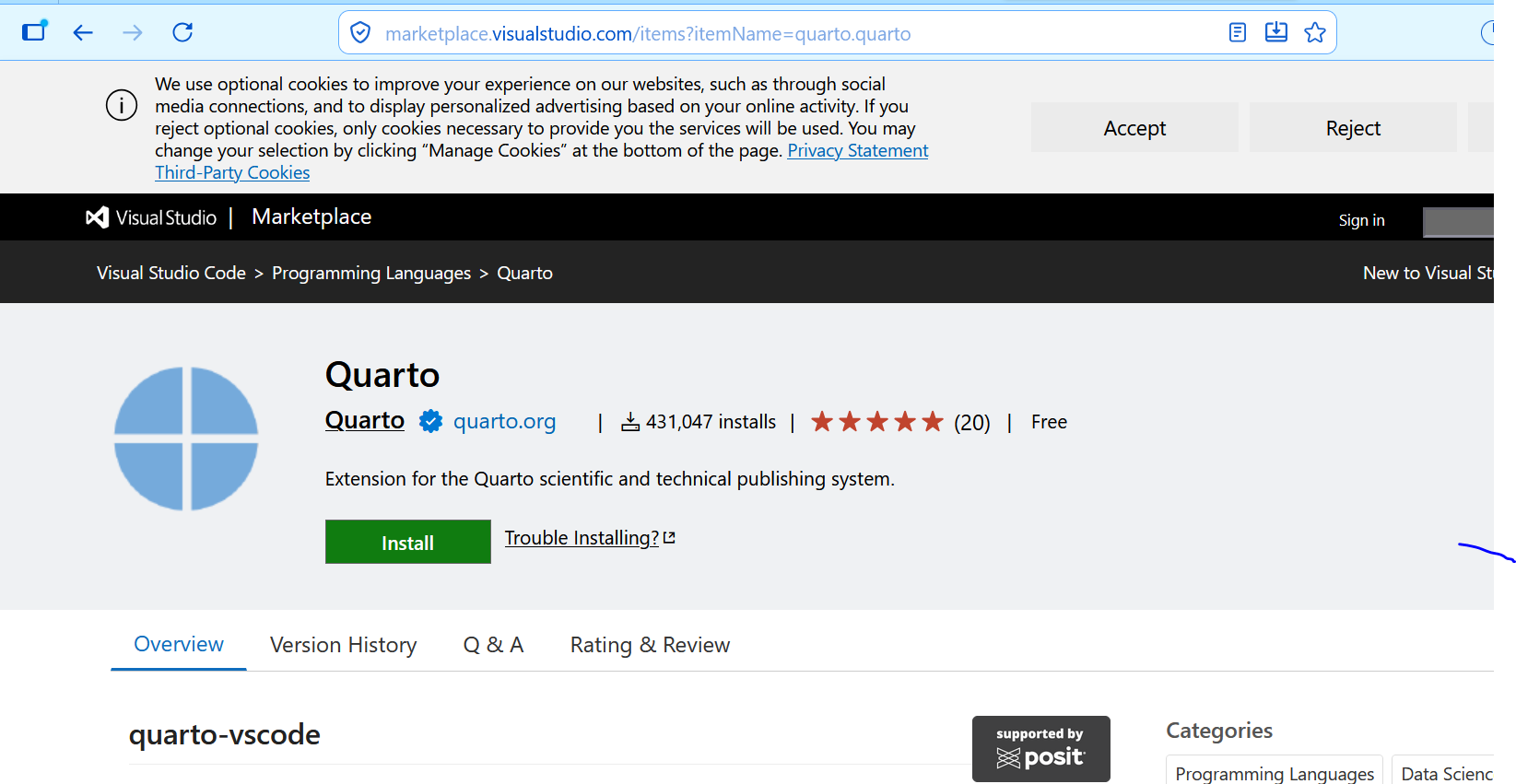
You will be redirected to Visual Studio Code.

Click Install again to add the extension to VS Code.

Once the installation is complete, you can create and edit Quarto documents directly in VS Code.
We now have everything we need to combine our forestry analysis results, Python-generated visualizations, and explanatory text into an automatically generated forest plot report.
Create Additional Processing Scripts
Before creating the scripts for visualization and reporting, let’s briefly revisit the project directory structure established in the previous tutorials:
project # top-level folder
├── data
├── scripts
|   ├── project_config.py
|   ├── 01_data_preparation.py
|   ├── 02_ground_classification.py
|   ├── 03_stem_detection.py
|   ├── 04_tree_segmentation.py
│   └── 05_tree_models.py
└── processing
In the scripts folder, create the following four Python scripts:
06_export_sideviews.py: Export side views of the reconstructed trees.07_create_plots.py: Generate graphs and visualizations of the forestry analysis results.08_export_report.py: Create a report summarizing the forest plot analysis.09_create_leaflet_map.py: Generate an interactive web map using Folium and Leaflet.
In VS Code, right-click the scripts folder in the Explorer panel and select New File... to create each script.
These scripts will extend our existing forestry analysis workflow with additional visualizations, reports, and interactive maps.
project # top-level folder
├── data
├── scripts
|   ├── project_config.py
|   ├── 01_data_preparation.py
|   ├── 02_ground_classification.py
|   ├── 03_stem_detection.py
|   ├── 04_tree_segmentation.py
│   ├── 05_tree_models.py
|   ├── 06_export_sideviews.py
|   ├── 07_create_plots.py
|   ├── 08_export_report.py
│   └── 09_create_leaflet_map.py
└── processing
Fill the Export Side Views Script
Open the empty 06_export_sideviews.py file in VS Code and copy the following code into it.
This script goes through all the individual trees of the dataset and creates sideviews of each tree. It creates sideviews for both point cloud and extracted pipe model.
import math, os
import project_config as cfg
from PySAGA import saga_api, lis_cmd

from PySAGA.tools import *


@lis_cmd.proc_function_wrapper
def process_unit(unit_index=0):

    # -----------------------------------------------------------------------------
    # Create a list of all metrics tiles.
    input_filelist = lis_cmd.Get_File_List_As_List(
        os.path.join(cfg.TREE_METRICS_DIR, "shp_input_file_list.txt")
    )

    # -----------------------------------------------------------------------------
    # get current tile by unit_index.
    file = input_filelist[unit_index]

    filename_metrics = os.path.basename(file)

    unit_name, unitext = os.path.splitext(filename_metrics)
    unit_name = unit_name.replace("_metrics", "")

    filename_pc = f"{unit_name}_segments.sg-pts-z"
    filename_pipes = f"{unit_name}_pipes.shp"

    # -----------------------------------------------------------------------------
    # load info table for analysed dataset
    info_table = saga_api.SG_Get_Data_Manager().Add_Table(
        os.path.join(os.path.join(cfg.TABLES_DIR, "tree_info.csv"))
    )

    if not info_table or info_table.Get_Count() < 1:
        return lis_cmd.Error_Return(f"Loading info table failed")

    # -----------------------------------------------------------------------------
    # get overview statistics
    maxCrownRadius = 5.0
    maxTreeHeight = 10.0
    for i in range(info_table.Get_Field_Count()):

        if info_table.Get_Field_Name(i) == "CrownMaxRad":
            maxCrownRadius = math.ceil(info_table.Get_Maximum(i))
        if info_table.Get_Field_Name(i) == "Height":
            maxTreeHeight = math.ceil(info_table.Get_Maximum(i))

    # -----------------------------------------------------------------------------
    # delete info table again
    saga_api.SG_Get_Data_Manager().Delete()

    # -----------------------------------------------------------------------------
    # load metrics of processing unit
    metrics = saga_api.SG_Get_Data_Manager().Add_Shapes(
        os.path.join(cfg.TREE_METRICS_DIR, filename_metrics)
    )

    if not metrics or metrics.Get_Count() < 1:
        return lis_cmd.Error_Return(
            f"Loading processing_units {filename_metrics} failed"
        )

    # -----------------------------------------------------------------------------
    # load point cloud of processing unit
    if not os.path.exists(os.path.join(cfg.SEGMENTS_DIR, filename_pc)):
        return lis_cmd.Error_Return(
            "tree segments file is not existing for tile, skipping... "
        )

    pc = saga_api.SG_Get_Data_Manager().Add_PointCloud(
        os.path.join(cfg.SEGMENTS_DIR, filename_pc)
    )

    if not pc or pc.Get_Count() < 1000:
        return lis_cmd.Error_Return(f"Loading processing_units {filename_pc} failed")

    # -----------------------------------------------------------------------------
    # load pipe model of processing unit
    if not os.path.exists(os.path.join(cfg.PIPES_DIR, filename_pipes)):
        return lis_cmd.Error_Return(
            "pipe model file is not existing for tile, skipping... "
        )

    pipes = saga_api.SG_Get_Data_Manager().Add_Shapes(
        os.path.join(cfg.PIPES_DIR, filename_pipes)
    )

    if not pipes or pipes.Get_Count() < 1:
        return lis_cmd.Error_Return(f"Loading processing_units {filename_pipes} failed")

    # -----------------------------------------------------------------------------
    # extract low deviation points
    pc_filtered_deviation = (
        saga_api.SG_Get_Data_Manager().Add_PointCloud()
    )  # output data object

    if not (
        lis_tools.Extract_Subset_from_Point_Cloud(
            PC_IN=pc,
            PC_OUT=pc_filtered_deviation,
            FIELD_ATTRIB="Deviation",
            METHOD="single value",
            VALUE=20,
            SINGLE_OP="< single value",
        )
    ):
        return lis_cmd.Error_Return("Failed to execute tool")

    # -----------------------------------------------------------------------------
    # extract high intensity/reflectance points
    pc_filtered = saga_api.SG_Get_Data_Manager().Add_PointCloud()  # output data object

    if not (
        lis_tools.Extract_Subset_from_Point_Cloud(
            PC_IN=pc_filtered_deviation,
            PC_OUT=pc_filtered,
            FIELD_ATTRIB="Reflectance",
            METHOD="single value",
            VALUE=-20,
            SINGLE_OP="> single value",
        )
    ):
        return lis_cmd.Error_Return("Failed to execute tool")

    lis_cmd.Message_Print(
        f"maxTreeHeight {maxTreeHeight}, maxCrownRadius {maxCrownRadius}"
    )

    # -----------------------------------------------------------------------------
    # go through single trees of current tile (tree_by_tree)
    for i in range(metrics.Get_Count()):

        shape = metrics.Get_Shape(i)

        # read attributes of tree
        x = shape.Get_Point(0, 0).x
        y = shape.Get_Point(0, 0).y
        z = shape.Get_Z(0, 0)

        treeid = shape.asLong("treeid")
        sliceheight = shape.asFloat("slice_height")
        treeheight = shape.asFloat("tree_height")

        treename = f"{cfg.PLOT_NAME}_{treeid}"

        lis_cmd.Message_Print(f"{treeid},{treeheight},{x},{y},{z}")

        if treeheight < cfg.MIN_TREE_HEIGHT_REPORT:
            continue

        # -----------------------------------------------------------------------------
        # extract point cloud of current single tree
        pc_tree = saga_api.SG_Get_Data_Manager().Add_PointCloud()

        if not (
            lis_tools.Extract_Subset_from_Point_Cloud(
                PC_IN=pc_filtered,
                PC_OUT=pc_tree,
                FIELD_ATTRIB="treeid",
                METHOD="single value",
                VALUE=treeid,
                SINGLE_OP="= single value",
            )
        ):
            return lis_cmd.Error_Return("Failed to execute tool")

        if pc_tree.Get_Count() < 1000:
            return lis_cmd.Error_Return(
                f"single tree point cloud has not enough points"
            )

        # -----------------------------------------------------------------------------
        # translate the point cloud so the tree location becomes the local origin.
        pc_tree_centred = (
            saga_api.SG_Get_Data_Manager().Add_PointCloud()
        )  # output data object
        if not (
            lis_orientation.Transform_Point_Cloud(
                PC_IN=pc_tree,
                PC_OUT=pc_tree_centred,
                DX=-x,
                DY=-y,
                DZ=-(z - sliceheight),
                WRITE_MATRIX=False,
            )
        ):
            return lis_cmd.Error_Return("Failed to execute tool")

        # -----------------------------------------------------------------------------
        # export single tree to LAZ file
        lazname = f"{treename}.laz"
        if not (
            lis_io.Export_LASLAZ_File(
                POINTS=pc_tree_centred,
                T="gps-time",
                r="number of the return",
                n="number of returns of given pulse",
                i="intensity",
                FILE=os.path.join(cfg.SINGLETREES_LAZ_DIR, lazname),
                FILE_FORMAT="LAS 1.4",
                FORMAT="3",
            )
        ):
            return lis_cmd.Error_Return("Failed to execute tool")

        # -----------------------------------------------------------------------------
        # extract pipe model of single tree
        query = f"and([TreeID]={treeid},[Hierarchy] < {cfg.MAX_HIERARCHY_REPORT+1})"
        pipes_tree = saga_api.SG_Get_Data_Manager().Add_Shapes()  # output data object

        if not shapes_tools.Select_by_Attributes_Numerical_Expression(
            SHAPES=pipes,
            COPY=pipes_tree,
            FIELD="<not set>",
            EXPRESSION=query,
            INVERSE=False,
            USE_NODATA=False,
            METHOD="new selection",
            POSTJOB="copy",
        ):
            return lis_cmd.Error_Return("Failed to execute tool")

        if pipes_tree.Get_Count() < 1:
            return lis_cmd.Error_Return(f"single tree pipemodel has no entries")

        # -----------------------------------------------------------------------------
        # translate the pipe model so the tree location becomes the local origin.
        if not shapes_tools.Transform_Shapes(
            SHAPES=pipes_tree,
            MOVEX=-x,
            MOVEY=-y,
            MOVEZ=-(z - sliceheight),
        ):
            return lis_cmd.Error_Return("Failed to execute tool")

        # -----------------------------------------------------------------------------
        # create samples on pipemodel for visualization
        pipes_samples = saga_api.SG_Get_Data_Manager().Add_PointCloud()

        if not (
            lis_conversion.Create_Points_on_Polygons(
                SHP_IN=pipes_tree,
                PC_OUT=pipes_samples,
                FIELD_Z="<not set>",
                COPY_ATTR=True,
                SAMPLING="3-dimensional",
                SPACING=0.005,
                FIT="cells",
            )
        ):
            return lis_cmd.Error_Return("Failed to execute tool")

        if pipes_samples.Get_Count() < 1000:
            return lis_cmd.Error_Return(f"not enough samples for pipemodel")

        # -----------------------------------------------------------------------------
        # generate sideviews from two perspectives
        for iProfile in range(2):
            filename_pointcloud = f"{treename}_pointcloud{iProfile}.png"
            filename_pipemodel = f"{treename}_pipemodel{iProfile}.png"

            if iProfile == 0:
                xmin, xmax = -maxCrownRadius, maxCrownRadius
                ymin, ymax = -maxCrownRadius, -maxCrownRadius
            else:
                xmin, xmax = maxCrownRadius, maxCrownRadius
                ymin, ymax = -maxCrownRadius, maxCrownRadius

            x_range = f"{int(xmin)};{int(xmax)}"
            y_range = f"{int(ymin)};{int(ymax)}"
            z_range = f"{0};{int(maxTreeHeight)}"

            # -----------------------------------------------------------------------------
            # create sideview image of point cloud
            tree_image = saga_api.SG_Get_Data_Manager().Add_Grid()  # output data object
            tree_range = saga_api.SG_Get_Data_Manager().Add_Grid()  # output data object

            if not lis_visualization.Point_Cloud_Orthoimager(
                PC_IN=pc_tree_centred,
                GRID_IMAGE=tree_image,
                GRID_RANGE=tree_range,
                FIELD_IMAGE="Reflectance",
                IS_RGB=False,
                COPY_ATTR=True,
                AGGR_METHOD="min Range",
                AOI_METHOD="left to profile line",
                RANGE=200,
                CELLSIZE=cfg.IMAGE_RESOLUTION,
                CUSTOM_ELEV_RANGE=True,
                ELEV_RANGE=z_range,
                ADD_GRID_LINES=True,
                GRID_LINE_SPACING=cfg.LINE_SPACING,
                PRO_XRANGE=x_range,
                PRO_YRANGE=y_range,
                GRIDIT=True,
            ):
                return lis_cmd.Error_Return("Failed to execute ortho imager")

            # -----------------------------------------------------------------------------
            # export sideview image of point cloud
            if not io_grid_image.Export_to_Image_File(
                GRID=tree_image,
                FILE=os.path.join(cfg.SINGLETREES_PNG_DIR, filename_pointcloud),
                FILE_WORLD=False,
                NO_DATA=False,
                COLOURING="histogram stretch to standard deviation",
                GRADUATED=True,
                STDDEV=2.000000,
                SCALE_MODE="linear intervals",
            ):
                return lis_cmd.Error_Return("Failed to execute export image")

            saga_api.SG_Get_Data_Manager().Delete(tree_image)
            saga_api.SG_Get_Data_Manager().Delete(tree_range)

            # -----------------------------------------------------------------------------
            # create sideview image of pipe model
            tree_image = saga_api.SG_Get_Data_Manager().Add_Grid()  # output data object
            tree_range = saga_api.SG_Get_Data_Manager().Add_Grid()  # output data object

            if not lis_visualization.Point_Cloud_Orthoimager(
                PC_IN=pipes_samples,
                GRID_IMAGE=tree_image,
                GRID_RANGE=tree_range,
                FIELD_IMAGE="RadiusModel",
                IS_RGB=False,
                COPY_ATTR=True,
                AGGR_METHOD="min Range",
                AOI_METHOD="left to profile line",
                RANGE=200,
                CELLSIZE=cfg.IMAGE_RESOLUTION,
                CUSTOM_ELEV_RANGE=True,
                ELEV_RANGE=z_range,
                ADD_GRID_LINES=True,
                GRID_LINE_SPACING=cfg.LINE_SPACING,
                PRO_XRANGE=x_range,
                PRO_YRANGE=y_range,
                GRIDIT=True,
            ):
                return lis_cmd.Error_Return("Failed to execute ortho imager")

            # -----------------------------------------------------------------------------
            # export sideview image of pipe model
            if not io_grid_image.Export_to_Image_File(
                GRID=tree_image,
                FILE=os.path.join(cfg.SINGLEPIPES_PNG_DIR, filename_pipemodel),
                FILE_WORLD=False,
                NO_DATA=False,
                COLOURING="histogram stretch to standard deviation",
                GRADUATED=True,
                STDDEV=2.000000,
                SCALE_MODE="linear intervals",
            ):
                return lis_cmd.Error_Return("Failed to execute export image")

            saga_api.SG_Get_Data_Manager().Delete(tree_image)
            saga_api.SG_Get_Data_Manager().Delete(tree_range)
            # -------------------------------------------------------------------------
            # end of viewing direction loop.

        saga_api.SG_Get_Data_Manager().Delete(pc_tree)
        saga_api.SG_Get_Data_Manager().Delete(pc_tree_centred)
        saga_api.SG_Get_Data_Manager().Delete(pipes_tree)
        saga_api.SG_Get_Data_Manager().Delete(pipes_samples)
        # -------------------------------------------------------------------------
        # end of single tree loop.

    # -----------------------------------------------------------------------------
    # free memory resources
    saga_api.SG_Get_Data_Manager().Delete()
    return True


# -----------------------------------------------------------------------------
# -----------------------------------------------------------------------------
# -----------------------------------------------------------------------------
if __name__ == "__main__":

    # -----------------------------------------------------------------------------
    # start the logging
    starttime = lis_cmd.Start_Logging(False)

    # -----------------------------------------------------------------------------
    # create a list of all segmented tiles
    file_list = lis_cmd.Get_File_List_As_List(
        os.path.join(cfg.TREE_METRICS_DIR, "shp_input_file_list.txt")
    )

    # -----------------------------------------------------------------------------
    # run the process_unit function in parallel (each tile in a separate thread)
    # here we will use 4 threads, please adjust to your CPU and available memory
    #
    # the maximum number of threads available with your CPU can be queried with:
    # num_threads = saga_api.SG_OMP_Get_Max_Num_Threads()

    num_threads = 4
    num_processing_units = len(file_list)

    lis_cmd.Run_Parallel_Tasks(process_unit, num_processing_units, num_threads)
    # -----------------------------------------------------------------------------

    # -----------------------------------------------------------------------------
    # free memory resources and stop logging
    saga_api.SG_Get_Data_Manager().Delete()
    lis_cmd.Stop_Logging(starttime)
Fill the Plots Script
Open the empty 07_create_plots.py file in VS Code and copy the following code into it.
This script iterates over all individual trees in the dataset and uses their reconstructed tree skeletons, together with the corresponding diameter information stored for each graph edge, to visualize stem taper.
The resulting diagrams illustrate how stem diameter changes with height, providing a useful overview of the stem shape of each tree.
import math, os
import project_config as cfg
from PySAGA import saga_api, lis_cmd

import numpy as np
import matplotlib.pyplot as plt
from collections import defaultdict


def generate_sideview_plot(
    diameter,
    height,
    circleCompleteness,
    goodnessOfFit,
    maxTreeHeight,
    maxCrownRadius,
    img_pointcloud,
    img_pipemodel,
    diagram_file,
):
    fig, (ax, ax_img, ax_img2) = plt.subplots(
        ncols=3,
        figsize=(20, 8),
        gridspec_kw={"width_ratios": [0.5, 1.0, 1.0], "wspace": 0.1},
    )
    constrained_layout = True

    # ----------------------------------------------------------------------
    # main axis: diameter over height
    ax.set_ylabel("height [m]", fontsize=14)
    ax.set_ylim(0.0, maxTreeHeight)  # fixed tree height
    ax.set_yticks(np.arange(0, maxTreeHeight + 1, 2))

    ax.set_xlabel("diameter [m]", fontsize=14)
    ax.set_xlim(0.0, 0.6)

    ax.grid(axis="y", color="0.9")

    ax.plot(diameter, height, color="black", linewidth=2, marker="o", label="diameter")

    # ----------------------------------------------------------------------
    # completeness axis
    ax2 = ax.twiny()

    ax2.set_xlim(0.0, 1.1)
    ax2.set_xlabel("completeness [0-1]", color="blue", fontsize=14)

    ax2.tick_params(axis="x", colors="blue")

    ax2.plot(circleCompleteness, height, color="blue", linestyle="--")

    ax2.fill_betweenx(height, 0, circleCompleteness, color="blue", alpha=0.25)

    # ----------------------------------------------------------------------
    # correctness axis
    ax3 = ax.twiny()

    ax3.spines["top"].set_position(("axes", 1.12))

    ax3.set_xlim(0.0, 1.1)
    ax3.set_xlabel("correctness [0-1]", color="red", fontsize=14)

    ax3.tick_params(axis="x", colors="red")

    ax3.plot(goodnessOfFit, height, color="red", linestyle="--")

    ax3.fill_betweenx(height, 0, goodnessOfFit, color="red", alpha=0.25)

    # ----------------------------------------------------------------------
    # sideview image, aligned to same height axis
    ax_img.imshow(
        img_pipemodel,
        extent=[0, maxCrownRadius * 2, 0, maxTreeHeight],  # 100 px = 1 m
        aspect="equal",
    )

    ax_img.set_ylim(0.0, maxTreeHeight)
    # ax_img.set_ylabel("height [m]", fontsize=14)
    ax_img.set_yticks(np.arange(0, maxTreeHeight + 1, 2))
    ax_img.set_xticks([])
    ax_img.set_title("pipe model", fontsize=14)

    # ----------------------------------------------------------------------
    # sideview image, aligned to same height axis
    ax_img2.imshow(
        img_pointcloud,
        extent=[0, maxCrownRadius * 2, 0, maxTreeHeight],  # 100 px = 1 m
        aspect="equal",
    )

    ax_img2.set_ylim(0.0, maxTreeHeight)
    # ax_img2.set_ylabel("height [m]", fontsize=14)
    ax_img2.set_yticks(np.arange(0, maxTreeHeight + 1, 2))
    ax_img2.set_xticks([])
    ax_img2.set_title("point cloud", fontsize=14)

    # ----------------------------------------------------------------------
    fig.tight_layout()

    # ----------------------------------------------------------------------
    fig.savefig(
        os.path.join(cfg.DIAGRAMS_DIR, diagram_file),
        format="png",
        dpi=300,
        bbox_inches="tight",
    )

    plt.close(fig)
    return


@lis_cmd.proc_function_wrapper
def process_unit(unit_index=0):

    # -----------------------------------------------------------------------------
    # create a list of all skeleton files.
    input_filelist = lis_cmd.Get_File_List_As_List(
        os.path.join(cfg.SKELETONS_DIR, "shp_input_file_list.txt")
    )

    # -----------------------------------------------------------------------------
    # get current unit by unit_index.
    file = input_filelist[unit_index]

    filename_skeletons = os.path.basename(file)

    unit_name, unitext = os.path.splitext(filename_skeletons)
    unit_name = unit_name.replace("_skeletons", "")

    # -----------------------------------------------------------------------------
    # load info table for analysed dataset
    info_table = saga_api.SG_Get_Data_Manager().Add_Table(
        os.path.join(os.path.join(cfg.TABLES_DIR, "tree_info.csv"))
    )

    if not info_table.is_Valid() or info_table.Get_Count() < 1:
        return lis_cmd.Error_Return(f"Loading info table failed")

    # -----------------------------------------------------------------------------
    # get overview statistics
    maxCrownRadius = 5.0
    maxTreeHeight = 10.0
    for i in range(info_table.Get_Field_Count()):

        if info_table.Get_Field_Name(i) == "CrownMaxRad":
            maxCrownRadius = math.ceil(info_table.Get_Maximum(i))
        if info_table.Get_Field_Name(i) == "Height":
            maxTreeHeight = math.ceil(info_table.Get_Maximum(i))

    # -----------------------------------------------------------------------------
    # load skeletons of processing unit
    skeletons = saga_api.SG_Get_Data_Manager().Add_Shapes(
        os.path.join(cfg.SKELETONS_DIR, filename_skeletons)
    )

    if not skeletons.is_Valid() or skeletons.Get_Count() < 1:
        return lis_cmd.Error_Return(
            f"Loading processing_units {filename_skeletons} failed"
        )

    # -----------------------------------------------------------------------------
    # initialize the nested dictionary for storing skeleton topology data.
    stem_database = defaultdict(
        lambda: defaultdict(
            lambda: {
                "branchCode": None,
                "height": [],
                "diameter": [],
                "goodnessOfFit": [],
                "circleCompleteness": [],
            }
        )
    )

    # -----------------------------------------------------------------------------
    # go through individual tree-skeleton graph-edges and fill nested dictionary (topology structure)
    for i in range(skeletons.Get_Count()):
        shape = skeletons.Get_Shape(i)
        treeid = shape.asLong("TreeID")
        branchid = shape.asInt("BranchID")

        if (
            shape.asInt("BranchCode_Leader") != 1
        ):  # only the main axis, no forks considered
            continue

        stem_database[treeid][branchid]["branchCode"] = shape.asInt("BranchCode_Leader")
        stem_database[treeid][branchid]["height"].append(shape.asFloat("DZ"))
        stem_database[treeid][branchid]["diameter"].append(
            shape.asFloat("RadiusModel") * 2
        )
        stem_database[treeid][branchid]["goodnessOfFit"].append(
            shape.asFloat("GoodnessOfFit")
        )
        stem_database[treeid][branchid]["circleCompleteness"].append(
            shape.asFloat("CircleCompleteness")
        )

    # -----------------------------------------------------------------------------
    # go through tree ids in nested dictionary and generate diameter-over-height diagrams
    for tree_id in stem_database:

        imagefile_point_cloud0 = f"{cfg.PLOT_NAME}_{tree_id}_pointcloud0.png"
        img_pointcloud0 = plt.imread(
            os.path.join(cfg.SINGLETREES_PNG_DIR, imagefile_point_cloud0)
        )
        imagefile_point_cloud1 = f"{cfg.PLOT_NAME}_{tree_id}_pointcloud1.png"
        img_pointcloud1 = plt.imread(
            os.path.join(cfg.SINGLETREES_PNG_DIR, imagefile_point_cloud1)
        )

        imagefile_pipemodel0 = f"{cfg.PLOT_NAME}_{tree_id}_pipemodel0.png"
        img_pipemodel0 = plt.imread(
            os.path.join(cfg.SINGLEPIPES_PNG_DIR, imagefile_pipemodel0)
        )
        imagefile_pipemodel1 = f"{cfg.PLOT_NAME}_{tree_id}_pipemodel1.png"
        img_pipemodel1 = plt.imread(
            os.path.join(cfg.SINGLEPIPES_PNG_DIR, imagefile_pipemodel1)
        )

        # -----------------------------------------------------------------------------
        # go through branch ids of current tree
        for branch_id in stem_database[tree_id]:
            branch_code = stem_database[tree_id][branch_id]["branchCode"]

            height = stem_database[tree_id][branch_id]["height"]
            diameter = stem_database[tree_id][branch_id]["diameter"]
            goodnessOfFit = stem_database[tree_id][branch_id]["goodnessOfFit"]
            circleCompleteness = stem_database[tree_id][branch_id]["circleCompleteness"]

            # -----------------------------------------------------------------------------
            # generate diameter-over-height diagram with view direction north
            plotname = f"{cfg.PLOT_NAME}_{tree_id}_0"
            diagram_file = f"{plotname}.png"

            generate_sideview_plot(
                diameter,
                height,
                circleCompleteness,
                goodnessOfFit,
                maxTreeHeight,
                maxCrownRadius,
                img_pointcloud0,
                img_pipemodel0,
                diagram_file,
            )

            # -----------------------------------------------------------------------------
            # generate diameter-over-height diagram with view direction west
            plotname = f"{cfg.PLOT_NAME}_{tree_id}_1"
            diagram_file = f"{plotname}.png"

            generate_sideview_plot(
                diameter,
                height,
                circleCompleteness,
                goodnessOfFit,
                maxTreeHeight,
                maxCrownRadius,
                img_pointcloud1,
                img_pipemodel1,
                diagram_file,
            )

    # -----------------------------------------------------------------------------
    # free memory resources
    saga_api.SG_Get_Data_Manager().Delete()
    return True


# -----------------------------------------------------------------------------
# -----------------------------------------------------------------------------
# -----------------------------------------------------------------------------
if __name__ == "__main__":

    # -----------------------------------------------------------------------------
    # start the logging
    starttime = lis_cmd.Start_Logging(False)

    # -----------------------------------------------------------------------------
    # create a list of all skeleton tiles.
    pathlist = lis_cmd.Create_File_List(
        cfg.SKELETONS_DIR,
        ".shp;.SHP",
        os.path.join(cfg.SKELETONS_DIR, "shp_input_file_list.txt"),
        False,
    )

    # -----------------------------------------------------------------------------
    # get a Python list object of all skeleton tiles.
    file_list = lis_cmd.Get_File_List_As_List(
        os.path.join(cfg.SKELETONS_DIR, "shp_input_file_list.txt")
    )

    # -----------------------------------------------------------------------------
    # run the process_unit function in parallel (each tile in a separate thread)
    # here we will use 4 threads, please adjust to your CPU and available memory
    #
    # the maximum number of threads available with your CPU can be queried with:
    # num_threads = saga_api.SG_OMP_Get_Max_Num_Threads()

    num_threads = 4
    num_processing_units = len(file_list)

    lis_cmd.Run_Parallel_Tasks(process_unit, num_processing_units, num_threads)
    # -----------------------------------------------------------------------------

    # -----------------------------------------------------------------------------
    # free memory resources and stop logging
    saga_api.SG_Get_Data_Manager().Delete()
    lis_cmd.Stop_Logging(starttime)
Fill the Report Script
Open the empty 08_export_report.py file in VS Code and copy the following code into it.
This script reads basic tree information, such as diameter at breast height (DBH), tree height, and other characteristics, from the tree metrics files.
It then combines these measurements with the previously generated tree side views and stem taper diagrams to create an informative report for each individual tree.
The reports provide a convenient way to explore and communicate the results of our TLS-based forestry analysis.
import os
import subprocess
import project_config as cfg
from PySAGA import saga_api, lis_cmd
from PySAGA.tools import *
from collections import defaultdict
def AddTitle(ExportText, Title):
ExportText += (
f"---\n"
f'title: "{Title}"\n'
'title-block-banner: "#88151b"\n'
"format:\n"
" html:\n"
" code-fold: false\n"
" self-contained: true\n"
"---\n\n"
)
return ExportText
def AddHeading(ExportText, Heading):
ExportText += f"\n## {Heading}\n\n"
return ExportText
def AddLink(ExportText, Link):
ExportText += f"\n[Back to Map]({Link})\n\n"
return ExportText
def AddFigure(ExportText, Figure, Caption):
ExportText += f"\n\n\n"
return ExportText
def Add2Figures(ExportText, Figure1, Caption1, Figure2, Caption2):
ExportText += (
"\n:::: {.columns}\n\n"
'::: {.column width="49%"}\n\n'
f"\n\n"
":::\n\n"
'::: {.column width="2%"}\n\n'
":::\n\n"
'::: {.column width="49%"}\n\n'
f"\n\n"
":::\n\n"
"::::\n\n"
)
return ExportText
def AddText(ExportText, Text):
ExportText += f"\n{Text}\n"
return ExportText
def GenerateQuartoTables(
info_table, caption, treeid_field_name="treeid", stem_field_name=None
):
treeid_field = info_table.Get_Field(treeid_field_name)
if treeid_field < 0:
raise ValueError(f"Field '{treeid_field_name}' not found.")
stem_field = None
if stem_field_name is not None:
stem_field = info_table.Get_Field(stem_field_name)
if stem_field < 0:
raise ValueError(f"Field '{stem_field_name}' not found.")
headers = [
info_table.Get_Field_Name(field)
for field in range(info_table.Get_Field_Count())
]
# group rows
if stem_field_name is None:
grouped_rows = defaultdict(list)
else:
grouped_rows = defaultdict(lambda: defaultdict(list))
for i in range(info_table.Get_Count()):
record = info_table.Get_Record(i)
treeid = record.asString(treeid_field).strip()
row = []
for field in range(info_table.Get_Field_Count()):
sValue = record.asString(field).strip()
if (
info_table.Get_Field_Type(field) == saga_api.SG_DATATYPE_Float
or info_table.Get_Field_Type(field) == saga_api.SG_DATATYPE_Double
):
value = record.asFloat(field)
sValue = f"{value:.2f}"
if value.is_integer():
value = int(value)
sValue = str(value)
row.append("" if sValue == "-1" else sValue)
if stem_field_name is None:
grouped_rows[treeid].append(row)
else:
stemno = record.asString(stem_field).strip()
grouped_rows[treeid][stemno].append(row)
# build Quarto tables
tables = {}
if stem_field_name is None:
for treeid, rows in grouped_rows.items():
text = '\n::: {style="text-align: center;"}\n\n'
text += f"**{caption} {treeid}**\n\n"
text += "| " + " | ".join(headers) + " |\n"
text += "| " + " | ".join(["---"] * len(headers)) + " |\n"
for row in rows:
text += "| " + " | ".join(row) + " |\n"
text += "\n:::\n\n"
tables[treeid] = text
else:
for treeid, stems in grouped_rows.items():
tables[treeid] = {}
for stemno, rows in stems.items():
text = '\n::: {style="text-align: center;"}\n\n'
text += f"**{caption} {treeid} - Stem {stemno}**\n\n"
text += "| " + " | ".join(headers) + " |\n"
text += "| " + " | ".join(["---"] * len(headers)) + " |\n"
for row in rows:
text += "| " + " | ".join(row) + " |\n"
text += "\n:::\n\n"
tables[treeid][stemno] = text
return tables
def process_unit():
# --------------------------------------------------------------
# start writing quarto document for current plot
FileName = os.path.join(cfg.REPORT_DIR, f"{cfg.PLOT_NAME}_Report.qmd")
with open(FileName, "w") as f:
TitleText = ""
Title = f"{cfg.PLOT_NAME}_Report"
TitleText = AddTitle(TitleText, Title)
EntryList = []
EntryList.append(TitleText)
# --------------------------------------------------------------
# prepare dictionary with basic tree information
tree_database = defaultdict(
lambda: {
"position": None,
"DBH": None,
"Height": None,
"CrownArea": None,
"CrownDiameter": None,
}
)
# --------------------------------------------------------------
# load tree metrics
metrics = saga_api.SG_Get_Data_Manager().Add_Shapes(
os.path.join(cfg.METRICS_DIR, "tree_metrics.shp")
)
if not metrics.is_Valid() or metrics.Get_Count() < 1:
return lis_cmd.Error_Return(f"Loading metrics failed")
# --------------------------------------------------------------
# go through tree metrics (tree-by-tree) and fill tree dictionary
for i in range(metrics.Get_Count()):
shape = metrics.Get_Shape(i)
treeid = shape.asInt("treeid")
if shape.asFloat("tree_height") < cfg.MIN_TREE_HEIGHT_REPORT:
continue
tree_database[treeid]["position"] = (
shape.Get_Point(0, 0).x,
shape.Get_Point(0, 0).y,
shape.Get_Z(0, 0),
)
tree_database[treeid]["DBH"] = shape.asFloat("DBH")
tree_database[treeid]["Height"] = shape.asFloat("tree_height")
tree_database[treeid]["CrownArea"] = shape.asFloat("crown_area")
tree_database[treeid]["CrownDiameter"] = shape.asFloat("crown_diameter")
# --------------------------------------------------------------
# load tree info table and generate quarto table from it
tree_info = saga_api.SG_Get_Data_Manager().Add_Table(
os.path.join(os.path.join(cfg.TABLES_DIR, "tree_info.csv"))
)
if not tree_info or tree_info.Get_Count() < 1:
return lis_cmd.Error_Return(f"Loading info table failed")
tree_tables = GenerateQuartoTables(tree_info, "tree_information", "TreeNumber")
# --------------------------------------------------------------
# load stem description table and generate quarto table from it
stem_description = saga_api.SG_Get_Data_Manager().Add_Table(
os.path.join(os.path.join(cfg.TABLES_DIR, "stem_description.csv"))
)
if not stem_description or stem_description.Get_Count() < 1:
return lis_cmd.Error_Return(f"Loading info table failed")
stem_tables = GenerateQuartoTables(
stem_description, "stem_information", "TreeNumber", "StemNo"
)
# --------------------------------------------------------------
# free memory resources
saga_api.SG_Get_Data_Manager().Delete()
# --------------------------------------------------------------
# go through tree dictionary (tree-by-tree), sorted by tree height
for treeid, data in sorted(
tree_database.items(), key=lambda item: item[1]["Height"], reverse=True
):
x, y, z = data["position"]
# --------------------------------------------------------------
# generate metrics textblock
NewTextBlock = ""
NewTextBlock = AddHeading(NewTextBlock, f"Tree {treeid}")
NewTextBlock = AddLink(NewTextBlock, f"{cfg.PLOT_NAME}_Map.html")
NewTextBlock = AddText(NewTextBlock, f"- Position: {x:.2f} | {y:.2f}")
NewTextBlock = AddText(
NewTextBlock, f"- Tree height: ${data['Height']:.2f}\\ \\mathrm{{m}}$"
)
NewTextBlock = AddText(
NewTextBlock, f"- DBH: ${data['DBH'] * 1000:.0f}\\ \\mathrm{{mm}}$"
)
NewTextBlock = AddText(
NewTextBlock,
f"- Crown diameter: ${data['CrownDiameter']:.2f}\\ \\mathrm{{m}}$",
)
NewTextBlock = AddText(
NewTextBlock,
f"- Crown area: ${data['CrownArea']:.2f}\\ \\mathrm{{m}}^2$",
)
# --------------------------------------------------------------
# organize the two sideviews, generated from pipes and pointcloud and add figure to textblock
for iProfile in range(2):
relative_path_sideviews = os.path.relpath(
cfg.DIAGRAMS_DIR, cfg.REPORT_DIR
)
diagramName = f"{cfg.PLOT_NAME}_{treeid}_{iProfile}.png"
filepathImage = os.path.join(cfg.DIAGRAMS_DIR, diagramName)
filepathImageRel = os.path.join(relative_path_sideviews, diagramName)
if os.path.exists(filepathImage):
heading = "view direction north"
if iProfile == 1:
heading = "view direction west"
lis_cmd.Message_Print(filepathImageRel)
NewTextBlock = AddFigure(NewTextBlock, filepathImageRel, heading)
# --------------------------------------------------------------
# add textblock with figure
EntryList.append(NewTextBlock)
# --------------------------------------------------------------
# add tree info table
if str(treeid) in tree_tables:
print("\n", treeid)
EntryList.append(tree_tables[str(treeid)])
# --------------------------------------------------------------
# add stem info table
if str(treeid) in stem_tables:
if "1" in stem_tables[str(treeid)]:
EntryList.append(stem_tables[str(treeid)]["1"])
if "101" in stem_tables[str(treeid)]:
EntryList.append(stem_tables[str(treeid)]["101"])
if "201" in stem_tables[str(treeid)]:
EntryList.append(stem_tables[str(treeid)]["201"])
if "10101" in stem_tables[str(treeid)]:
EntryList.append(stem_tables[str(treeid)]["10101"])
# --------------------------------------------------------------
# add Link to leaflet map
NewTextBlock = ""
NewTextBlock = AddLink(NewTextBlock, f"{cfg.PLOT_NAME}_Map.html")
EntryList.append(NewTextBlock)
# --------------------------------------------------------------
# write current tree infos into quarto document.
with open(FileName, "w", encoding="utf-8") as f:
f.writelines(EntryList)
# --------------------------------------------------------------
# render the final document with quarto.
subprocess.run(
["quarto", "render", FileName],
check=True,
)
# -----------------------------------------------------------------------------
# free memory resources
saga_api.SG_Get_Data_Manager().Delete()
return True
# -----------------------------------------------------------------------------
# -----------------------------------------------------------------------------
# -----------------------------------------------------------------------------
if __name__ == "__main__":
# -----------------------------------------------------------------------------
# start the logging
starttime = lis_cmd.Start_Logging(False)
# -----------------------------------------------------------------------------
# call the processing function
process_unit()
# -----------------------------------------------------------------------------
# free memory resources and stop logging
saga_api.SG_Get_Data_Manager().Delete()
lis_cmd.Stop_Logging(starttime)Fill the Leaflet Map Script
Open the empty 09_create_leaflet_map.py file in VS Code and copy the following code into it.
This script uses the output layers from our forestry analysis to create an interactive web map using Folium and Leaflet.
The map displays the spatial distribution of the analyzed trees and provides links to their individual reports. This allows us to navigate between the map and detailed information about each tree, combining spatial visualization with the results of our TLS-based forestry analysis.
import folium
from folium.raster_layers import ImageOverlay

import json
import os
import project_config as cfg
from PySAGA import saga_api, lis_cmd
from PySAGA.tools import *


# -----------------------------------------------------------------------------
# function generating popup content with all attributes
def get_popup_content(properties, page):
    popup_content = ""
    tree_id_entry = ""
    for key, value in properties.items():

        if key not in ["treeid", "tree_height", "DBH", "crown_diameter", "crown_area"]:
            continue

        if value == None:
            continue

        if key == "treeid":
            treeid = int(value)
            tree_id_entry = f"<b>{key}</b>: {value}<br>"
            continue

        popup_content += f"<b>{key}</b>: {value}<br>"

    popup_content = tree_id_entry + popup_content
    popup_content += (
        f"<a href='{page}#tree-{treeid}'>Click to see the tree in detail</a>"
    )
    return popup_content


# -----------------------------------------------------------------------------
# function deriving the centroid of your plot dataset in order to centre the view in the leaflet map
def compute_centroid(stem_pos):
    x = 0.0
    y = 0.0
    for i in range(stem_pos.Get_Count()):
        shape = stem_pos.Get_Shape(i)
        x += shape.Get_Point(0, 0).x
        y += shape.Get_Point(0, 0).y
    x /= stem_pos.Get_Count()
    y /= stem_pos.Get_Count()
    return (x, y)


# ----------------------------------------------------------------------------


def process_unit():

    # --------------------------------------------------------------
    # define leaflet map filepath
    map_page = os.path.join(cfg.REPORT_DIR, f"{cfg.PLOT_NAME}_Map.html")

    # --------------------------------------------------------------
    # load tree metrics
    lis_cmd.Message_Print("start")
    metrics = saga_api.SG_Get_Data_Manager().Add_Shapes(
        os.path.join(cfg.METRICS_DIR, "tree_metrics.shp")
    )

    if not metrics or metrics.Get_Count() < 1:
        return lis_cmd.Error_Return(f"Loading metrics failed")

    metrics.Get_Projection().Create(cfg.TARGET_COORD)

    # --------------------------------------------------------------
    # translate into latlon reference system for leaflet map
    metrics_latlon = saga_api.SG_Get_Data_Manager().Add_Shapes()
    if not pj_proj4.Coordinate_Transformation_Shapes(
        SOURCE=metrics,
        TARGET=metrics_latlon,
        CRS_STRING="+proj=longlat +datum=WGS84 +no_defs",
        TRANSFORM_Z=True,
        PARALLEL=False,
        COPY=True,
    ):
        return lis_cmd.Error_Return("Failed to execute tool")

    # --------------------------------------------------------------
    # save latlon metrics as geojson
    metrics_latlon.Save(os.path.join(cfg.LAYERS_DIR, "treepositions.geojson"))

    # --------------------------------------------------------------
    # compute centroid of stems
    x, y = compute_centroid(metrics_latlon)

    # --------------------------------------------------------------
    # generate stem cross-sections from tree metrics
    stem_crosssections = saga_api.SG_Get_Data_Manager().Add_Shapes()

    if not shapes_tools.Shapes_Buffer(
        SHAPES=metrics,
        BUFFER=stem_crosssections,
        DIST_FIELD="DBH",
        DIST_SCALE=0.500000,
        DISSOLVE=False,
        NZONES=1,
        DARC=5.000000,
    ):
        return lis_cmd.Error_Return("Failed to execute tool")

    # --------------------------------------------------------------
    # translate into latlon reference system for leaflet map
    stem_crosssections_latlon = saga_api.SG_Get_Data_Manager().Add_Shapes()

    if not pj_proj4.Coordinate_Transformation_Shapes(
        SOURCE=stem_crosssections,
        TARGET=stem_crosssections_latlon,
        CRS_STRING="+proj=longlat +datum=WGS84 +no_defs",
        TRANSFORM_Z=True,
        PARALLEL=False,
        COPY=True,
    ):
        return lis_cmd.Error_Return("Failed to project shapefile")

    # --------------------------------------------------------------
    # save latlon stem cross-sections as geojson
    stem_crosssections_latlon.Save(
        os.path.join(cfg.LAYERS_DIR, "stem_crosssections.geojson")
    )

    # --------------------------------------------------------------
    # load boundaries
    outlines = saga_api.SG_Get_Data_Manager().Add_Shapes(
        os.path.join(cfg.SEGMENTATION_DIR, "tree_outlines.shp")
    )

    if not outlines or outlines.Get_Count() < 1:
        return lis_cmd.Error_Return(f"Loading outlines failed")

    outlines.Get_Projection().Create(cfg.TARGET_COORD)

    # --------------------------------------------------------------
    # translate into latlon reference system for leaflet map
    outlines_latlon = saga_api.SG_Get_Data_Manager().Add_Shapes()  # output data object
    if not pj_proj4.Coordinate_Transformation_Shapes(
        SOURCE=outlines,
        TARGET=outlines_latlon,
        CRS_STRING="+proj=longlat +datum=WGS84 +no_defs",
        TRANSFORM_Z=True,
        PARALLEL=False,
        COPY=True,
    ):
        return lis_cmd.Error_Return("Failed to project shapefile")

    # --------------------------------------------------------------
    # save latlon outlines as geojson
    outlines_latlon.Save(os.path.join(cfg.LAYERS_DIR, "tree_outlines.geojson"))

    # --------------------------------------------------------------
    # load chm
    chm = saga_api.SG_Get_Data_Manager().Add_Shapes(
        os.path.join(cfg.GRIDS_DIR, f"{cfg.PLOT_NAME}_chm.tif")
    )

    if not chm:
        return lis_cmd.Error_Return(f"Loading chm failed")

    chm.Get_Projection().Create(cfg.TARGET_COORD)

    # --------------------------------------------------------------
    # translate into latlon reference system for leaflet map
    chm_latlon = saga_api.SG_Get_Data_Manager().Add_Grid()  # output data object
    if not (
        pj_proj4.Coordinate_Transformation_Grid(
            SOURCE=chm,
            GRID=chm_latlon,
            CRS_STRING="+proj=longlat +datum=WGS84 +no_defs ",
            RESAMPLING="B-Spline Interpolation",
            BYTEWISE=False,
            DATA_TYPE="Preserve",
            TARGET_AREA=False,
            TARGET_DEFINITION="user defined",
            TARGET_USER_FITS="nodes",
        )
    ):
        return lis_cmd.Error_Return("Failed to projection to latlon")

    chm_latlon.Save(os.path.join(cfg.LAYERS_DIR, "chm_latlon.tif"))

    # --------------------------------------------------------------
    # export into png image
    if not io_grid_image.Export_to_Image_File(
        GRID=chm_latlon,
        FILE=os.path.join(cfg.LAYERS_DIR, "chm.png"),
        FILE_WORLD=True,
        NO_DATA=True,
        COLOURING="histogram stretch to standard deviation",
        GRADUATED=True,
        STDDEV=2.000000,
        SCALE_MODE="linear intervals",
    ):
        return lis_cmd.Error_Return("Failed to execute export image")

    xmin = chm_latlon.Get_Extent().Get_XMin()
    ymin = chm_latlon.Get_Extent().Get_YMin()
    xmax = chm_latlon.Get_Extent().Get_XMax()
    ymax = chm_latlon.Get_Extent().Get_YMax()

    bounds_chm = [(ymin, xmin), (ymax, xmax)]

    # --------------------------------------------------------------
    # loading diameter slices
    slice = saga_api.SG_Get_Data_Manager().Add_Shapes(
        os.path.join(cfg.GRIDS_DIR, f"{cfg.PLOT_NAME}_slices_grid.tif")
    )

    if not slice:
        return lis_cmd.Error_Return(f"Loading slice failed")

    slice.Get_Projection().Create(cfg.TARGET_COORD)

    # --------------------------------------------------------------
    # translate into latlon reference system for leaflet map
    slice_latlon = saga_api.SG_Get_Data_Manager().Add_Grid()  # output data object
    if not (
        pj_proj4.Coordinate_Transformation_Grid(
            SOURCE=slice,
            GRID=slice_latlon,
            CRS_STRING="+proj=longlat +datum=WGS84 +no_defs ",
            RESAMPLING="B-Spline Interpolation",
            BYTEWISE=False,
            DATA_TYPE="Preserve",
            TARGET_AREA=False,
            TARGET_DEFINITION="user defined",
            TARGET_USER_FITS="nodes",
        )
    ):
        return lis_cmd.Error_Return("Failed to projection to latlon")

    slice_latlon.Save(os.path.join(cfg.LAYERS_DIR, "slice_latlon.tif"))

    # --------------------------------------------------------------
    # export into png image
    if not io_grid_image.Export_to_Image_File(
        GRID=slice_latlon,
        FILE=os.path.join(cfg.LAYERS_DIR, "slice.png"),
        FILE_WORLD=True,
        NO_DATA=True,
        COLOURING="histogram stretch to standard deviation",
        GRADUATED=True,
        STDDEV=2.000000,
        SCALE_MODE="linear intervals",
    ):
        return lis_cmd.Error_Return("Failed to execute export image")

    xmin = slice_latlon.Get_Extent().Get_XMin()
    ymin = slice_latlon.Get_Extent().Get_YMin()
    xmax = slice_latlon.Get_Extent().Get_XMax()
    ymax = slice_latlon.Get_Extent().Get_YMax()

    bounds_slice = [(ymin, xmin), (ymax, xmax)]

    # -----------------------------------------------------------------------------
    # free memory resources
    saga_api.SG_Get_Data_Manager().Delete()

    # -----------------------------------------------------------------------------
    # -----------------------------------------------------------------------------
    # Create a map centered at a specific location (x,y)
    m = folium.Map(
        location=[y, x], max_zoom=100, zoom_start=19, control_scale=True, tiles=None
    )

    # -----------------------------------------------------------------------------
    # Add background layer (google maps)
    folium.TileLayer(
        tiles="https://mt1.google.com/vt/lyrs=s&x={x}&y={y}&z={z}",
        attr="Google Maps",
        name="Google Maps Satellite",
        detect_retina=False,
        max_native_zoom=200,
        max_zoom=200,
        min_zoom=0,
        no_wrap=False,
        opacity=1,
        subdomains="abc",
        tms=False,
    ).add_to(m)

    # -----------------------------------------------------------------------------
    # add dbh slice to the map
    ImageOverlay(
        os.path.join(cfg.LAYERS_DIR, "slice.png"),
        bounds=bounds_slice,
        opacity=1,  # set the opacity of the image (0 = transparent, 1 = opaque)
        name="Trunk Crosssection",
        show=True,
    ).add_to(m)
    lis_cmd.Message_Print("entropy added")

    # -----------------------------------------------------------------------------
    # add chm file to the map
    ImageOverlay(
        os.path.join(cfg.LAYERS_DIR, "chm.png"),
        bounds=bounds_chm,
        opacity=1,  # set the opacity of the image (0 = transparent, 1 = opaque)
        name="Canopy Height Model",
        show=True,
    ).add_to(m)
    lis_cmd.Message_Print("chm added")

    # -----------------------------------------------------------------------------
    # add fitted dbh crossections to the map
    geojson_layer = folium.GeoJson(
        os.path.join(cfg.LAYERS_DIR, "stem_crosssections.geojson"),
        name="Trunk Diameters",
        show=True,
    )
    geojson_layer.add_to(m)
    m.fit_bounds(geojson_layer.get_bounds())
    lis_cmd.Message_Print("stem diameters added")

    # -----------------------------------------------------------------------------
    # add tree crown outlines to the map
    geojson_layer = folium.GeoJson(
        os.path.join(cfg.LAYERS_DIR, "tree_outlines.geojson"),
        name="Tree Outlines",
        show=True,
    )
    geojson_layer.add_to(m)
    m.fit_bounds(geojson_layer.get_bounds())
    lis_cmd.Message_Print("crown shapes added")

    # -----------------------------------------------------------------------------
    # add tree positions to the map
    with open(os.path.join(cfg.LAYERS_DIR, "treepositions.geojson"), "r") as file:
        data = json.load(file)

    # go through features of tree positions
    for feature in data["features"]:
        attributes = feature["properties"]

        treeid = feature["properties"]["treeid"]

        # define the marker label to be used
        label = f"Tree {treeid}"

        # define the position of the marker
        coordinates = feature["geometry"]["coordinates"][
            ::-1
        ]  # reverse the coordinates due to Leaflet's [lat, lon] order
        coordinates = coordinates[1:]

        # generate pop up content for the marker
        popup_content = get_popup_content(attributes, f"{cfg.PLOT_NAME}_Report.html")

        # define icon for marker
        icon = folium.Icon(icon="leaf")

        # create marker
        marker = folium.Marker(
            location=coordinates, icon=icon, label=label, popup=popup_content
        )
        marker.add_to(m)
    lis_cmd.Message_Print("Icons added")

    # -----------------------------------------------------------------------------
    # add layer control
    folium.LayerControl().add_to(m)

    # -----------------------------------------------------------------------------
    # save map
    m.save(map_page)

    # -----------------------------------------------------------------------------
    # free memory resources
    saga_api.SG_Get_Data_Manager().Delete()
    return True


# -----------------------------------------------------------------------------
# -----------------------------------------------------------------------------
# -----------------------------------------------------------------------------
if __name__ == "__main__":

    # -----------------------------------------------------------------------------
    # start the logging
    starttime = lis_cmd.Start_Logging(False)

    # -----------------------------------------------------------------------------
    # call the processing function
    process_unit()

    # -----------------------------------------------------------------------------
    # free memory resources and stop logging
    saga_api.SG_Get_Data_Manager().Delete()
    lis_cmd.Stop_Logging(starttime)
Execute the Processing Pipeline
Now that we have created all four additional scripts, we are ready to generate the tree visualizations, individual reports, and interactive web map.
Open the Miniforge Prompt
First, open the Miniforge Prompt on your computer.
Activate Your Conda Environment
Activate the Conda environment containing your LIS Pro 3D installation and the additional Python libraries. Replace myenv with the name of your environment.
(base) C:\Users\LiDAR>conda activate myenv

(myenv) C:\Users\LiDAR>Run the Visualization and Reporting Pipeline
Execute the following command to run all four scripts sequentially:
python run_script.py 06_export_sideviews.py 07_create_plots.py 08_export_report.py 09_create_leaflet_map.pyThe runner script will execute the individual steps in the specified order:
- Export tree side views: Generate visual representations of the individual trees.
- Create plots: Produce stem taper diagrams using the reconstructed tree skeletons and diameter information.
- Generate tree reports: Combine tree metrics, side views, and diagrams into individual tree reports.
- Create an interactive web map: Visualize the spatial distribution of the trees and link them to their corresponding reports.
Once the scripts have finished, you can explore the generated reports and interactive web map to inspect and communicate the results of your TLS-based forestry analysis.
Try running the entire workflow in one go!
You can combine all scripts from the previous tutorial sections into a single command, starting with data preparation and ending with the interactive web map and individual tree reports.
python run_script.py 01_data_preparation.py 02_ground_classification.py 03_stem_detection.py 04_tree_segmentation.py 05_tree_models.py 06_export_sideviews.py 07_create_plots.py 08_export_report.py 09_create_leaflet_map.pyThis demonstrates how the complete workflow can be automated, from the original TLS point clouds to the final visualizations and reports.
Explore the Results
Once the processing pipeline has finished, open the generated interactive web map in your browser.
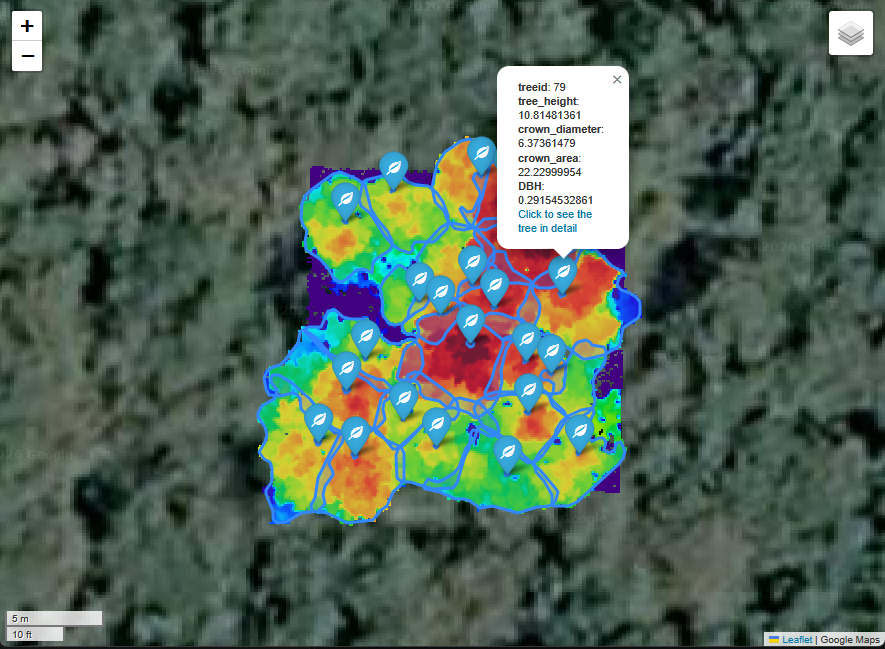
The map displays the analyzed forest plot, including the individual tree positions and crown boundaries. Clicking on a tree marker opens a popup showing basic tree information, such as tree height, diameter at breast height (DBH), crown diameter, and crown area.
The popup also provides a link to the corresponding individual tree report, allowing you to move directly from the spatial overview to a more detailed analysis of each tree.
Each tree report combines the extracted tree metrics with additional visualizations. Alongside basic measurements, the reports include stem taper diagrams, reconstructed 3D pipe models, and point cloud side views from different viewing directions.
These visualizations help us explore individual tree characteristics, inspect the reconstructed tree geometry, and better understand the results of our TLS-based forestry analysis.
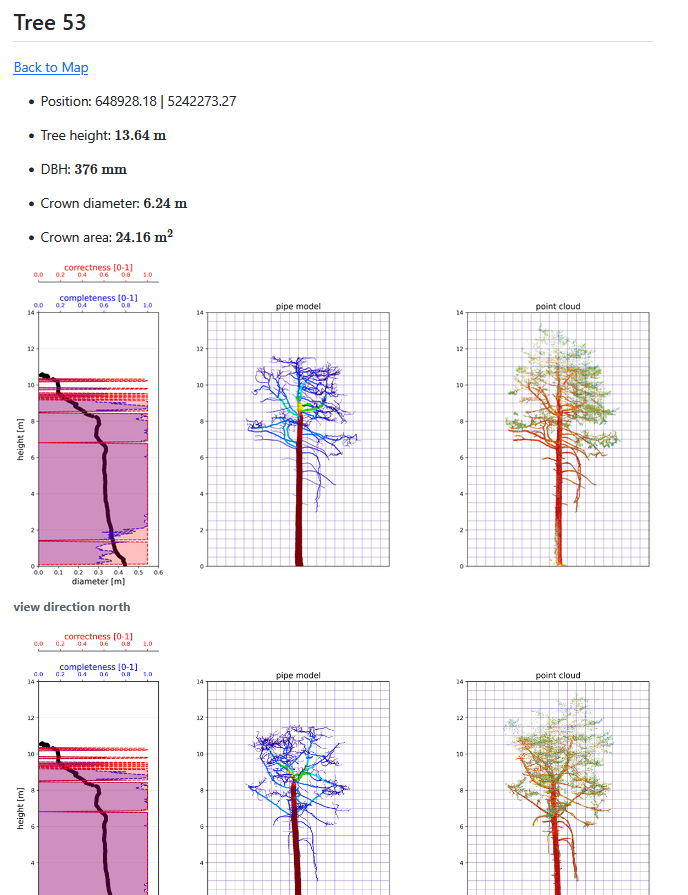
The reports also include a Back to Map link, making it easy to navigate between individual trees and the overall forest plot.
Together, the interactive map and individual tree reports demonstrate how we can extend the standard LIS Pro 3D processing workflow using additional Python libraries to create informative, accessible, and visually appealing outputs.
Summary and Outlook
With this final tutorial section, we have reached the end of our TLS-based forestry analysis tutorial series.
We started by exploring the basic functionality of the LIS Pro 3D forestry tools through the graphical user interface. Using individual trees and small point cloud subsets, we learned how to detect tree stems, segment individual trees, reconstruct their 3D structure, and extract forestry-related information such as tree height, diameter, wood volume, and biomass.
Along the way, we also discussed the underlying principles of the individual tools and how their parameters influence the processing results. Understanding these principles is essential when adapting the workflow to different forest structures, tree species, and TLS datasets.
Next, we moved from individual trees to larger forest areas. We introduced tile-by-tile processing, processing units, and buffered areas to handle datasets that are too large to process in memory all at once. Using the LIS Pro 3D graphical user interface, we learned how to organize intermediate results and combine the outputs of individual processing tiles into consistent datasets.
Building on this experience, we then translated the complete workflow into Python scripts. By separating the individual processing steps, managing parameters through a central configuration file, and introducing parallel processing, we created a more efficient and reproducible approach to TLS-based forestry analysis.
Finally, in this last tutorial section, we explored how to extend the standard LIS Pro 3D workflow using additional Python libraries. With Matplotlib, Folium, and Quarto, we generated informative diagrams, individual tree reports, and an interactive web map that connects the spatial distribution of trees with their detailed measurements and reconstructed structures.
And that brings us to the main advantage of automation: Once everything is configured, we can launch the entire workflow with a single command, from the original TLS point clouds to the final tree reports and interactive web map.
Depending on the size of your dataset, you might have time to grab a coffee, catch up on other office work, or even call it a day while your computer does the processing!
Of course, automation does not eliminate the need to inspect the results, evaluate their quality, and adjust processing parameters where necessary. However, it frees us from repeatedly executing the same processing steps manually and allows us to focus more on interpreting and using the resulting information.
We hope this tutorial series has provided you with a solid foundation for applying LIS Pro 3D to your own TLS forestry datasets, whether you are interested in exploring individual trees, analyzing entire forest plots, or developing more advanced automated workflows.
Happy processing!