Automate Point Cloud Classification with Python
Overview
This section contains the code needed to run the data preparation, basic classification and powerline/pylon classification by calling the LIS Pro 3D tools via the PySAGA api. The classification code furthermore is parallelized and makes use of LIS Pro 3D tools for logging and parallelization.
If you have not yet setup LIS Pro 3D for usage with Python (specifically the PySAGA api), please have a look at our Automation Guide and specifically the section Installation of LIS Pro 3D with Python. There, you will find a step-by-step description on how to setup your development environment!
It is recommended to complete the Automation Guide before proceeding with this section, in order to have more background knowledge about what we are doing here.
The provided scripts expect the following folder structure (LAZ-files must already exist in the data\las folder):
project # top-level folder
├── scripts
└── data
    └── las
        ├── 472053_5245153.laz
        └── 472053_5245903.laz
Config Script
In order to keep our code structured, we have our file paths, filenames and settings in a separate configuration script called project_config.py.
Use the Copy to Clipboard button in the upper-right corner of the code block in order to copy the whole code block in one go. Paste the code into your empty project config script!
import os
import sys

# make sure to adapt the SAGA_PATH if necessary!
os.environ['SAGA_PATH'] = 'C:\Program Files\Laserdata\LIS Pro 3D' # SAGA / LIS installation path
sys.path.insert(0, os.environ['SAGA_PATH'])

# -----------------------------------------------------------------------------
# processing directories
BASE_DIR        = r'C:\...\AUTOMATION_GUIDE'

LAS_IN_DIR       = os.path.join(BASE_DIR, 'data', 'las')
PROCESS_DIR     = os.path.join(BASE_DIR, 'processing')

SHAPES_DIR      = os.path.join(PROCESS_DIR, 'shapes')
SPC_CLASS_DIR    = os.path.join(PROCESS_DIR, 'spc_class')
# -----------------------------------------------------------------------------


# -----------------------------------------------------------------------------
# create (non-existing) dirs
os.makedirs(PROCESS_DIR, exist_ok=True)
os.makedirs(SHAPES_DIR, exist_ok=True)
os.makedirs(SPC_CLASS_DIR, exist_ok=True)
# -----------------------------------------------------------------------------

# -----------------------------------------------------------------------------
# global settings: files, tool parameters, ...
TILESHAPE_100    = os.path.join(SHAPES_DIR, 'Tiles_100.shp')
TILESHAPE_300      = os.path.join(SHAPES_DIR, 'Tiles_300.shp')
SINGLE_TILE      = os.path.join(SHAPES_DIR, 'single_tile_graticule.shp')
LASVF               = os.path.join(LAS_IN_DIR, 'tiles.lasvf')
SPCVF_CLASS         = os.path.join(SPC_CLASS_DIR, 'tiles.spcvf')

#EPSG:2056 — CH1903+ / LV95 (Swiss projected coordinate system)
PROJ ='+proj=somerc +lat_0=46.95240555555556 +lon_0=7.439583333333333 +k_0=1 +x_0=2600000 +y_0=1200000 +ellps=bessel +towgs84=674.374,15.056,405.346,0,0,0,0 +units=m +no_defs'

TILE_SIZE_PROCESSING    = 100.0
TILE_SIZE_DELIVERY      = 300.0

# get subset from point cloud
TILE_OVERLAP            = 30.0

# outlier removal
SEARCH_RADIUS_OUTLIER   = 3.0

# ground filtering
GRD_INITIAL_CELLSIZE    = 50.0
GRD_FINAL_CELLSIZE      = 0.5
GRD_MAX_ANGLE           = 35.0
GRD_MAX_DISTANCE        = 0.8

# building classification
SEARCH_RADIUS           = 1.0

# powerline classification
SEARCH_RADIUS_PL        = 5.0
MIN_WIRE_LENGTH         = 5.0

# pylon classification
MIN_PYLON_HEIGHT = 20.0Set the BASEDIR to your actual project path!
Data Preparation Script
This script primarily performs the following four main tasks:
- Create LAS/LAZ index
- Create a point cloud catalog
- Create a vector dataset containing the extent of each of the input files
- Create a tiling scheme for processing units of 100,300,200/500m
import os
import project_config as cfg
from PySAGA import saga_api, lis_cmd
from PySAGA.tools import *


def prepare_data():
    # -----------------------------------------------------------------------------
    # create a list of all LAS/LAZ input files in the data folder
    inputfiles = lis_cmd.Create_File_List(cfg.LAS_IN_DIR, '.las;.laz', cfg.LAS_IN_DIR + os.sep + 'lasvf_input_file_list.txt')

    # -----------------------------------------------------------------------------
    # create a spatial index for all LAS/LAZ files
    if not lis_io.Create_LASLAZ_Index(FILES='', INPUT_FILE_LIST=inputfiles, INDEX_ALL=True, TILE_SIZE=0.000000, THRESHOLD=1000, MIN_POINTS=100000, MAX_INTERVALS=-20):
        return lis_cmd.Error_Return('Failed to execute tool')

    # -----------------------------------------------------------------------------
    # create a virtual point cloud dataset from the LAS/LAZ files
    if not lis_virtual.Create_Virtual_LASLAZ_Dataset(FILES='', INPUT_FILE_LIST=inputfiles, FILENAME=cfg.LASVF,
                                                         METHOD_PATHS='relative', COLOR_DEPTH='16 bit'):
        return lis_cmd.Error_Return('Failed to execute tool')

    # -----------------------------------------------------------------------------
    # create a tileshape of the virtual point cloud dataset
    tileshape_vf = saga_api.SG_Get_Data_Manager().Add_Shapes()

    if not lis_virtual.Create_Tileshape_from_Virtual_LASLAZ(TILE_SHP=tileshape_vf, FILENAME=cfg.LASVF):
        return lis_cmd.Error_Return('Failed to execute tool')

    # -----------------------------------------------------------------------------
    # create a (small) tiling scheme and its polygon shapefile for data processing
    tileshape_100 = saga_api.SG_Get_Data_Manager().Add_Shapes()

    if not lis_tools.Create_Spatial_Processing_Units(
        SHP_EXTENT=tileshape_vf,
        SHP_UNITS=tileshape_100,
        TILE_SIZE=cfg.TILE_SIZE_PROCESSING
    ):
        return lis_cmd.Error_Return("Failed to execute tool")

    tileshape_100.Get_Projection().Create(saga_api.CSG_String(cfg.PROJ))
    tileshape_100.Save(cfg.TILESHAPE_100)

    # -----------------------------------------------------------------------------
    # create a (larger) tiling scheme and its polygon shapefile for data export
    tileshape_300 = saga_api.SG_Get_Data_Manager().Add_Shapes()

    if not lis_tools.Create_Spatial_Processing_Units(
        SHP_EXTENT=tileshape_vf,
        SHP_UNITS=tileshape_300,
        TILE_SIZE=cfg.TILE_SIZE_DELIVERY
    ):
        return lis_cmd.Error_Return("Failed to execute tool")

    tileshape_300.Get_Projection().Create(saga_api.CSG_String(cfg.PROJ))
    tileshape_300.Save(cfg.TILESHAPE_300)

    # -----------------------------------------------------------------------------
    # create one (large) single tile for data export
    single_tile_graticule = saga_api.SG_Get_Data_Manager().Add_Shapes()

    if not shapes_tools.Get_Shapes_Extents(
        SHAPES=tileshape_vf,
        EXTENTS=single_tile_graticule,
        OUTPUT='all shapes',
    ):
        return lis_cmd.Error_Return('Failed to execute tool')


    single_tile_graticule.Get_Projection().Create(saga_api.CSG_String(cfg.PROJ))
    single_tile_graticule.Save(cfg.SINGLE_TILE)

    return True


if __name__ == '__main__':
    # -----------------------------------------------------------------------------
    # start the logging
    starttime = lis_cmd.Start_Logging(False)

    # -----------------------------------------------------------------------------
    # call the data preparation function
    result = prepare_data()

    if not result:
        lis_cmd.Error_Exit('Processing task failed', starttime)


    # -----------------------------------------------------------------------------
    # stop logging
    lis_cmd.Stop_Logging(starttime)
Processing Script
The process_unit-function of the following script performs these steps:
- Query the point cloud from the virtual point cloud dataset
- Filter noise points
- Perform ground classification
- Segment planar objects for building roof detection
- Perform building and vegetation classification
- Clean building facades
- Clean building roofs
- Perform power line classification
- Cluster of power line points for filtering
- Calculate power line cluster lengths for filtering
- Filter power line clusters by minimum length
- Relabel power line classification
- Perform pylon classification
In the previous tutorial sections, the basic classification and the powerline/pylon classification were split into two parts. Here, the `process_unit()-function performs both steps in a single function call!
Each unit (red square) is processed using an overlap (red dotted square), in order to avoid edge effects. After the end of the processing pipeline, the overlap will be cut away.
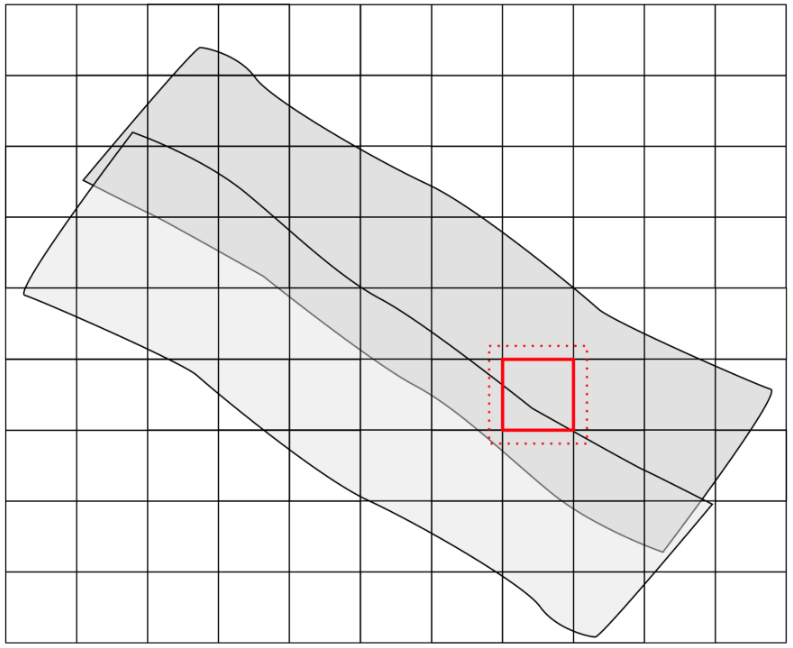
Each processing unit is saved with a unique name, based on its extent.
import os
import project_config as cfg
from PySAGA import saga_api, lis_cmd
from PySAGA.tools import *


@lis_cmd.proc_function_wrapper
def process_unit(unit_index=0):
    # -----------------------------------------------------------------------------
    # load the shapefile with the tiling scheme used for processing
    processing_units = saga_api.SG_Get_Data_Manager().Add_Shapes(cfg.TILESHAPE_100)

    if not processing_units.is_Valid():
        return lis_cmd.Error_Return('Loading processing_units ' + cfg.TILESHAPE_100 + ' failed')

    # -----------------------------------------------------------------------------
    # get tile to process
    proc_unit = processing_units.Get_Shape(unit_index)

    xmin = proc_unit.Get_Extent().Get_XMin()
    ymin = proc_unit.Get_Extent().Get_YMin()
    xmax = proc_unit.Get_Extent().Get_XMax()
    ymax = proc_unit.Get_Extent().Get_YMax()

    # units are referenced by their lower-left corner coordinate
    unit_name = f"{int(xmin)}_{int(ymin)}"

    lis_cmd.Message_Print(f"\nProcessing unit {unit_name} \n")


    # -----------------------------------------------------------------------------
    # processing starts here!

    # -----------------------------------------------------------------------------
    # query point cloud (with overlap) from virtual point cloud dataset
    pc_out_list = []

    if not lis_virtual.Get_Subset_from_Virtual_LASLAZ(PC_OUT=pc_out_list, FILENAME=cfg.LASVF, COPY_ATTR=True,
                                                          CONSTRAIN_QUERY=False, FILE_COMPRESSION=True, ERROR_IF_EMPTY=True,
                                                          THIN_OUT=True, SPACING=0.01, AOI_XRANGE=f"{xmin};{xmax}",
                                                          AOI_YRANGE=f"{ymin};{ymax}", AOI_ADD_OVERLAP=True,
                                                          OVERLAP=cfg.TILE_OVERLAP, SKIP_EMPTY_AOIS=True,
                                                          METHOD_CLIP='complete boundary is inside'):
        return lis_cmd.Error_Return('Tool execution failed')

    if len(pc_out_list) < 1:
        return lis_cmd.Error_Return('Unit ' + unit_name + ' contains no point cloud data, skipping!')

    # add the point cloud datasets to the data manager for easier memory management
    pc_buff = saga_api.SG_Get_Data_Manager().Add(pc_out_list[0]).asPointCloud()

    if pc_buff.Get_Count() < 5:
        return lis_cmd.Error_Return('Unit ' + unit_name + ' has less than 5 points, skipping ...')


    # -----------------------------------------------------------------------------
    # filter noise points
    if not lis_filtering.Remove_Isolated_Points(PC_IN=pc_buff, COPY_ATTR=True, SEARCH_RADIUS=cfg.SEARCH_RADIUS_OUTLIER,
                                                       MAX_POINTS=2, METHOD='label points', ATTR_NAME='noise', CLASSID=7,
                                                       CLASSID_UNDEF=1):
        return lis_cmd.Error_Return('Tool execution failed')


    # -----------------------------------------------------------------------------
    # ground classification
    if not lis_classification.Ground_Classification(PC_IN=pc_buff, FIELD_CLASS='noise', COPY_ATTR=True,
                                                           INIT_CELLSIZE=cfg.GRD_INITIAL_CELLSIZE, FINAL_CELLSIZE=cfg.GRD_FINAL_CELLSIZE,
                                                           FILTER_SEEDS=False, TERRAIN_ANGLE=88, MIN_EDGE_LENGTH=cfg.GRD_FINAL_CELLSIZE,
                                                           MAX_ANGLE=cfg.GRD_MAX_ANGLE, MAX_DISTANCE=cfg.GRD_MAX_DISTANCE,
                                                           Z_TOLERANCE=0.05, ATTACH_DZ=True, EXCLUDE_CLASSES='7'):
        return lis_cmd.Error_Return('Tool execution failed')


    # -----------------------------------------------------------------------------
    # segmentation of planar objects for building roof detection
    if not lis_segmentation.Segmentation_by_Plane_Growing(PC_IN=pc_buff, FILTER_FIELD='grdclass', COPY_ATTR=True, LOW_RANGE='0;1',
                                                                 HIGH_RANGE='3;64', METHOD_NN='radius', RADIUS_NN=cfg.SEARCH_RADIUS,
                                                                 MIN_K=3, ROBUST=True, ROBUST_THRES=0.1, ROBUST_PERCENTAGE=50.0,
                                                                 METHOD_ROBUST_SEARCH_POINT='search point must be included in best fit plane',
                                                                 GROWING_RADIUS=cfg.SEARCH_RADIUS / 2.0, GROWING_PLANE_DIST=0.1,
                                                                 SEG_ITERATIONS=1, REGION_RADIUS=cfg.SEARCH_RADIUS, REGION_MINSIZE=20,
                                                                 REGION_MAXSIZE=100000, REGION_MAXANGLE=10, REGION_MAXOFFSET=0.2,
                                                                 REGION_RECALC_NORMAL=100000):
        return lis_cmd.Error_Return('Tool execution failed')


    # -----------------------------------------------------------------------------
    # building and vegetation classification
    if not lis_classification.Enhanced_Point_Cloud_Classification(PC_IN=pc_buff, FIELD_SEGMENTID='segmentid', FIELD_CLASSID_GROUND='grdclass',
                                                                      FIELD_DZ='dz', COPY_ATTR=True, EXCLUDE_CLASSES='7', METHOD_BUILDING='point cloud features',
                                                                      MIN_DZ_BUILDING=2.0, GROWING_RADIUS_BUILDING=cfg.SEARCH_RADIUS,
                                                                      FEATURE_RADIUS_BUILDING=cfg.SEARCH_RADIUS, MIN_NEIGHBOR_RATIO_BUILDING=60.0,
                                                                      SLOPE_ADAPTIVE_RATIO=False, MIN_POINTS_BUILDING=200, RADIUS_VEGETATION=cfg.SEARCH_RADIUS * 2.0,
                                                                      MIN_POINTS_VEGETATION=5, MIN_DZ_LOW_VEGETATION=0, MIN_DZ_MEDIUM_VEGETATION=0.3,
                                                                      MIN_DZ_HIGH_VEGETATION=2, OUTPUT_CALIBRATION=False):
        return lis_cmd.Error_Return('Tool execution failed')


    # -----------------------------------------------------------------------------
    # clean building facades
    if not lis_classification.Clean_Building_Facades(PC_IN=pc_buff, FIELD_FILTERATTR='classid', COPY_ATTR=True, ATTR_SUFFIX='facades',
                                                            RADIUS_NN=cfg.SEARCH_RADIUS, BUILDING_CLASS='6;6', LOW_ATTR_RANGE='3;5',
                                                            HIGH_ATTR_RANGE='7;64', TARGET_CLASS=1):
        return lis_cmd.Error_Return('Tool execution failed')


    # -----------------------------------------------------------------------------
    # clean building roofs
    if not lis_classification.Clean_Building_Roofs(PC_IN=pc_buff, FIELD_FILTERATTR='classid_facades', COPY_ATTR=True, ATTR_SUFFIX='roofs',
                                                       DIMENSION='3D search', RADIUS_NN=2.5, USE_INNER_RADIUS=False, THRES_MAJORITY=25,
                                                       TARGET_CLASS=1):
        return lis_cmd.Error_Return('Tool execution failed')


    # -----------------------------------------------------------------------------
    # power line classification
    if not lis_classification.Power_Line_Classification(PC_IN=pc_buff, FIELD_CLASS='classid_facades_roofs', FIELD_THRES='dz',
                                                            COPY_ATTR=True, ATTR_SUFFIX='pl', EXCLUDE_CLASSES='7', THRES_RANGE='3;1000',
                                                            SEARCH_RADIUS=cfg.SEARCH_RADIUS_PL, CLASSIFY_POLES=False):
        return lis_cmd.Error_Return('Tool execution failed')


    # -----------------------------------------------------------------------------
    # clustering of power line points for filtering
    if not lis_segmentation.Densitybased_Spatial_Clustering(PC_IN=pc_buff, FIELD_ATTR_1='X', FIELD_ATTR_2='Y', FIELD_ATTR_3='Z',
                                                                   FIELD_CONSTRAINT='classid_pl', COPY_ATTR=True, ATTR_SUFFIX='pl',
                                                                   CHOICE_DIM='3-dimensional', SEARCH_RADIUS=cfg.SEARCH_RADIUS * 2, MIN_POINTS=1,
                                                                   RANGE_CONSTRAINT='14;14', TOL_CONSTRAINT='-0.5;0.5'):
        return lis_cmd.Error_Return('Tool execution failed')


    # -----------------------------------------------------------------------------
    # calculate power line cluster lengths for filtering
    if not lis_analysis.Segment_Features(PC_IN=pc_buff, FIELD_SEGMENTID='cluster_pl', COPY_ATTR=True, LENGTH_2D=True):
        return lis_cmd.Error_Return('Tool execution failed')


    # -----------------------------------------------------------------------------
    # filter power line clusters by minimum length
    if not lis_filtering.Attribute_Filter(PC_IN=pc_buff, FIELD_ATTR_1='length2d', COPY_ATTR=True, METHOD='binary flag',
                                              TYPE_1='lower limit (min)', MIN_1=cfg.MIN_WIRE_LENGTH, ATTR_NAME='pl_filtered'):
        return lis_cmd.Error_Return('Tool execution failed')


    # -----------------------------------------------------------------------------
    # relabel power line classification
    if not lis_arithmetic.Point_Cloud_Attribute_Calculator(PC_IN=pc_buff,
                                                               FORMULA='ifelse(eq([classid_pl],14),ifelse(eq([pl_filtered],1),14,1),[classid_pl])',
                                                               NAME='classid_pl_filtered', TYPE='1 byte unsigned integer',
                                                               INCLUDE_NODATA=False):
        return lis_cmd.Error_Return('Tool execution failed')


    # -----------------------------------------------------------------------------
    # pylon classification
    if not lis_classification.Pylon_Classification(PC_IN=pc_buff, FIELD_CLASS='classid_pl_filtered', FIELD_DZ='dz',
                                                       COPY_ATTR=True, ATTR_SUFFIX='pylon', MIN_PYLON_HEIGHT=cfg.MIN_PYLON_HEIGHT,
                                                       MAX_PYLON_DIAMETER=25.0, RADIUS_NN=3.0, MAX_DIFFERENCE=1.0, MIN_POINTS=200,
                                                       SEED_CLASS=14, EXCLUDE_CLASSES='7', OUTPUT_CALIBRATION=False):
        return lis_cmd.Error_Return('Tool execution failed')


    # -----------------------------------------------------------------------------
    # remove tile overlap
    pc_out = saga_api.SG_Get_Data_Manager().Add_PointCloud()

    if not lis_tools.Clip_Point_Cloud_with_Extent(PC_IN=pc_buff, PC_OUT=pc_out,
                                                      X_EXTENT=f"{xmin};{xmax}", Y_EXTENT=f"{ymin};{ymax}",
                                                      METHOD_CLIP='lower and left boundary is inside'):
        return lis_cmd.Error_Return('Tool execution failed')


    # -----------------------------------------------------------------------------
    # save classified tile (without overlap)
    pc_out.Get_Projection().Create(saga_api.CSG_String(cfg.PROJ))
    pc_out.Save(cfg.SPC_CLASS_DIR + os.sep + 'tile_' + unit_name  + '.sg-pts-z')


    # -----------------------------------------------------------------------------
    # free memory resources and return success
    saga_api.SG_Get_Data_Manager().Delete()

    return True

if __name__ == '__main__':
    # -----------------------------------------------------------------------------
    # start the logging
    starttime = lis_cmd.Start_Logging(False)


    # -----------------------------------------------------------------------------
    # load the shapefile with the tiling scheme used for processing
    processing_units = saga_api.SG_Get_Data_Manager().Add_Shapes(cfg.TILESHAPE_100)

    if not processing_units.is_Valid():
        lis_cmd.Error_Exit('Loading processing_units ' + cfg.TILESHAPE_100 + ' failed', starttime, True)

    lis_cmd.Message_Print(f'Number of units to process: {processing_units.Get_Count()} \n\n')


    # -----------------------------------------------------------------------------
    # run the process_unit function in parallel (each unit on a CPU core)
    # with the maximum number of available CPU cores
    num_threads = saga_api.SG_OMP_Get_Max_Num_Threads()

    lis_cmd.Message_Print(
        f"Number of threads for parallized processing: {num_threads}\n\n"
    )

    num_processing_units = processing_units.Get_Count()

    lis_cmd.Run_Parallel_Tasks(process_unit, num_processing_units, num_threads)


    # -----------------------------------------------------------------------------
    # finished processing.
    # now create virtual point cloud dataset of classified units
    # for subsequent processing steps (here LAS/LAZ export in script #3)
    inputfiles = lis_cmd.Create_File_List(cfg.SPC_CLASS_DIR, '.sg-pts;.sg-pts-z', cfg.SPC_CLASS_DIR + os.sep + 'spcvf_input_file_list.txt')

    if not lis_virtual.Create_Virtual_Point_Cloud_Dataset(INPUT_FILE_LIST=inputfiles, FILENAME=cfg.SPCVF_CLASS,
                                                              METHOD_PATHS=1, USE_HEADER=True):
        lis_cmd.Error_Exit('Failed to execute tool', starttime, True)


    # -----------------------------------------------------------------------------
    # free memory and stop logging
    saga_api.SG_Get_Data_Manager().Delete()

    lis_cmd.Stop_Logging(starttime)
Now run the script!
Visualize Result
View Individual Point Cloud Files
After running the script, you will have the individual processing units of your point cloud in the AUTOMATION_GUIDE/processing/spc_class folder. Depending on the chosen tiling scheme, the output files and their names should look similar to this:
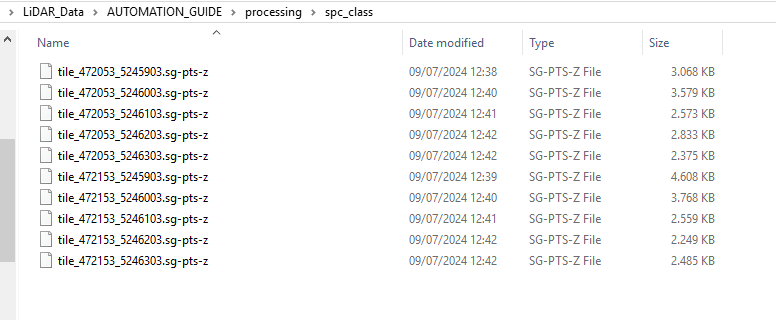
Loading these files into the GUI and adding them to the same map will look like the following screenshot:
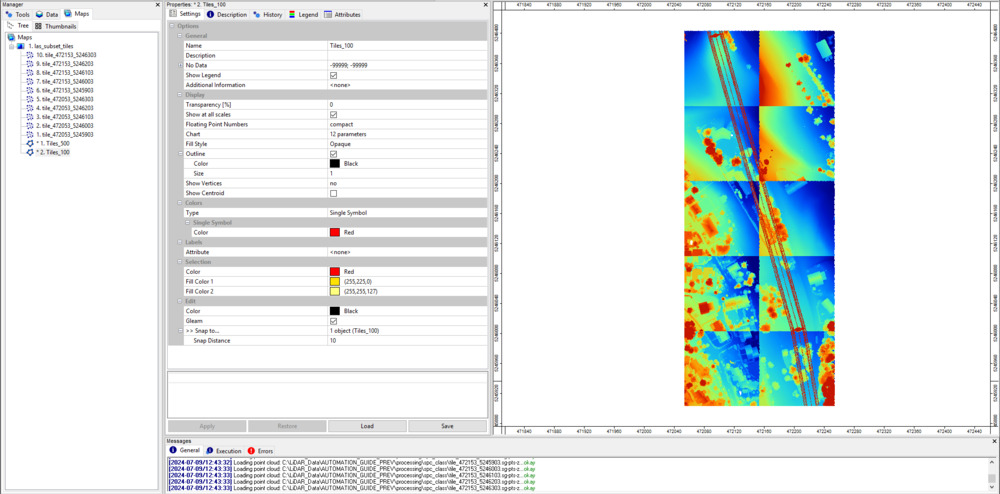
The different color stretches of each dataset depend are a result of the varying height distributions among the datasets. If we change the coloring for every dataset to Classified and use the classid_pylon, you will see that everything fits together.
Query Entire Point Cloud from Virtual SAGA Point Cloud
After successful execution, the output folder also has a *.spcvf file available (Virtual SAGA point cloud). To import this file, use the tool: LIS Pro 3D > Virtual > Get Subset From Virtual Pointcloud [Interactive] and provide the *.spcvf file.
Tool: Get Subset from Virtual Point Cloud
Geoprocessing → LIS Pro 3D → Virtual → SPC // Tool Libaries → LIS Pro 3D → Virtual
| Parameter | Setting |
|---|---|
| Options | |
| Filename | C:\LiDAR_Data\AUTOMATION_GUIDE\processing\spc_class\tiles.spcvf |
| Copy existing Attributes | 🗹 |
| Constrain Query | ☐ |
| Point Cloud Thinning | ☐ |
| Clipping Method | complete boundary is inside |
| Run Once | 🗹 |
Click Execute!
Now, to interactively draw a bounding box for loading, activate the action tool (black cursor):
Left click and hold with the mouse to draw a bounding box that covers all the individual point cloud tiles! The query will be processed after releasing the left-mouse.
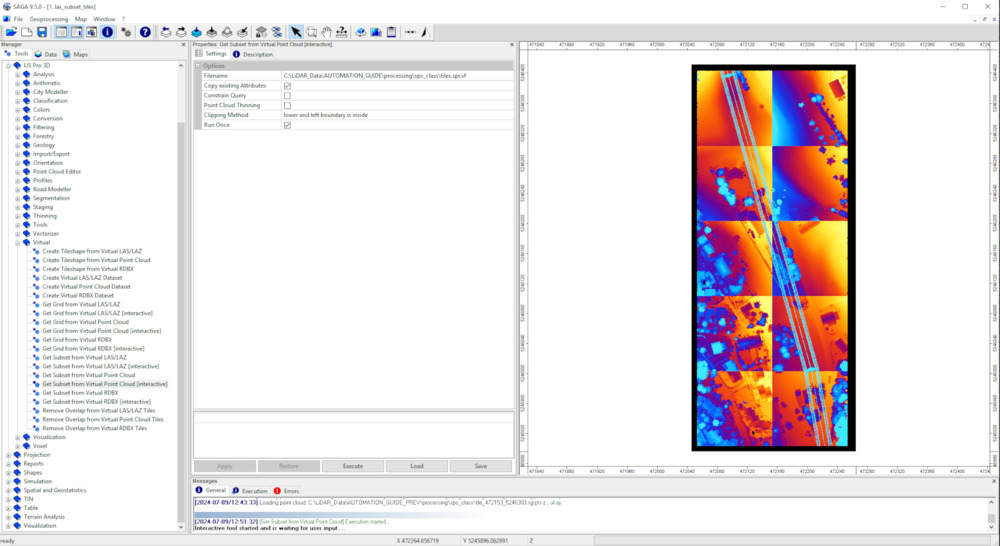
When finished, a new file appears in the Data tab. Add this dataset to the map:
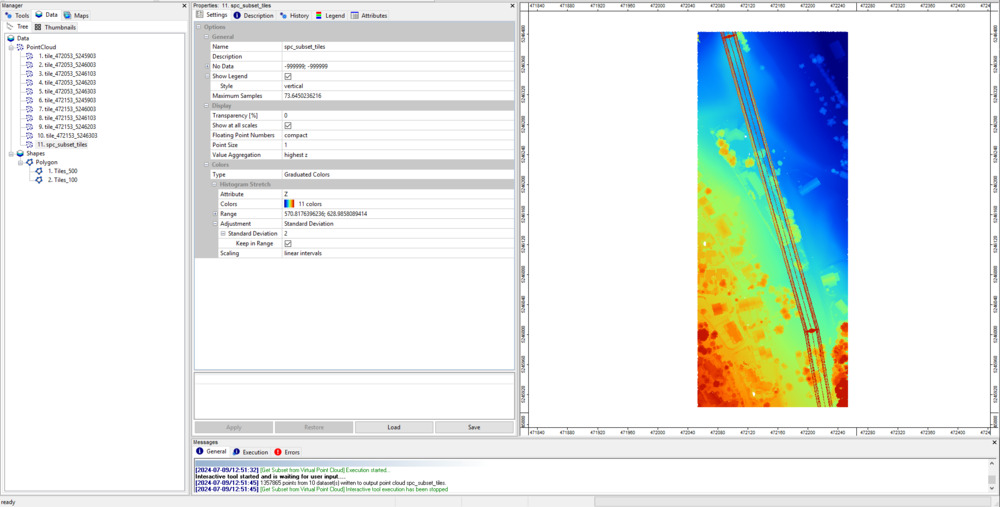
You can see that you have one single point cloud again.
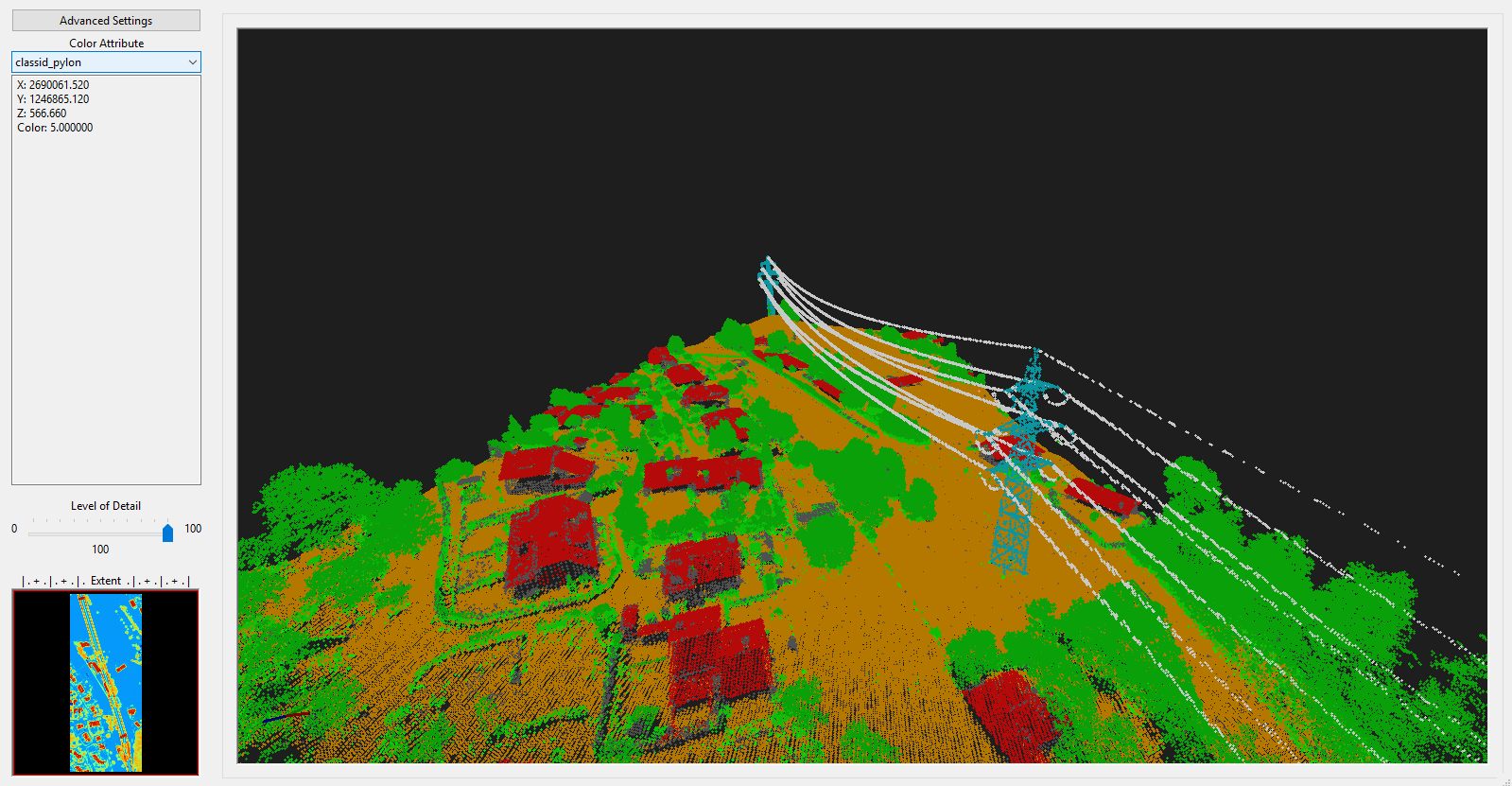
Recap
Here, we presented a workflow consisting of 13 individual steps for automated point cloud classification with LIS Pro 3D. The tile-wise processing of many units allows you to apply the workflow to larger datasets with 1000, 10000 or 100000 processing units with minimal adaptions of the code!