Getting Started - Stem Detection
< Previous section Next section >
Recap
In the previous tutorial section, we prepared our TLS dataset for tree analysis by extracting a small subset from the virtual point cloud, applying point cloud thinning, removing isolated points, and performing ground classification.
As part of this preparation, we also generated the dz attribute for our tutorial_pc point cloud, which represents the height of each LiDAR point above the ground surface.
In this tutorial section, we will build on these results to detect individual tree stems and estimate their diameters at breast height (DBH). The dz attribute allows us to extract a horizontal slice of the point cloud at breast height and use the resulting stem cross-sections to estimate tree diameters.
Load the Project
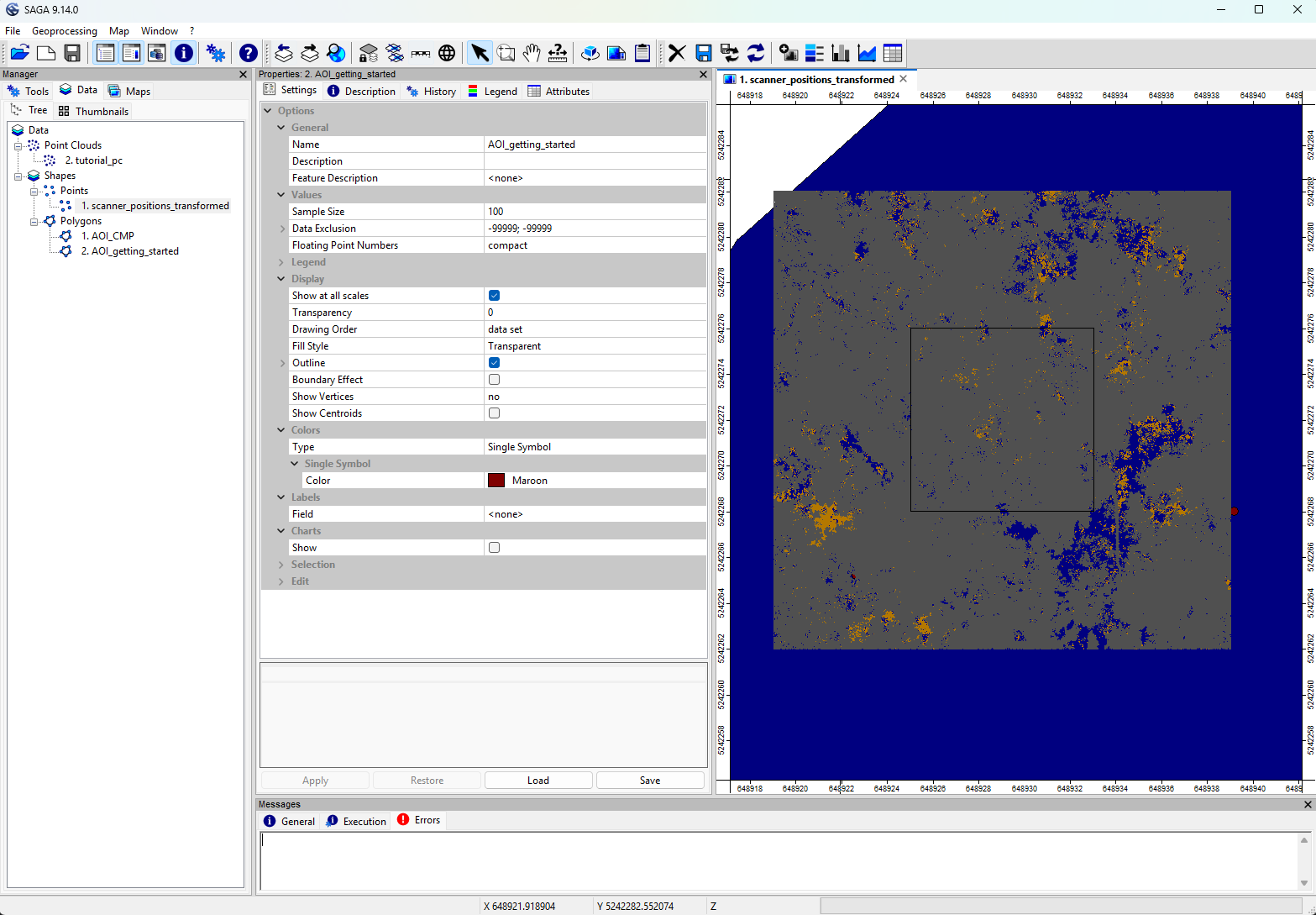
To continue where we left off, we first need to open the LIS Pro 3D project saved in the previous tutorial section.
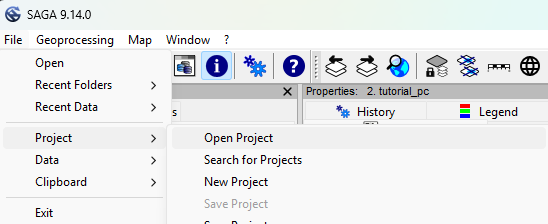
From the top menu, select File > Project > Open Project and navigate to your saved project file.
Click below to learn about the basic principles behind the tree stem detection and diameter estimation tool.
Basic Principle
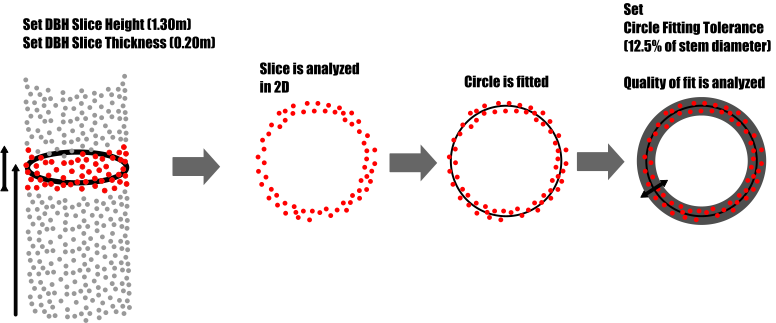
The Tree Trunk and Diameter Detection tool identifies tree stems by analyzing horizontal slices of the point cloud.
The user defines three main parameters:
Slice Height: Height above ground (typically breast height,dz = 1.30 m)DBH Slice Thickness: Vertical thickness of the slice (e.g., 0.2 m)Stem Diameter Range: Expected stem diameters (e.g., 0.05–0.6 m)
Each slice is analyzed in 2D by fitting circles to potential stem cross-sections. The fit quality is evaluated using a user-defined Circle Fitting Tolerance.
We will first use the Single Slice method, which detects stems at one defined height (breast height).
This approach is computationally efficient and works well in relatively simple forest structures. However, it can be sensitive to occlusions at the selected height.
Prefiltering – Intensity and Deviation
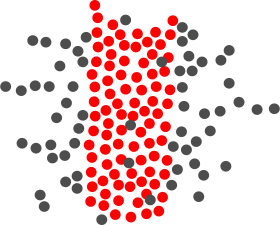
Stem detection generally benefits from filtering the point cloud before circle fitting. Since we are looking for solid stem surfaces, points representing small branches, twigs, and foliage should ideally be excluded.
Reflectance and deviation provide useful information for distinguishing these surfaces.
Large, solid targets often produce stronger laser returns, while small objects such as twigs may intercept only part of the laser footprint, resulting in weaker returns. Additionally, complex or porous structures can distort the shape of the returned laser pulse, leading to higher deviation values.
In contrast, solid stem surfaces generally produce stronger returns with lower pulse shape deviations.
Based on these characteristics, prefiltering can use:
IntensityorReflectanceDeviation
Standard LAS Intensity values (stored as 16-bit unsigned integers) can be used for filtering. However, if available, we recommend using the original floating-point measurements provided by the scanner.
In this example, we use data acquired with a RIEGL VZ-2000i scanner. RIEGL provides range-normalized intensity measurements as Reflectance values, stored in the LAS/LAZ Extra Bytes.
While Intensity is a standard LAS attribute, Deviation is a scanner-specific attribute available in RIEGL waveform-processing data. It is typically stored in the LAS/LAZ Extra Bytes.
If your dataset does not contain Deviation, simply leave the corresponding parameter set to <not set>.
Typical filtering thresholds for this dataset are:
Deviation< 10Intensity> 28000 orReflectance> -7 dB
In this example dataset, a Reflectance value of -7 dB corresponds to a rescaled Intensity value of approximately 28000.
Prefiltering – Minimum Compactness
If reflectance and deviation filtering are insufficient, an additional Minimum Compactness criterion can be applied.
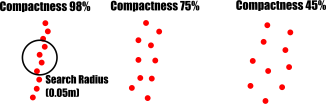
For each point within a slice, the tool evaluates a local neighborhood using a user-defined search radius (e.g., 0.05 m). Based on the local point distribution, a compactness metric is calculated.
Solid surfaces, such as tree stems or walls, typically show higher compactness, while foliage and noisy point distributions tend to have lower compactness.
The threshold depends on the characteristics of the dataset:
- Terrestrial laser scanning (TLS): Relatively low noise allows stricter thresholds (e.g., > 90%).
- Uncrewed laser scanning (ULS): Higher noise levels may require more tolerant thresholds (e.g., around 70%).
In general, cleaner and more accurate point clouds allow stricter filtering criteria.
If reflectance and deviation filtering already provide sufficient separation between stem surfaces and vegetation, Minimum Compactness can be set to 0.
Prefiltering – Minimum Point Count
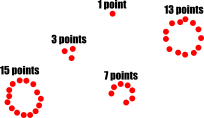
Within each slice, the tool identifies clusters of points representing potential stem cross-sections. Circle fitting is then performed on these clusters.
The Minimum Point Count parameter defines the minimum number of points required for a valid stem candidate. This helps reject detections based on too few points and improves robustness against noise.
Stem Diameter Calculation
In datasets with higher noise levels, stem surfaces may appear as a band of scattered points rather than a smooth, well-defined surface.
To account for this, each detected stem cross-section is analyzed along 18 equally spaced profiles passing through the estimated stem center, with an angular spacing of 10°.
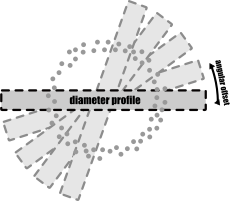
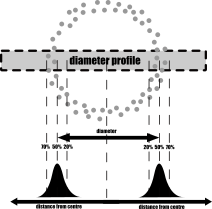
For each profile, the positions of the points along the diameter direction are evaluated relative to the estimated stem center. These measurements form an empirical distribution function (EDF) describing the point distribution across the stem cross-section.
Since each profile intersects the stem surface on two opposite sides, the distribution typically shows two dominant peaks corresponding to these intersection regions.
Tree Trunk and Diameter Detection - Run Tool (without filtering)
With these basic principles in mind, we can now run the Tree Trunk and Diameter Detection tool using the following settings:
Tool: Tree Trunk and Diameter Detection
Geoprocessing → LIS Pro 3D → Forestry → Point Cloud // Tools → LIS Pro 3D → Forestry
| Parameter | Setting |
|---|---|
| Data Objects | |
| Point Clouds | |
| >> Point Cloud | tutorial_pc |
| DZ | dz |
| Tree Height | <not set> |
| Intensity | Reflectance |
| Deviation | Deviation |
| Options | |
| Copy existing Attributes | 🗹 |
| Output Stems | |
| << Output Stem Positions | <create> |
| < Point Cloud Slice | <create> |
| Attribute Suffix | |
| Stem Detection | |
| Method Stem Detection | single slice |
| Slice Height | 1.3 |
| Slice Thickness | 0.2 |
| Minimum Intensity | -7 |
| Maximum Deviation | 10 |
| Search Radius | 0.05 |
| Minimum Point Count | 30 |
| Minimum Compactness | 0 |
| Stem Diameter Estimation | |
| Stem Diameter Range | 0.05;0.6 |
| Circle Fitting Tolerance | 20 |
| Filtering | |
| Points on Circle | 0 |
| Goodness of Fit | 0 |
| Circle Completeness | 0 |
| Percentile Radius | 0 |
| Apply Correction Function | ☐ |
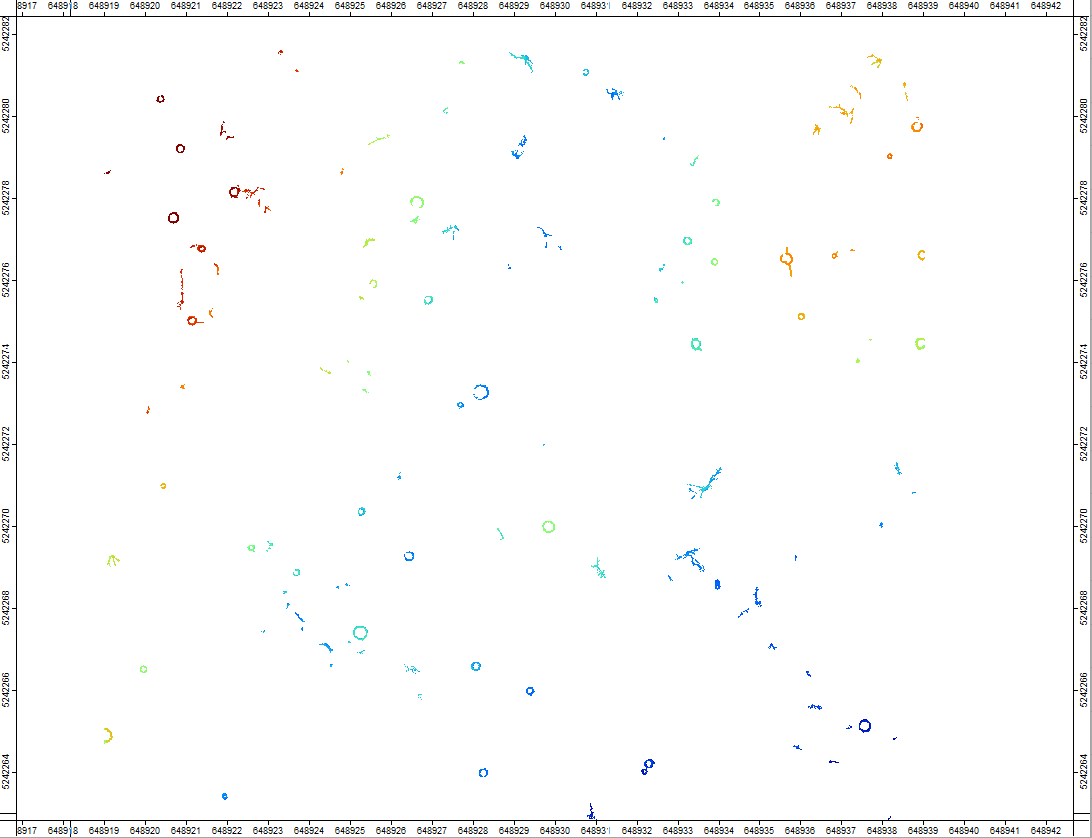
After running the tool, a new point cloud layer named tutorial_pc_slice appears in the Data tab. Double-click the layer to display it in a new map.
Compare with Reference Data
The map shows the extracted horizontal slice at 1.3 m above ground (dz), with a vertical thickness of 0.2 m.
You will also find a new point shapes layer named tutorial_pc_stem_positions. Add this layer to the previously created map.
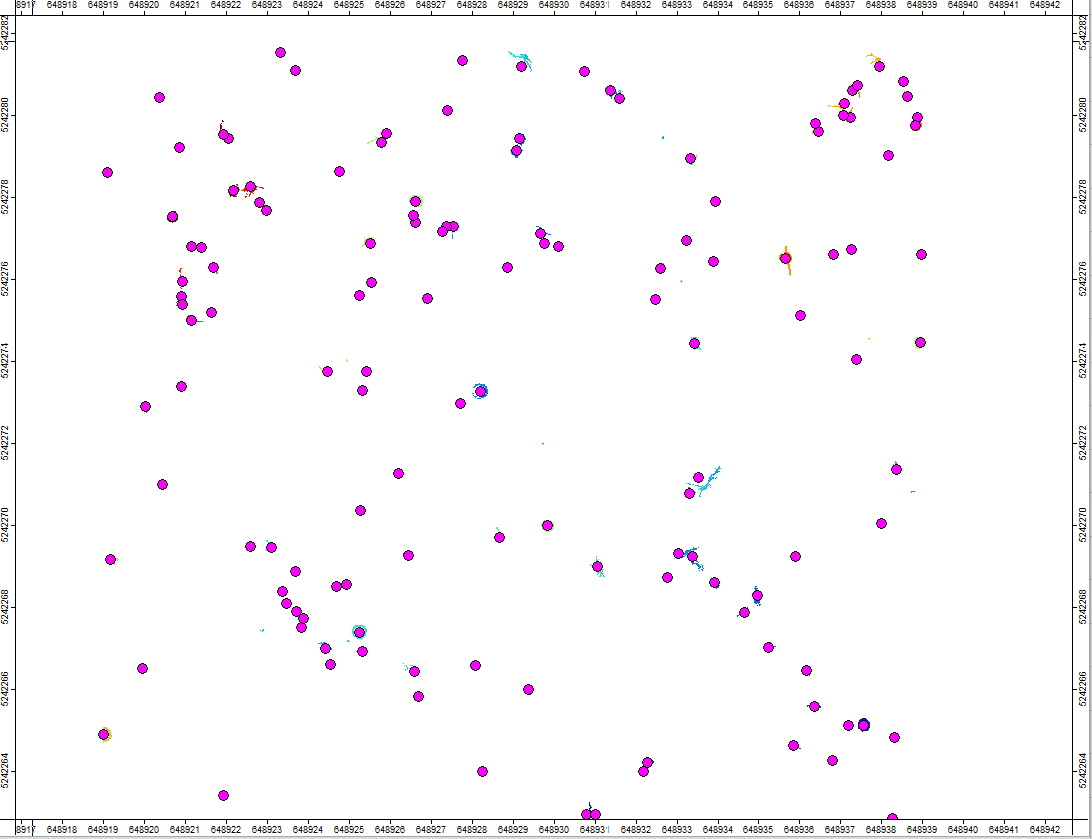
As you can see, the algorithm has detected a potential stem position for almost every cluster of points within the slice.
To evaluate the detection results, load the ReferenceMeasurements.shp file from the auxillary_files folder and add it to the same map.
project # top-level folder
└── data
    ├── auxillary_files
    │   └── ReferenceMeasurements.shp
    └── lazfiles
        └── ...
The map should now look like this:
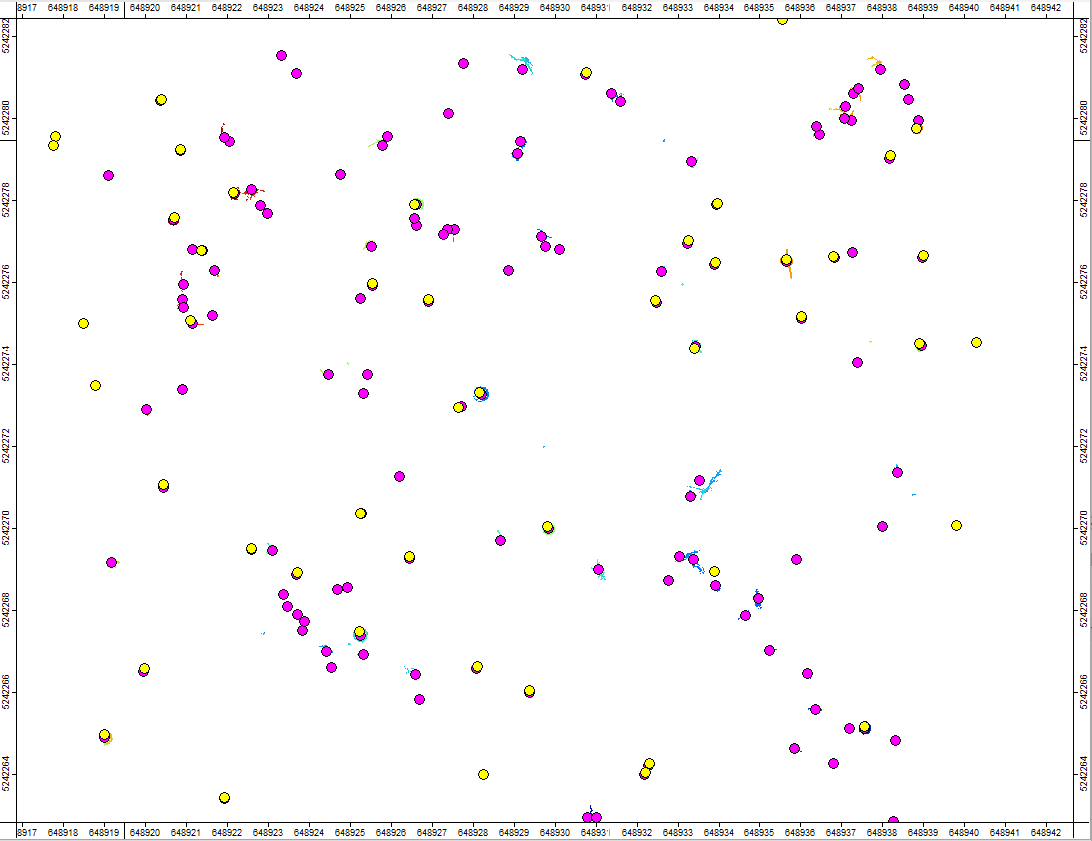
As you can see, the algorithm has detected considerably more potential tree stems than are included in the reference dataset.
Click below to learn about the basic principles of filtering the detected tree stems.
Filtering Principles
To control the completeness and reliability of stem detections, we can apply several quality-based filtering criteria.
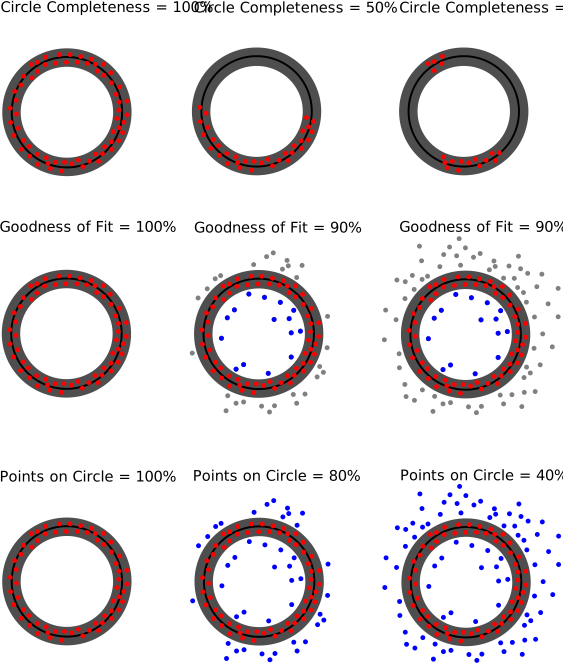
Circle Completeness
Circle Completeness describes the proportion of the fitted circle’s circumference that is covered by points within the buffer defined by the Circle Fitting Tolerance.
For example:
- A tree scanned predominantly from one side may reach approximately 50% completeness.
- A tree scanned from multiple directions may reach more than 80% completeness.
Good fieldwork improves processing results! Scanning trees from multiple directions increases circle completeness and provides more flexibility when filtering stem detections.
Goodness of Fit
Goodness of Fit evaluates how well the point distribution matches the expected geometry of a solid tree stem.
It considers the relationship between:
- The number of points within the fitted circle buffer, representing the stem surface.
- The number of points inside the fitted circle, which should ideally be empty.
Since laser beams cannot penetrate solid stems, a high-quality detection typically has:
- Many points within the circle buffer.
- Few or no points inside the fitted circle.
Points outside the circle buffer are not considered for this metric.
Points on Circle
Points on Circle describes the proportion of points within a local cluster that belong to the fitted stem surface.
It compares:
- The total number of points in the local cluster, including points inside and outside the fitted circle buffer.
- The number of points within the circle buffer, representing the stem surface.
This parameter is particularly useful for distinguishing clearly defined tree stems from irregular point clusters, such as dense understory vegetation.
However, when working with partially occluded stems, lower threshold values may be necessary to avoid rejecting valid detections.
Influence of Circle Fitting Tolerance
The Circle Fitting Tolerance directly influences the calculated quality metrics.
Noisier datasets generally require a larger tolerance to account for greater variation in the measured stem surface. Increasing the tolerance can also increase the number of points accepted within the circle buffer, potentially resulting in higher quality scores.
Therefore, the tolerance and filtering thresholds should be adjusted together to achieve the desired balance between detecting as many valid stems as possible and rejecting false detections.
Tree Trunk and Diameter Detection – Run the Tool with Filtering
Now, rerun the Tree Trunk and Diameter Detection tool using the following filtering settings in the bottom section of the tool interface.
When running the tool again without changing the output settings, the existing output datasets are updated automatically. The updated results will also be immediately visible in the map.
If you want to create a separate output dataset instead of updating an existing one, set the corresponding output parameter to <create>.
Tool: Tree Trunk and Diameter Detection
Geoprocessing → LIS Pro 3D → Forestry → Point Cloud // Tools → LIS Pro 3D → Forestry
| Parameter | Setting |
|---|---|
| Data Objects | |
| Point Clouds | |
| >> Point Cloud | tutorial_pc |
| DZ | dz |
| Tree Height | <not set> |
| Intensity | Reflectance |
| Deviation | Deviation |
| Options | |
| Copy existing Attributes | 🗹 |
| Output Stems | |
| << Output Stem Positions | Output Stem Positions |
| < Point Cloud Slice | Point Cloud Slice |
| Attribute Suffix | |
| Stem Detection | |
| Method Stem Detection | single slice |
| Slice Height | 1.3 |
| Slice Thickness | 0.2 |
| Minimum Intensity | -7 |
| Maximum Deviation | 10 |
| Search Radius | 0.05 |
| Minimum Point Count | 30 |
| Minimum Compactness | 0 |
| Stem Diameter Estimation | |
| Stem Diameter Range | 0.05;0.6 |
| Circle Fitting Tolerance | 20 |
| Filtering | |
| Points on Circle | 20 |
| Goodness of Fit | 90 |
| Circle Completeness | 40 |
| Percentile Radius | 20 |
| Apply Correction Function | ☐ |
As you can see, the number of false detections has decreased significantly. However, a few false positives and false negatives remain.
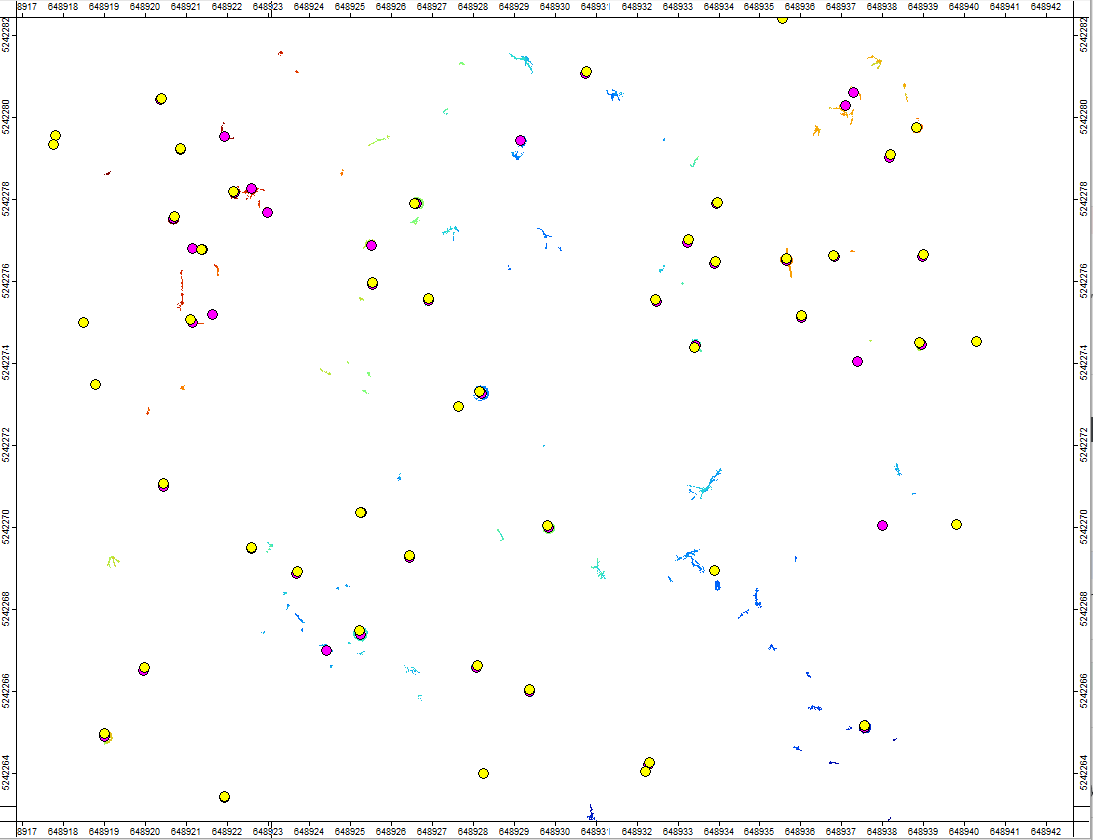
To further improve the detection results, we will now switch to the Multi Slice mode.
Click below to learn about the basic principles of the Multi Slice mode.
Principle of Multi Slice Mode
In complex forests with dense understory vegetation, tree stems are often partially occluded. As a result:
- Understory vegetation may be incorrectly detected as stems.
- Actual stems may not be visible at a particular slice height.
The Multi Slice mode helps overcome these limitations by applying the same detection procedure at multiple height levels.
This approach:
- Reduces the risk of missing stems due to local occlusions.
- Allows detections to be validated across multiple heights.
- Enables filtering based on the number of detections per stem.
For example, false detections caused by dense foliage may occur only in individual slices, while actual tree stems are generally detected more consistently across multiple heights.
The user defines three main parameters:
Slice Height Range: Vertical range to be analyzed (e.g., 1.2–1.8 m above ground).Slice Thickness: Vertical thickness of each horizontal slice.Slice Stepping: Vertical distance between consecutive slice levels.
These parameters determine how the horizontal slices are generated and analyzed within the specified height range.
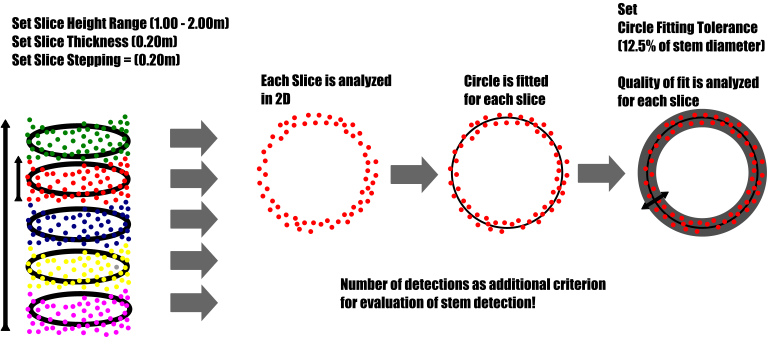
Relationship Between Slice Thickness and Slice Stepping
The relationship between Slice Thickness and Slice Stepping determines how densely the stem is sampled along its vertical extent.
Slice Stepping>Slice Thickness:- Gaps remain between consecutive slices.
- Parts of the stem are not sampled.
- Faster processing due to fewer overlapping observations.
Slice Stepping<Slice Thickness:- Consecutive slices overlap.
- Increased redundancy can improve robustness against local occlusions.
- Higher computational effort.
Slice Stepping=Slice Thickness:- Continuous vertical sampling without overlap.
In general, we recommend using equal values for continuous, non-overlapping sampling or a slightly smaller Slice Stepping to introduce some overlap.
Overlapping slices can improve detection stability, particularly in datasets with variable point density or local occlusions.
Slice Connection Distance
The Slice Connection Distance defines the maximum allowed horizontal (2D) distance between fitted circle centers in consecutive slices for grouping them into the same stem.
During multi-slice detection, each horizontal slice is analyzed independently. The algorithm then compares the positions of the detected circle centers to identify detections belonging to the same tree.
- If the distance between two circle centers is within the specified threshold, the detections can be connected into a single stem group.
- If the distance exceeds the threshold, the detections are not connected and remain separate candidates.
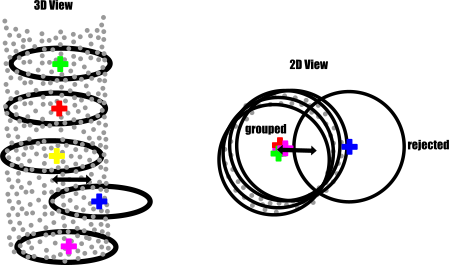
Interaction with Slice Stepping and Thickness
The appropriate Slice Connection Distance depends on the vertical sampling configuration.
Slice Stepping
- Smaller stepping results in smaller vertical distances between consecutive slices, allowing tighter connection thresholds.
- Larger stepping increases the potential horizontal displacement between slices, especially for tilted stems, and may require a larger connection distance.
Slice Thickness
- Thicker slices contain more points and may provide more stable circle center estimates.
- Thinner slices may be more sensitive to local noise and uneven point distributions, potentially requiring a slightly larger connection distance.
Influence of Stem Inclination
Stem inclination also affects the horizontal displacement between consecutive slice centers.
- Nearly vertical stems generally require only a small connection distance.
- Tilted stems may require a larger connection distance to remain connected across multiple slices.
Choosing an appropriate threshold is important:
- Too small: Detections belonging to the same tilted stem may be split into separate groups.
- Too large: Detections from neighboring stems may be incorrectly connected.
Therefore, the Slice Connection Distance should be as small as possible to avoid merging neighboring trees, while remaining large enough to account for expected stem inclination, slice stepping, and uncertainty in circle center positions.
Dense vertical sampling generally allows smaller and more reliable connection thresholds.
Num Detections
The Num Detections parameter provides an additional filtering criterion to reduce false positives in Multi Slice mode.
While actual tree stems are generally detected across multiple height levels, false detections caused by understory vegetation or irregular point clusters often occur only in individual slices.
By requiring a minimum number of connected detections per stem, we can reject candidates that are not consistently detected across the selected height range.
A higher threshold generally reduces false positives but may also exclude valid stems that are only visible in a few slices due to occlusion or incomplete scanning.
The threshold should therefore be selected according to the forest structure, point cloud completeness, and number of available slices.
Tree Trunk and Diameter Detection – Run the Tool in Multi Slice Mode
Tool: Tree Trunk and Diameter Detection
Geoprocessing → LIS Pro 3D → Forestry → Point Cloud // Tools → LIS Pro 3D → Forestry
| Parameter | Setting |
|---|---|
| Data Objects | |
| Point Clouds | |
| >> Point Cloud | tutorial_pc |
| DZ | dz |
| Tree Height | <not set> |
| Intensity | Reflectance |
| Deviation | Deviation |
| Options | |
| Copy existing Attributes | 🗹 |
| Output Stems | |
| << Output Stem Positions | Output Stem Positions |
| < Point Cloud Slice | Point Cloud Slice |
| Attribute Suffix | |
| Stem Detection | |
| Method Stem Detection | multiple slices |
| Slice Height Range | 1.2;1.8 |
| Slice Stepping | 0.1 |
| Connection Distance | 0.2 |
| Slice Thickness | 0.2 |
| Minimum Intensity | -7 |
| Maximum Deviation | 10 |
| Search Radius | 0.05 |
| Minimum Point Count | 30 |
| Minimum Compactness | 0 |
| Stem Diameter Estimation | |
| Stem Diameter Range | 0.05;0.6 |
| Circle Fitting Tolerance | 20 |
| Filtering | |
| Points on Circle | 20 |
| Goodness of Fit | 90 |
| Circle Completeness | 40 |
| Minimum Detections per Stem | 3 |
| Percentile Radius | 20 |
| Apply Correction Function | ☐ |
Running the tool in Multi Slice mode requires more computation time but generally provides more robust tree stem detections.
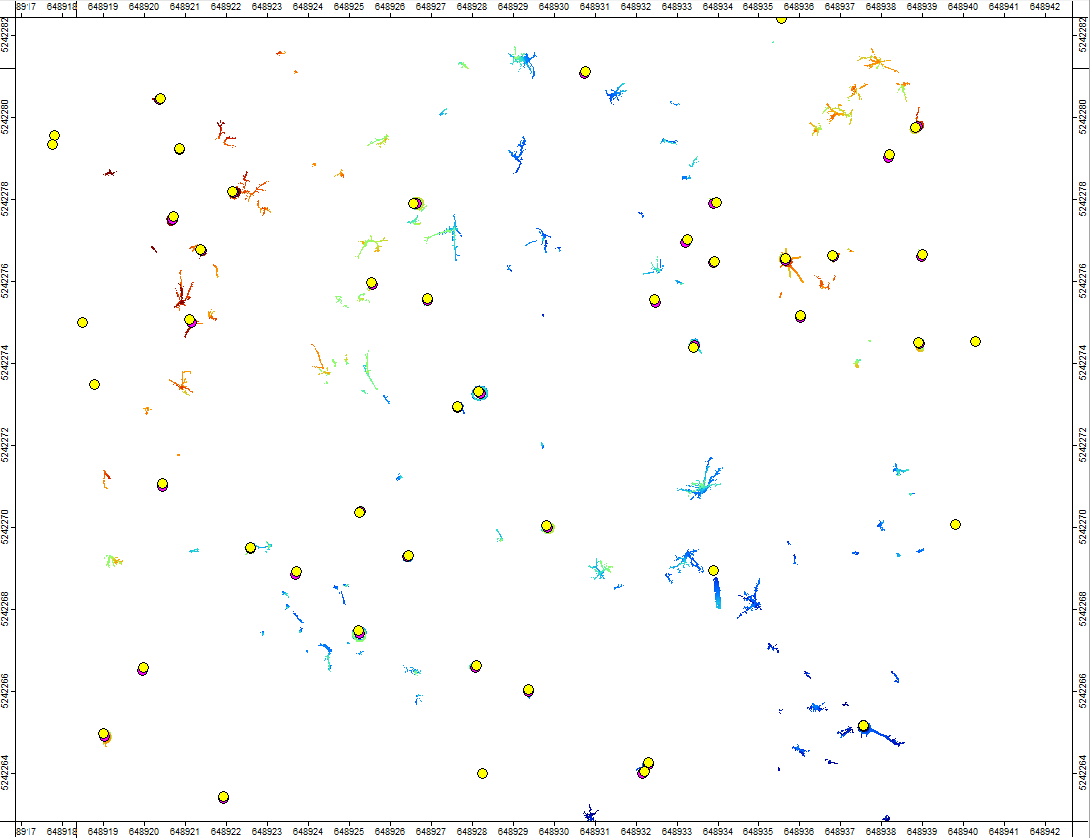
In the resulting map, you can see that the automatically detected stem positions now show very good agreement with the reference measurements.
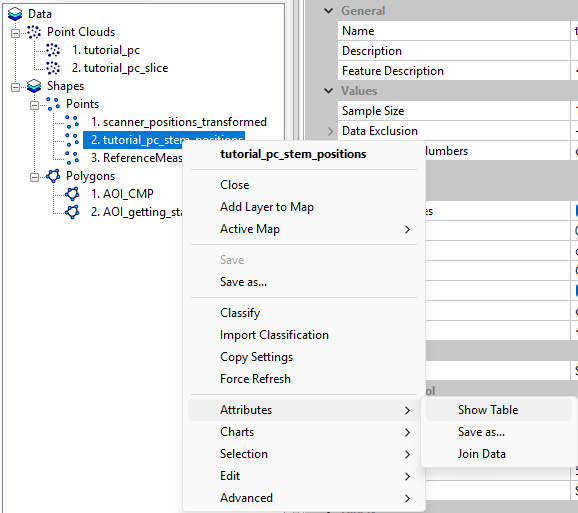
Right-click the tutorial_pc_stem_positions layer and select Attributes > Show Table to inspect the detection results.
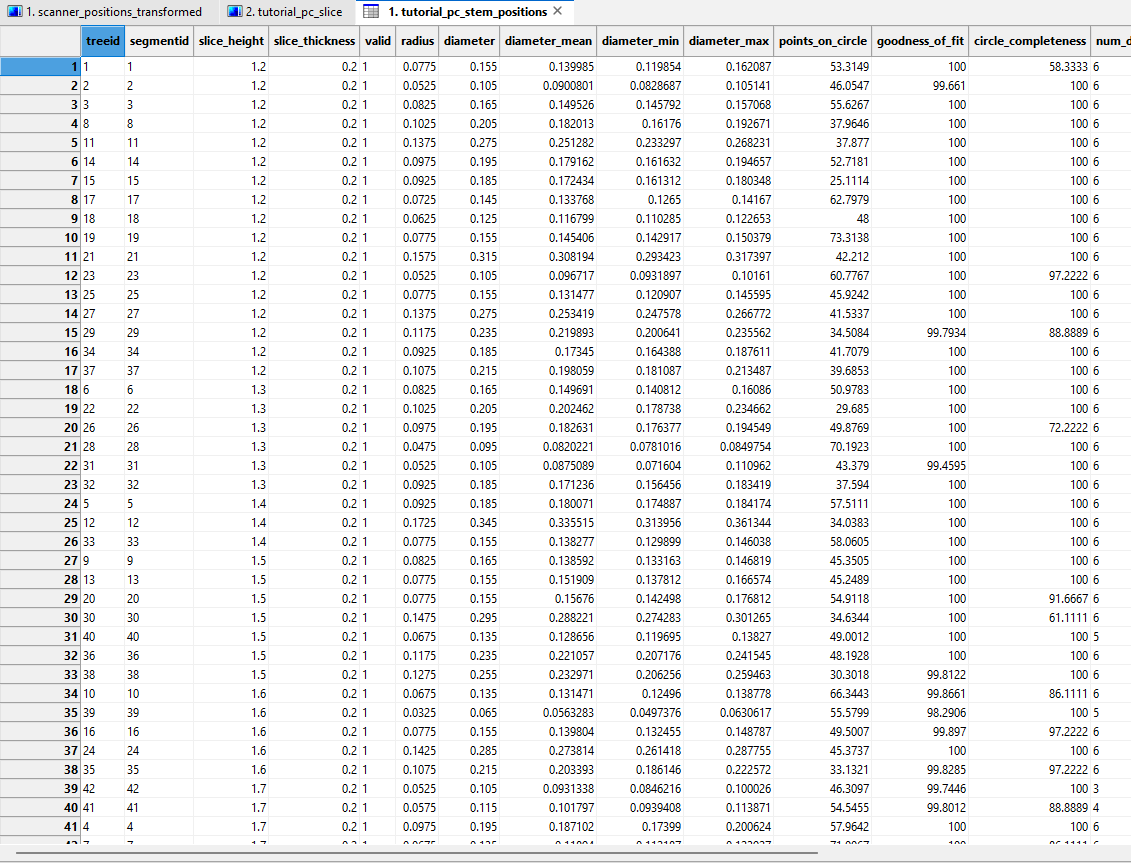
As you can see, each detected stem has been assigned a unique tree ID. Additionally, the attribute table contains the estimated stem radius and diameter, along with the corresponding quality metrics.
Inspect Radius and Diameter Estimates
First, double-click ReferenceMeasurements in the Maps tab to hide the reference data.
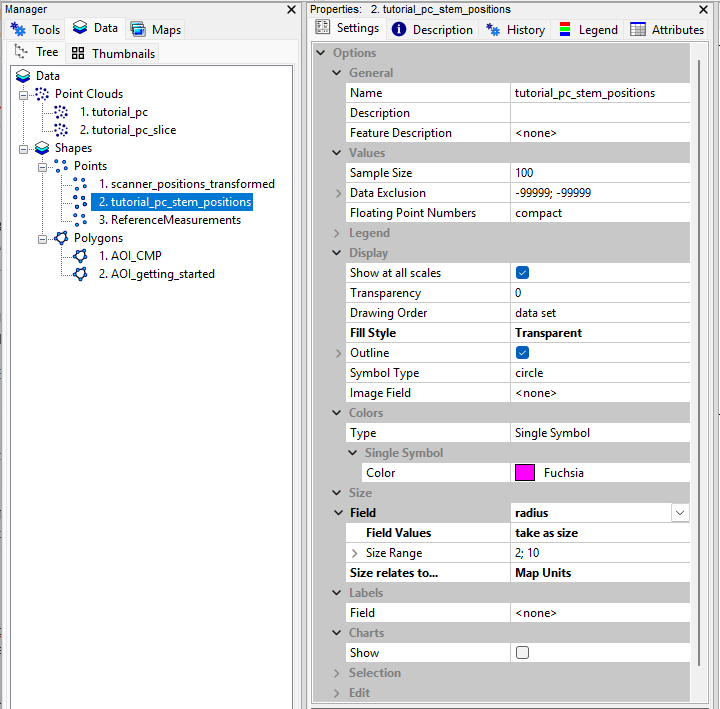
Next, select the tutorial_pc_stem_positions layer in the Data tab and open the Settings tab in the Properties window.
Set the Fill Style to Transparent. You can also expand the Outline settings by clicking the small arrow next to Outline to adjust the line thickness.
Next, expand the Size section and configure the following settings:
Field:radiusField Values:take as sizeSize relates to...:Map Units
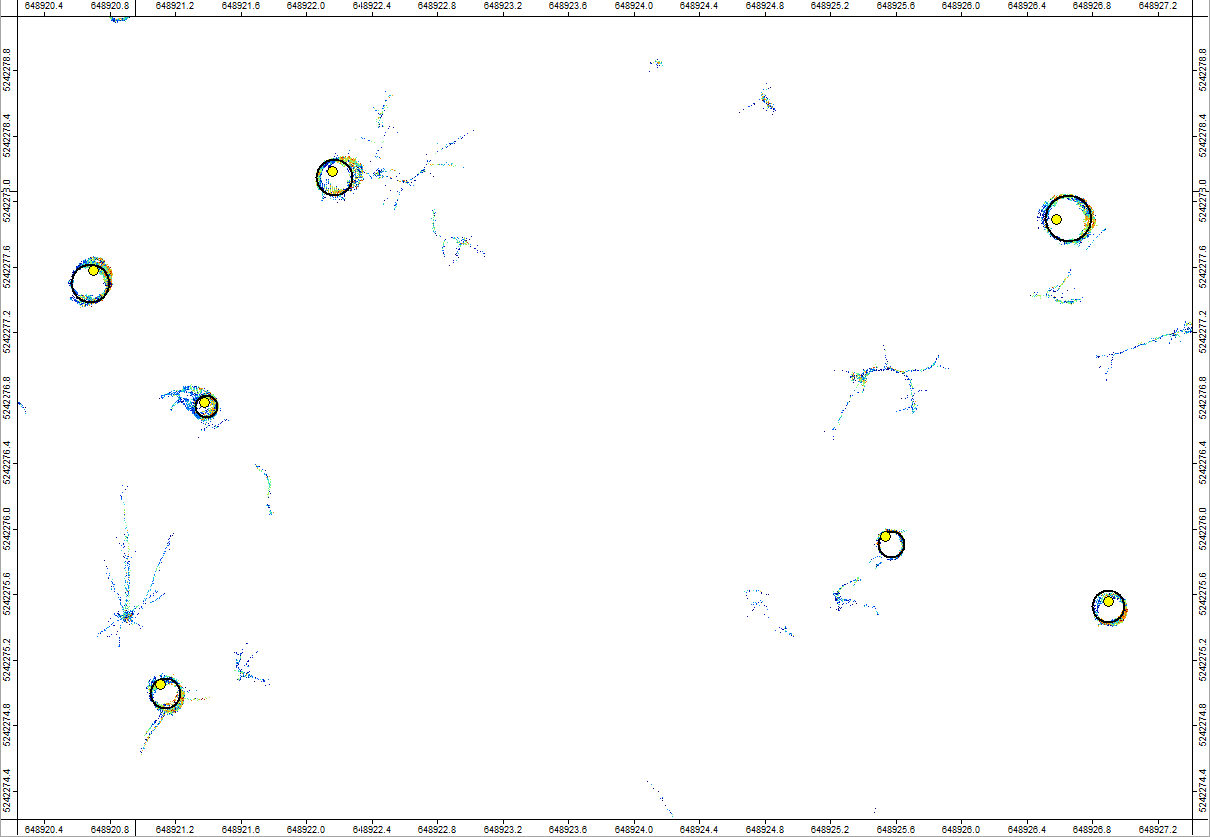
This allows us to visualize the estimated stem radii directly on the map and inspect how well the fitted circles match the point cloud cross-sections.
Join Reference Tree IDs
In many projects, you may already have existing tree IDs that you want to use for your LiDAR analysis. Maintaining consistent tree IDs across multiple monitoring campaigns is particularly important for tracking individual trees over time.
If you do not have existing reference tree IDs, you can simply use the treeids automatically generated by the detection tool.
In this example, we have reference tree IDs from traditional field measurements. We will therefore join these IDs to our detected tree stems to ensure consistency with the reference dataset.
Tool: Join Attributes by NN Search (Shapes)
Geoprocessing → LIS Pro 3D → Tools → Shapes → Attributes // Tools → LIS Pro 3D → Tools
| Parameter | Setting |
|---|---|
| Data Objects | |
| Shapes | |
| >> Shapes | tutorial_pc_stem_positions |
| Maximum Distance | <not set> |
| >> Shapes to Join | ReferenceMeasurements |
| Attributes | choose “ID” in the Attributes Selection |
| < Shapes | <not set> |
| Options | |
| Attribute Suffix | Reference |
| Dimension | 2D search |
| Maximum Distance | 0.2 |
| Value for Undefined Points | NoData |
| Add Join Flag | ☐ |
The final result now contains an additional attribute named ID_Reference, which stores the matched reference tree ID.
Save the tutorial_pc_slice and tutorial_pc_stem_positions layers to disk.
Finally, save your LIS Pro 3D project to preserve the changes.
Summary
In this tutorial section, we have learned how to:
- Detect individual tree stems and estimate their diameters at breast height (DBH) using the
Tree Trunk and Diameter Detectiontool. - Understand the basic principles of
Single SliceandMulti Slicedetection and how their parameters influence the results. - Apply different filtering criteria to reduce false detections and improve the reliability of stem detection.
- Compare automatically detected stem positions with reference measurements and visually inspect the estimated stem diameters.
- Join existing reference tree IDs to the detected stems to maintain consistent tree identification across datasets and monitoring campaigns.
Finally, we saved the detection results and updated our LIS Pro 3D project for use in the following tutorial sections.