Getting Started - Single Tree Metrics
< Previous section Next section >
Recap
In the previous tutorial section, we segmented our example point cloud into individual trees using the Single Tree Derivation 3D tool. Based on the previously detected stem positions, we obtained complete tree segments with individual tree IDs and derived metrics such as tree height and crown dimensions.
These individual tree segments now provide the basis for a more detailed analysis of tree structure.
In this tutorial section, we will process each tree individually to reconstruct its stem and branching structure. This will allow us to analyze tree architecture, including branch angles and stem straightness, and estimate wood volume and biomass.
Load the Project
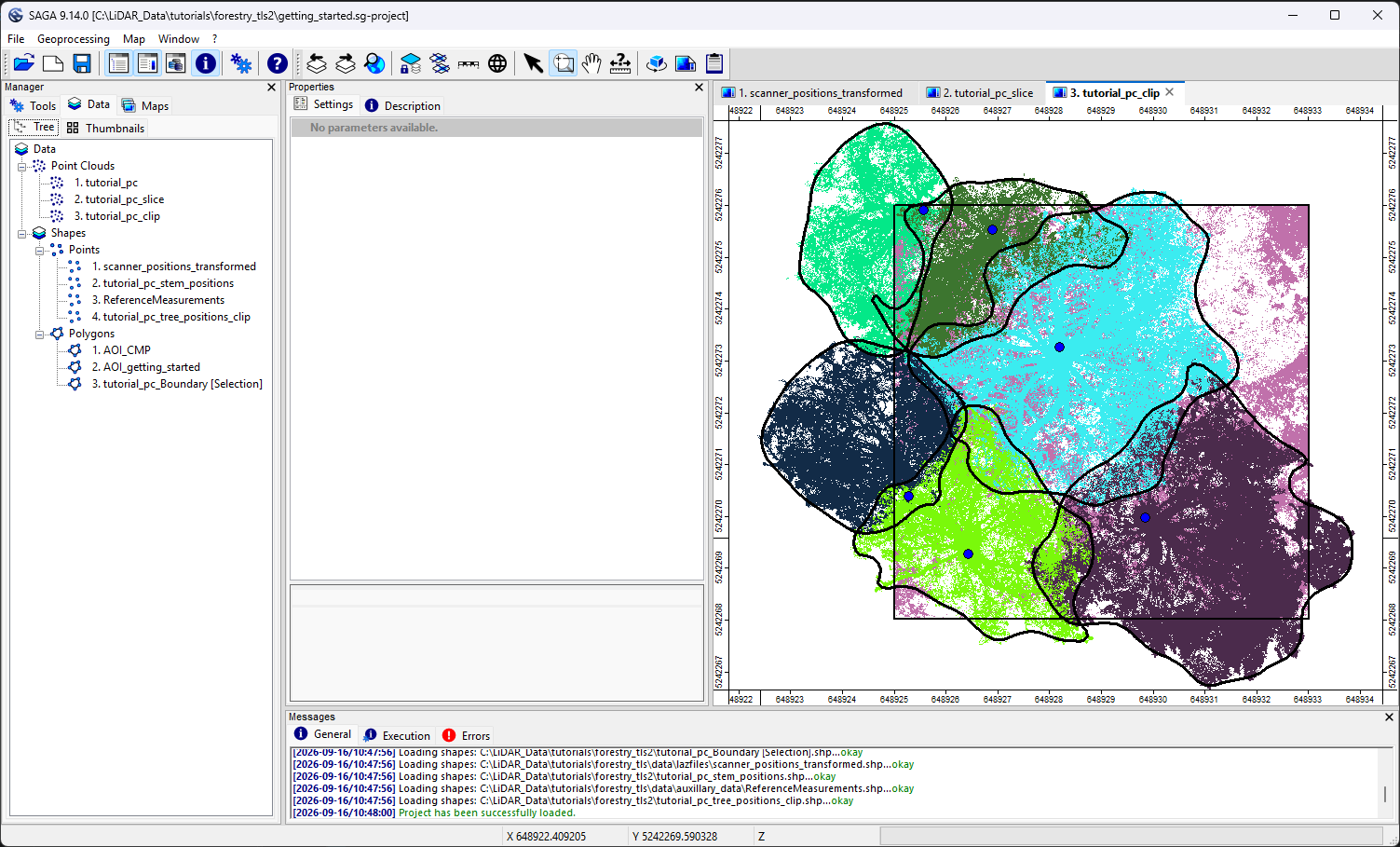
To continue where we left off, we first need to open the LIS Pro 3D project saved in the previous tutorial section.
From the top menu, select File > Project > Open Project and navigate to your saved project file.
Click below to learn about the basic principles of tree structure reconstruction and metric derivation.
Basic Principles
The Tree Shape Metrics tool reconstructs the stem and branching structure of individual trees as a pipe model consisting of connected cylindrical segments. Based on this model, various structural metrics can be derived, including wood volume and branch angles.
The tool offers several processing modes, ranging from fast, coarse-resolution reconstruction to more detailed modes in which the reconstructed pipe model is fine-tuned to the point cloud.
Preprocessing Filters – Minimum Intensity / Maximum Deviation
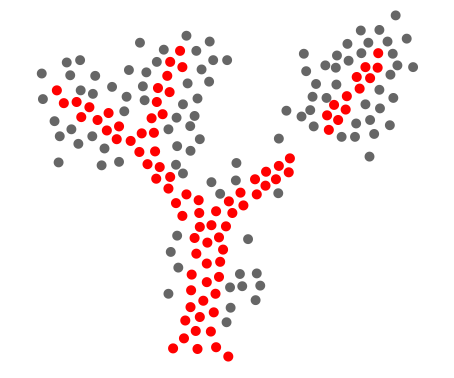
Similar to the stem detection workflow, the Tree Shape Metrics tool focuses on solid surface structures when reconstructing tree architecture. Therefore, it is important to distinguish between solid surfaces (red points) and noisy or porous structures (gray points) before processing.
This separation is controlled by two parameters:
Minimum Intensity(or RIEGLReflectance)Maximum Deviation(if available)
These parameters help identify reliable surface points for reconstructing the woody structure while excluding less reliable observations from the structural analysis.
Intensity Weighting
Intensity weighting allows us to influence the reconstruction of tree architecture by assigning different weights to points according to their intensity values.
The weighting is controlled through the Value Range Normalization parameters:
Lower Intensity ThresholdUpper Intensity Threshold
Lower Threshold
The lower threshold should be equal to or greater than the minimum intensity threshold used during preprocessing.
Points with intensity values at or below this threshold receive a neutral weighting factor of 1.
Upper Threshold
The upper threshold should be set close to the highest intensity values in the point cloud.
Points with intensity values at or above this threshold receive the maximum weighting factor. With the default Scale Factor of 1, this corresponds to a weight of 2.
These points are therefore given a stronger preference when establishing structural connections during reconstruction.
Weight Blending
For intensity values between the lower and upper thresholds, the weighting factor increases linearly from the neutral weight to the maximum weight.
Scale Factor
The Scale Factor controls the strength of the intensity weighting:
1: Weight range from 1 to 22: Weight range from 1 to 33: Weight range from 1 to 4
Higher scale factors increase the influence of high-intensity points during reconstruction.
Purpose and Practical Considerations
Intensity weighting is particularly useful when woody surfaces exhibit higher intensity values than foliage.
By assigning higher weights to these points, the algorithm is encouraged to follow connections along stems and branches rather than taking unrealistic shortcuts through the canopy.
However, the relationship between intensity and material type depends on the sensor, acquisition conditions, and point cloud characteristics. The thresholds should therefore be adjusted to the dataset.
Search Radius
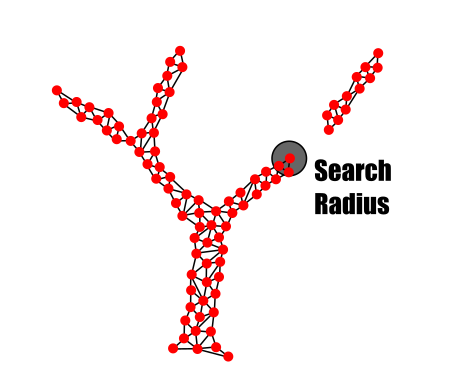
The Search Radius is one of the key parameters controlling the reconstruction of individual tree architecture.
It defines the distance within which neighboring points are considered for local structural connections. This allows the algorithm to identify continuous paths through the point cloud based on its point spacing.
How to Set the Search Radius
The Search Radius should be approximately equal to the typical point-to-point distance in the dataset, including the upper canopy, where point spacing is often larger.
When selecting this value:
- Consider the overall point density of the dataset.
- Account for crown regions with larger point spacing.
- Do not use large gaps caused by occlusion as a basis for the local search radius.
In general:
- Smaller values: Provide more detailed local connections but increase the risk of disconnected structures.
- Larger values: Improve connectivity but increase the risk of connecting unrelated structures or losing fine detail.
Bridge Distance
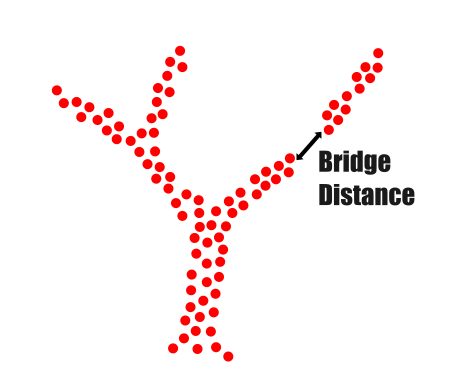
To achieve both detailed and complete tree reconstruction, the Search Radius is combined with the Bridge Distance.
While the Search Radius controls local connectivity, the Bridge Distance allows the algorithm to bridge larger gaps caused by occlusions or incomplete scan coverage.
This helps reconstruct more continuous stem and branching structures, even when some parts of the tree are not fully represented in the point cloud.
The two parameters serve different purposes:
Search Radius: Controls local connectivity and reconstruction detail.Bridge Distance: Allows connections across larger gaps to improve structural completeness.
Choosing the Correct Value
The Bridge Distance should be as small as possible while still compensating for gaps caused by incomplete data capture.
The main challenge is distinguishing between actual gaps separating different structures and artificial gaps caused by occlusion.
- Too small: Branches may remain disconnected, resulting in incomplete reconstructions.
- Too large: Separate structures may be incorrectly connected, reducing reconstruction accuracy.
The appropriate value depends on point cloud completeness, point density, and tree architecture.
Skeleton Resolution (Node Stepping)
The Skeleton Resolution (or Node Stepping) controls the level of detail of the reconstructed tree skeleton.
It determines how finely the stem and branches are subdivided into individual segments during reconstruction. These segments form the basis for calculating structural metrics such as wood volume.
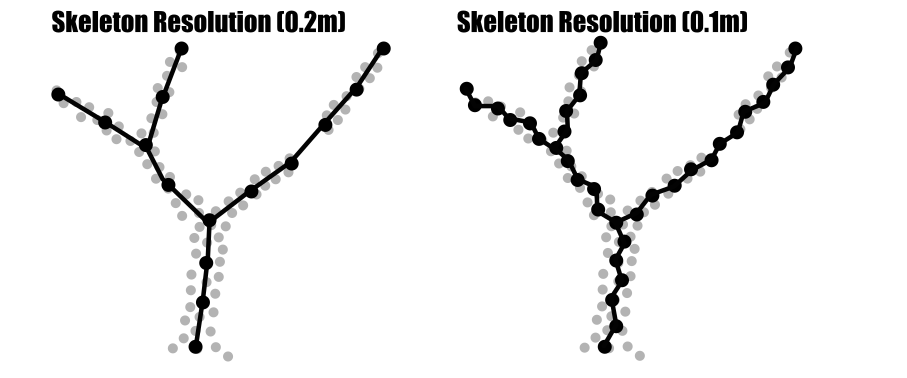
For example, the total wood volume of a tree can be calculated by summing the volumes of its individual cylindrical segments.
In general:
- Smaller values:
- Create more segments along stems and branches.
- Preserve finer geometric detail.
- Allow more detailed metric calculations.
- Increase computational demand.
- Larger values:
- Create fewer segments.
- Produce a smoother, more generalized structure.
- Reduce processing time.
- Provide less geometric detail.
Choosing the Correct Value
The appropriate Skeleton Resolution depends on the intended analysis:
- For detailed structural analysis or fine-scale volume estimation, use smaller values.
- For faster processing or larger inventory datasets, use larger values.
The goal is to balance reconstruction detail, computational efficiency, and the quality of the available point cloud.
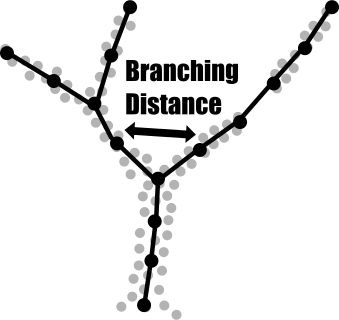
Branching Distance
The Branching Distance controls the minimum separation required for the algorithm to identify distinct structural paths at a branching point.
It influences when a continuous stem or branch is divided into separate paths during reconstruction.
How to Set the Branching Distance
The Branching Distance should be:
- Larger than the typical point-to-point distance to reduce artificial branching caused by sparse or irregular point distributions.
- As small as practical to preserve genuine forks and fine branching structures.
Typical starting values range from 0.05 m to 0.10 m, depending on point density and scan quality.
In general:
- Too small:
- May produce artificial forks in sparsely sampled regions.
- Can result in fragmented or unstable branching structures.
- Too large:
- May fail to detect smaller branches or forks.
- Can lead to an oversimplified tree architecture.
The appropriate value depends on dataset quality and the required level of structural detail.
Model Smoothing
The Tree Shape Metrics tool reconstructs tree architecture directly from the point cloud and is therefore sensitive to measurement noise and irregular point distributions.
An optional model smoothing step can reduce directional noise in the reconstructed skeleton, particularly in areas with uneven point density.
Sigma
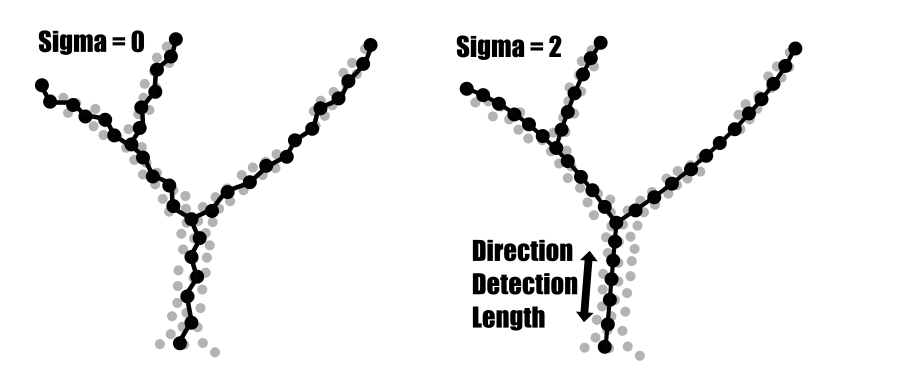
The Sigma parameter controls the strength of the smoothing.
It is a dimensionless parameter with a range from 0 to 4:
0: No smoothing.1–2: Moderate smoothing that generally preserves structural detail.3–4: Stronger smoothing that reduces directional noise but may also remove fine structural details.
The appropriate value depends on the amount of noise and the desired level of geometric detail.
Direction Detection Length
The Direction Detection Length defines the distance used to estimate the local direction of a stem or branch at each skeleton node.
It influences the stability and detail of the reconstructed branch directions:
- Shorter values: Capture local changes in direction but are more sensitive to noise.
- Longer values: Produce more stable direction estimates but may smooth over smaller bends and branching details.
This parameter is particularly relevant during fine adjustment of the reconstructed model.
Tree Shape Metrics 3D – Run the Tool
With our project open, we can now run the Tree Shape Metrics 3D tool for the first time.
As the input point cloud, select the segmented and clipped tutorial_pc_clip dataset and assign the following attributes:
treeid: Identifies the individual tree segments.Intensity(orReflectance): Used for intensity-based filtering.Deviation: Used for additional filtering, if available. Otherwise, leave this field as<not set>.
For the tree positions input, select tutorial_pc_tree_positions_clip, which was generated during the previous tutorial. Assign the corresponding treeid, trunk diameter, and slice height attributes.
For the output datasets, set the following parameters to <create>:
Tree MetricsSkeletonSimplified SkeletonPipe Model
This will create separate output datasets for the derived tree metrics and reconstructed tree structures.
Tool: Tree Shape Metrics 3D
Geoprocessing → LIS Pro 3D → Forestry → Point Cloud // Tools → LIS Pro 3D → Forestry
| Parameter | Setting |
|---|---|
| Data Objects | |
| Point Clouds | |
| >> Point Cloud | tutorial_pc_clip |
| Intensity | Reflectance |
| Deviation | Deviation |
| Tree ID | treeid |
| < Point Cloud | <create> |
| Shapes | |
| >> Tree Positions | tutorial_pc_tree_positions_clip |
| Tree ID | treeid |
| Trunk Diameter | trunk_diameter |
| Slice Height | slice_height |
| > Stem Axes | <not set> |
| << Tree Metrics | <create> |
| Options | |
| Copy Existing Attributes | 🗹 |
| Diameter Factor | 1.5 |
| Attribute Suffix | |
| Intensity and Deviation Processing | |
| Minimum Intensity Value | -10 |
| Maximum Deviation Value | 10 |
| Value Range Normalization | -10;0 |
| Scale Factor | 1 |
| Region Growing | |
| Search Radius | 0.05 |
| Bridge Distance | 0.2 |
| Iterations | 10 |
| Skeletonization | |
| Node Stepping | 0.05 |
| Branching Distance | 0.05 |
| < Skeleton | <create> |
| < Simplified Skeleton | <create> |
| < Pipe Model | <create> |
| < Diameter Rings | <not set> |
| Number of Prism Faces | 12 |
| Minimum Number of Children | 2 |
| Minimum Modelling Diameter | 0.005 |
| Fork Ratio | 90 |
| Minimum Fork Diameter | 0.15 |
| Sigma (Smoothing) | 2 |
| Direction Detection Length | 0.5 |
| DBH Reference Height | 1.3 |
| Branch Radius | pipe model approach |
| Model Fine Adjustment | |
| Adjustment Mode | no adjustment |
| Adjustment - Circle Fitting Parameters | |
| Log Classification | |
| Long Log Classification |
After running the tool, four new shapes layers appear in the Data tab:
tutorial_pc_clip_metrics: A point shapes layer containing aggregated tree-level metrics, such as tree dimensions, crown characteristics, and wood volume, along with the diameter at breast height (DBH).tutorial_pc_clip_skel: A line shapes layer representing the detailed tree skeleton as a graph. Each graph edge represents a section of the tree and contains geometric, topological, and pipe model attributes.tutorial_pc_clip_axes: A simplified representation of the tree skeleton in which graph edges belonging to the same branch are merged into a single feature. Attributes are reported per branch rather than per graph edge.tutorial_pc_clip_pipe: A polygon shapes layer representing the reconstructed pipe model. It contains the same attribute set as the detailed skeleton.
Additionally, a new point cloud dataset called tutorial_pc_clip_metrics is created.
View the Output Datasets
The main output for tree-level analysis is the tutorial_pc_clip_metrics point shapes layer. It contains the aggregated metrics for each individual tree.
Right-click the point shapes layer and select Attributes > Show Table.
The attribute table opens, displaying one record per tree.
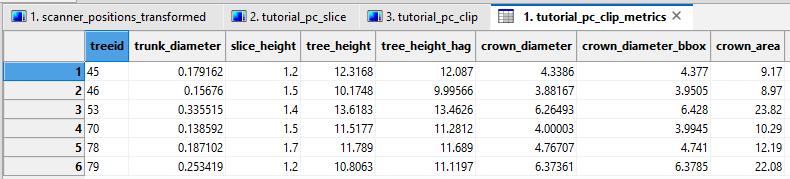
The attribute table of the shapes layer appears and shows one entry per tree.
The attribute table contains the following fields with tree level information.
| Attribute | Description |
|---|---|
treeid |
Unique tree identifier, assigned automatically during processing (or joined from reference dataset). |
trunk_diameter |
Fitted trunk diameter at the specified slice height. |
slice_height |
Height above ground used to estimate trunk diameter. |
tree_height |
Total tree height, measured from the root point to the tree top. |
tree_height_hag |
Tree height above ground, measured from the ground beneath the tree top. |
crown_diameter |
Crown diameter calculated from the longest and shortest crown axes. |
crown_diameter_bbox |
Crown diameter estimated from the crown bounding box. |
crown_area |
Two-dimensional crown footprint area. |
crown_max_rad |
Maximum distance from the trunk to the edge of the crown. |
DBH |
Diameter at breast height (1.3 m above ground or user-defined height). |
CrownBottom |
Height of the lowest first-order branch meeting the minimum child-branch requirement. |
GroundHeight |
Ground elevation at the tree root point. |
MaxHierarchy |
Maximum branching hierarchy detected, representing tree structural complexity. |
WoodVolume |
Total modelled wood volume of the tree. |
WoodVolume0 |
Wood volume of the trunk only (hierarchy level 0). |
WoodVolume1 |
Combined wood volume of the trunk and first-order branches. |
WoodVolume10cm |
Wood volume including branches with diameters >10 cm. |
WoodVolume6cm |
Wood volume including branches with diameters >6 cm. |
WoodVolume4cm |
Wood volume including branches with diameters >4 cm. |
AverageBranchingAngle |
Mean branching angle measured across all branches. |
AverageDifferenceAngle |
Mean angle between each branch and its parent branch. |
NumBranches |
Total number of branches in the tree topology. |
NumFirstOrderBranches |
Number of branches directly connected to the trunk. |
AverageStraightness |
Mean straightness of all branches and the trunk, calculated as Euclidean distance divided by path length. |
AverageStraightnessLeader |
Mean straightness of all leading axes, including the trunk. |
Entropy_Cardinal |
Entropy of branch orientations in the horizontal plane. Higher values indicate a more uniform directional distribution. |
Entropy_Cardinal_Leader |
Entropy of the cardinal orientations of leading axes. |
Contrast_Cardinal |
Contrast of branch orientation distribution. Higher values indicate pronounced directional clustering. |
Contrast_Cardinal_Leader |
Contrast of the orientation distribution of leading axes. |
Average_Insertion_Angle |
Mean branch insertion angle measured at branch junctions. |
Average_Insertion_Angle_Leader |
Mean insertion angle for branches attached to leading axes. |
Average_Insertion_Diameter |
Mean branch diameter at the insertion point. |
Average_Insertion_Diameter_Leader |
Mean insertion diameter for branches attached to leading axes. |
BranchCode_Leader |
Encodes the leading-axis branching topology (e.g., trunk and successive forks). |
Fork |
Indicates whether a major fork was detected. |
ForkX |
X-coordinate of the detected fork. |
ForkY |
Y-coordinate of the detected fork. |
ForkZ |
Z-coordinate of the detected fork. |
ForkAngle |
Angle between the two leading stems at the detected fork. |
SweepClass |
Highest available sweep quality class assigned to the tree based on trunk log geometry. |
View the Pipe Model and Point Cloud
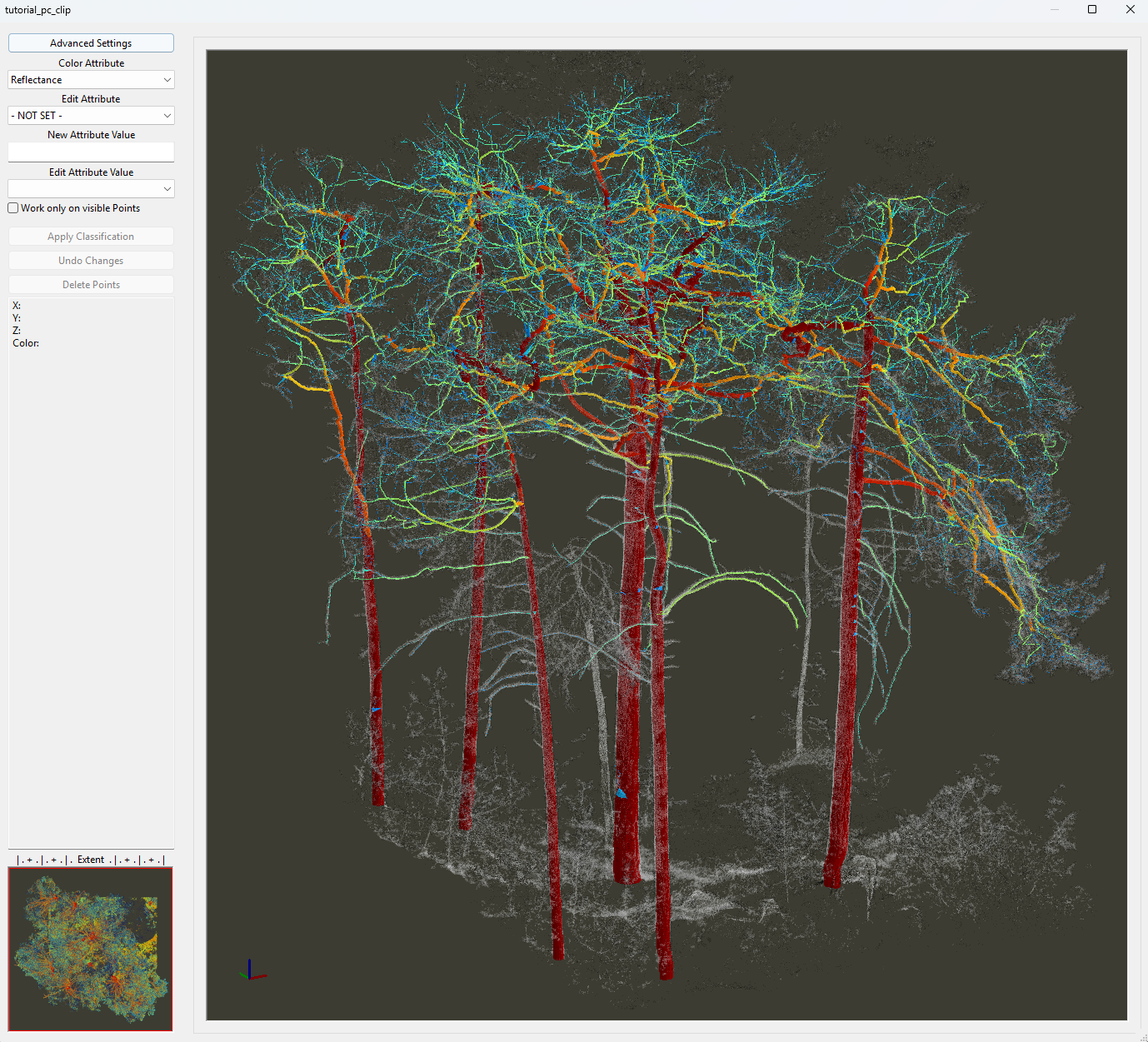
To visually assess the plausibility of the reconstruction results, we can inspect the tutorial_pc_clip_pipe dataset alongside the point cloud.
The pipe model is a polygonal mesh representing the reconstructed stem and branching structure.
The tutorial_pc_clip_pipe dataset is primarily intended for visualization. For detailed structural analysis at the branch level, the tree skeleton (tutorial_pc_clip_skel) and the simplified tree axes (tutorial_pc_clip_axes) are better suited.
The pipe model is a geometric representation derived from the skeleton rather than an independent reconstruction.
Open the datasets in the Point Cloud Editor to inspect the reconstructed tree structure in 3D.
Tool: Point Cloud Editor
Geoprocessing → LIS Pro 3D → Point Cloud Editor // Tools → LIS Pro 3D → Point Cloud Editor
| Parameter | Setting |
|---|---|
| Data Objects | |
| Point Clouds | |
| >> Point Cloud | tutorial_pc_clip |
| Intensity | Reflectance |
| RGB | <not set> |
| Shading | <not set> |
| Classification | grdclass |
| Random | treeid |
| Normal Vector (X) | <not set> |
| Report Attribute 1 | <not set> |
| Report Attribute 2 | <not set> |
| Grids | |
| > Elevation Grids | No objects |
| > Color Grids | No objects |
| Shapes | |
| > Shapes | tutorial_pc_clip_pipe |
| Color | RadiusModel |
| Options | |
| Work on Copy of Point Cloud | ☐ |
| Background Color | #3C3C32 |
| Classification LUT | ASPRS LAS (Formats 6-10) |
| Continue Digitizing | ☐ |

Use the following keyboard shortcuts in the Point Cloud Editor to inspect the reconstruction results:
2: Colorize the point cloud by intensity or reflectance.P: Toggle parallel projection.F12/F11: Adjust the transparency of the point cloud.W: Switch between wireframe and solid rendering of the pipe model.
Click below to learn about the basic principles of pipe model fine adjustment.
Model Fine Adjustment
The fine adjustment function allows us to refine the reconstructed tree structure by fitting branch positions and diameters more closely to the point cloud.
Depending on the objectives of the analysis, different adjustment modes are available, ranging from fast processing without geometric refinement to detailed adjustment of the entire tree structure.
The adjustment procedure attempts to fit a circle to the point cloud at individual nodes of the reconstructed tree skeleton. It follows the same basic principles as the stem diameter detection described in an earlier tutorial.
Adjustment Modes
The tool provides several adjustment modes with different levels of detail:
- No Adjustment (used in the previous section):
- Fastest processing mode.
- Suitable for an initial evaluation of the reconstruction results.
- Recommended for becoming familiar with the dataset and the basic reconstruction parameters.
- Adjustment modes:
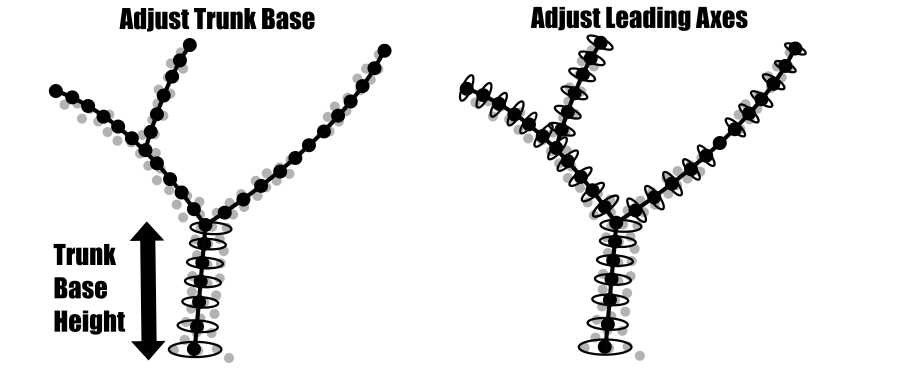
Adjust trunk base: Refits stem diameters below a user-defined trunk base height.Adjust leading axes: Refits diameters along the main structural axes.Adjust leading axes and branch bases: Extends the adjustment to the bases of individual branches.Adjust all axes: Performs geometric refinement across the entire reconstructed tree structure.
Unlike the horizontal slices used for stem detection, the cross-sections for model adjustment are oriented perpendicular to the local branch axis at each skeleton node.
Adjustment Stepping
The Adjustment Stepping parameter defines the interval between nodes at which diameter adjustment is attempted.
1: Attempts an adjustment at every skeleton node (recommended).- Values greater than
1: Perform adjustments at larger node intervals.
If a reliable diameter estimate cannot be obtained at a particular node, the corresponding values are interpolated from neighboring valid measurements.
Circular Cross-Section Mode
The tool provides two methods for estimating branch diameters from point cloud cross-sections.
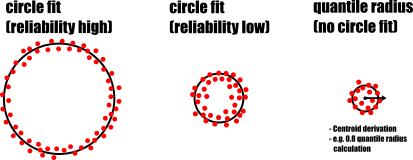
The primary method is circle fitting, which we already introduced in the stem detection tutorial section. This method fits a circle to the points in a cross-section and uses quality control criteria to reject unreliable estimates.
However, as branch diameters decrease, clearly defined circular cross-sections become less common. Small branches may appear as compact clusters of points rather than recognizable circular structures.
For these cases, the tool provides an alternative method called quantile radius.
This method calculates the centroid of the point cluster and determines the distance of each point from that centroid. The branch radius is then estimated as the 0.8 quantile (80th percentile) of these distances.
Both methods can also be combined using circle fitting + quantile radius:
circle fittingis used as the primary diameter estimation method.quantile radiusserves as a fallback when reliable circle fitting is not possible.
Quality Control Parameters
For model adjustment, we can use the same quality control parameters introduced in the stem detection tutorial section:
Search Radius CompactnessMinimum CompactnessCircle Fitting ToleranceCircle CompletenessGoodness of Fit
These parameters help determine whether a fitted diameter is sufficiently reliable to be incorporated into the reconstructed tree model.
Use relatively strict quality control thresholds during model adjustment.
The goal is to introduce new diameter measurements only where the point cloud provides reliable geometric information. In regions where a trustworthy fit is not possible, the model relies on interpolation rather than potentially inaccurate measurements.
Taper Tolerance
The Taper Tolerance parameter provides an additional plausibility check for diameter estimates.
Unlike the initial stem detection, the model adjustment procedure already has information about the tree’s topology. This allows the algorithm to evaluate diameter measurements against the expected taper of the reconstructed stem or branch.
Starting at the tree base and progressing toward the tree top, the parameter defines the maximum permitted increase in diameter relative to the preceding measurement.
For example, with a Taper Tolerance of 20%, a new diameter measurement is accepted only if it is no more than 20% larger than the preceding diameter.
This helps reject implausible diameter estimates while allowing some natural variation in stem and branch shape.
Refine Branch Nodes
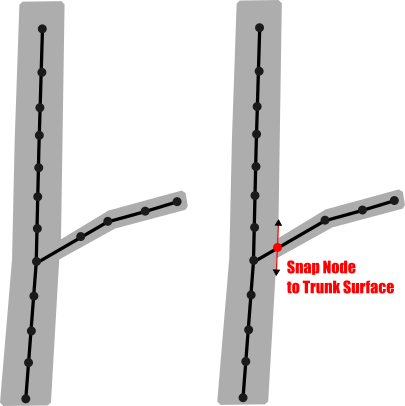
The initial reconstruction represents the tree structure as a skeleton graph. Branching points are therefore located along the medial axes of the connected structures.
For example, a branch originating from the main stem may initially be connected to a node near the center of the trunk rather than at its surface.
If we want to analyze branch insertion angles or the distribution of branches along the stem, enable Refine Branch Nodes.
This option adjusts the branch connection points toward the trunk surface, providing more representative branch insertion positions and angles.
Tree Shape Metrics 3D – Run the Tool with Fine Adjustment
Let’s run the Tree Shape Metrics 3D tool a second time, this time enabling fine adjustment to improve the fit of the reconstructed tree model to the point cloud.
Tool: Tree Shape Metrics 3D
Geoprocessing → LIS Pro 3D → Forestry → Point Cloud // Tools → LIS Pro 3D → Forestry
| Parameter | Setting |
|---|---|
| Data Objects | |
| Point Clouds | |
| >> Point Cloud | tutorial_pc_clip |
| Intensity | Reflectance |
| Deviation | Deviation |
| Tree ID | treeid |
| < Point Cloud | Point Cloud |
| Shapes | |
| >> Tree Positions | tutorial_pc_tree_positions_clip |
| Tree ID | treeid |
| Trunk Diameter | trunk_diameter |
| Slice Height | slice_height |
| > Stem Axes | <not set> |
| << Tree Metrics | Tree Metrics |
| Options | |
| Copy Existing Attributes | 🗹 |
| Diameter Factor | 1.5 |
| Attribute Suffix | |
| Intensity and Deviation Processing | |
| Minimum Intensity Value | -10 |
| Maximum Deviation Value | 10 |
| Value Range Normalization | -10;0 |
| Scale Factor | 1 |
| Region Growing | |
| Search Radius | 0.05 |
| Bridge Distance | 0.2 |
| Iterations | 10 |
| Skeletonization | |
| Node Stepping | 0.05 |
| Branching Distance | 0.05 |
| < Skeleton | Skeleton |
| < Simplified Skeleton | Simplified Skeleton |
| < Pipe Model | Pipe Model |
| < Diameter Rings | <not set> |
| Number of Prism Faces | 12 |
| Minimum Number of Children | 2 |
| Minimum Modelling Diameter | 0.005 |
| Fork Ratio | 90 |
| Minimum Fork Diameter | 0.15 |
| Sigma (Smoothing) | 2 |
| Direction Detection Length | 0.5 |
| DBH Reference Height | 1.3 |
| Branch Radius | pipe model approach |
| Model Fine Adjustment | |
| Adjustment Mode | adjust leading axes and branch bases |
| Adjustment Stepping | 1 |
| Adjustment Start | 1 |
| Trunk Base Height | 1 |
| Cross-Section Mode | circular cross-sections |
| Circular Crosssection Method | circle fitting + quantile radius |
| Refine Branch Nodes | 🗹 |
| Adjustment - Circle Fitting Parameters | |
| Search Radius Compactness | 0.05 |
| Minimum Compactness | 60 |
| Circle Fitting Tolerance | 20 |
| Resolution of Circle Fit | 0.01 |
| Diameter Correction Factor | 1 |
| Goodness of Fit | 95 |
| Circle Completeness | 50 |
| Taper Tolerance | 20 |
| Apply Thinning | 🗹 |
| Log Classification |
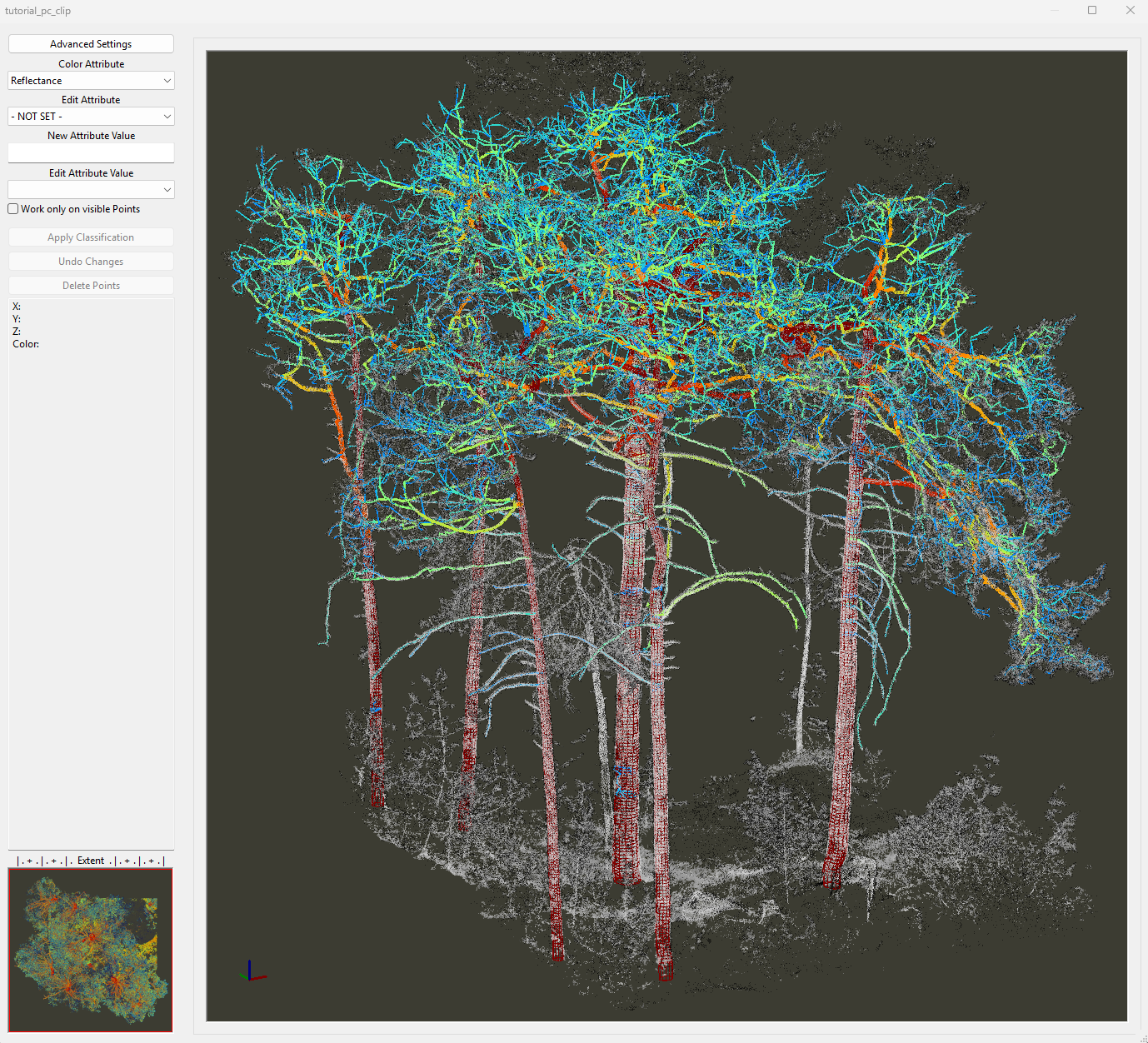
After fine adjustment, the attribute table of the tutorial_pc_clip_metrics point shapes layer is updated. You may notice slight changes in the estimated wood volume and branching metrics compared to the initial reconstruction.
The resulting pipe model should look similar to the following examples:
Aggregate Tree Metrics into a Table
Although the tutorial_pc_clip_metrics point shapes layer already contains the derived tree metrics, we can further organize and aggregate this information into a table.
This table can then be exported as a CSV file for further analysis in other software.
To do this, run the Extract Tree Information 3D tool.
Tool: Extract Tree Information 3D
Geoprocessing → LIS Pro 3D → Forestry → Point Cloud // Tools → LIS Pro 3D → Forestry
| Parameter | Setting |
|---|---|
| Data Objects | |
| Shapes | |
| >> Tree Metrics | tutorial_pc_clip_metrics |
| Tree ID | treeid |
| DBH | DBH |
| Tree Height | tree_height |
| Wood Volume | WoodVolume |
| Crown Diameter | crown_diameter |
| Crown Area | crown_area |
| Crown Bottom Height | CrownBottom |
| Crown Maximum Radius | crown_max_rad |
| >> Branches | tutorial_pc_clip_axes |
| > Stem Axes | <not set> |
| Tables | |
| << Tree Information | <create> |
| << Stem Information | <create> |
| Options | |
| Metadata | |
| Population Name | LISPro3D trials |
| Stratum Name | scots_pine |
| Plot Name | mieming_fair_CMP |
| DBH Height | 1.3 |
| Branch Analysis | |
| Analyze Branches | ☐ |
| Above Ground Biomass | |
| Calculate Biomass | 🗹 |
| Basic Wood Density | 0.44 |
| Tree Crown Information | |
| Add Crown Information | 🗹 |
In the Calculate Biomass section, we use a Basic Wood Density value of 0.44 for Scots pine (Pinus sylvestris).
This value is taken from the Global Wood Density Database v.2 (GWDD v.2):
Fischer, F. J., Chave, J., Zanne, A., Jucker, T., Fajardo, A., Fayolle, A., Ferreira de Lima, R. A., Vieilledent, G., Beeckman, H., Hubau, W., De Mil, T., Wallenus, D., Aldana, A. M., Alvarez-Davila, E., Alves, L., Apgaua, D. M. G., Arcanjo, F., Bastin, J.-F., Bilous, A., … Zieminska, K. (2026). Global Wood Density Database v.2 (GWDD v.2) [Data set]. Zenodo. doi.org/10.5281/zenodo.18262736
After running the tool, two additional table datasets are created:
tutorial_pc_clip_metrics_infotutorial_pc_clip_metrics_stem
We will explore the stem-level information in tutorial_pc_clip_metrics_stem in more detail in the next tutorial section.
Double-click the tutorial_pc_clip_metrics_info dataset to open the resulting table.

The table contains the main tree-level metrics for our six trees:
- Diameter at breast height (DBH)
- Tree height
- Crown diameter
- Crown area
- Crown base height
- Maximum crown radius (measured from the stem)
- Wood volume
- Wood specific gravity (WSG)
- Woody aboveground biomass (AGB)
- Stored CO₂ equivalent (CO₂e)
Save the Data and Project
Save the tutorial_pc_clip_metrics_info table as a .csv file for further analysis.
After inspecting the results, save the following four output datasets to disk:
tutorial_pc_clip_metricstutorial_pc_clip_skeltutorial_pc_clip_axestutorial_pc_clip_pipe
Finally, save the LIS Pro 3D project to preserve the updated datasets and map settings.
Summary
In this tutorial section, we have learned how to:
- Reconstruct the stem and branching structure of individual trees using the
Tree Shape Metrics 3Dtool. - Understand the basic reconstruction parameters and how they influence the resulting tree skeleton and pipe model.
- Perform an initial reconstruction without fine adjustment and inspect the results in 3D.
- Apply model fine adjustment to improve branch diameter estimates and the resulting wood volume calculations.
- Derive and aggregate key tree metrics, including tree dimensions, crown characteristics, wood volume, and aboveground biomass, using the
Extract Tree Information 3Dtool. - Export the aggregated tree metrics as a CSV file for further analysis.
Finally, we saved the reconstructed tree models, structural datasets, and updated LIS Pro 3D project for use in the following section.