In-Depth Single Tree Examples
< Previous section Next section >
Recap
In the previous tutorial section, we detected tree stems, segmented individual trees, and reconstructed their branching structures using the Tree Shape Metrics 3D tool. We applied this workflow to an example dataset containing six trees and derived structural metrics such as wood volume and biomass.
Before extending this workflow to a larger area of interest, we will explore two additional applications of the Tree Shape Metrics 3D tool:
- Stem reconstruction and straightness: We will examine how to improve stem reconstruction when our main interest is stem geometry and straightness, particularly for assessing sawlog quality.
- Irregular stem cross-sections: We will explore how to reconstruct old, solitary trees, such as those found in urban parks, which often have irregular or noncircular stem cross-sections.
These examples will help us understand how to adapt the reconstruction workflow to different tree structures and analysis objectives.
Open a New Project
To get started, we first need to create a new, empty LIS Pro 3D project.
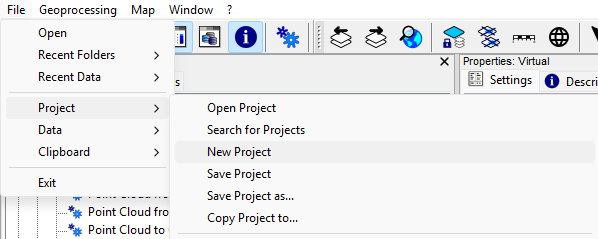
From the top menu, select File > Project > New Project.
Download the Prepared Trees
Download the prepared tree datasets from here.
Download the prepared trees folder as a ZIP archive and extract it into your project folder.
The extracted folder contains two example trees and their corresponding tree position files:
Deciduous Tree – Norway Maple (Acer platanoides)
acer_platanoides.sg-pts-zacer_platanoides_tree_positions.cpgacer_platanoides_tree_positions.dbfacer_platanoides_tree_positions.mshpacer_platanoides_tree_positions.prjacer_platanoides_tree_positions.shpacer_platanoides_tree_positions.shx
Coniferous Tree – Norway Spruce (Picea abies)
picea_abies.sg-pts-zpicea_abies_tree_positions.cpgpicea_abies_tree_positions.dbfpicea_abies_tree_positions.mshppicea_abies_tree_positions.prjpicea_abies_tree_positions.shppicea_abies_tree_positions.shx
Load the Coniferous Tree into the GUI
Load the picea_abies.sg-pts-z point cloud and the picea_abies_tree_positions.shp shapefile into your empty project.
Both datasets are the result of a typical LIS Pro 3D workflow involving data preparation, ground classification, tree trunk and diameter detection, and individual tree segmentation.
As a result, we have a point cloud containing an individual tree segment and a corresponding point shapes layer containing its stem position.
Run Tree Shape Metrics 3D – Basic Mode
Tool: Tree Shape Metrics 3D
Geoprocessing → LIS Pro 3D → Forestry → Point Cloud // Tools → LIS Pro 3D → Forestry
| Parameter | Setting |
|---|---|
| Data Objects | |
| Point Clouds | |
| >> Point Cloud | picea_abies |
| Intensity | reflectance |
| Deviation | deviation |
| Tree ID | treeid |
| < Point Cloud | Point Cloud |
| Shapes | |
| >> Tree Positions | picea_abies_tree_positions |
| Tree ID | treeid |
| Trunk Diameter | trunk_diameter |
| Slice Height | slice_height |
| > Stem Axes | <not set> |
| << Tree Metrics | <create> |
| Options | |
| Copy Existing Attributes | 🗹 |
| Diameter Factor | 1.5 |
| Attribute Suffix | |
| Intensity and Deviation Processing | |
| Minimum Intensity Value | -10 |
| Maximum Deviation Value | 14 |
| Value Range Normalization | -10;0 |
| Scale Factor | 4 |
| Region Growing | |
| Search Radius | 0.05 |
| Bridge Distance | 0.3 |
| Iterations | 10 |
| Skeletonization | |
| Node Stepping | 0.1 |
| Branching Distance | 0.05 |
| < Skeleton | <create> |
| < Simplified Skeleton | <create> |
| < Pipe Model | <create> |
| < Diameter Rings | <not set> |
| Number of Prism Faces | 12 |
| Minimum Number of Children | 10 |
| Minimum Modelling Diameter | 0.02 |
| Fork Ratio | 90 |
| Minimum Fork Diameter | 0.15 |
| Sigma (Smoothing) | 2 |
| Direction Detection Length | 1 |
| DBH Reference Height | 1.3 |
| Branch Radius | pipe model approach |
| Model Fine Adjustment | |
| Adjustment Mode | no adjustment |
| Adjustment - Circle Fitting Parameters | |
| Log Classification |
For this relatively large tree, we use the suggested default parameters of the Tree Shape Metrics 3D tool.
In the previous Scots pine plot tutorial section, we used slightly smaller values for Bridge Distance, Node Stepping, and Minimum Children because the trees were relatively small and we wanted to reconstruct and analyze even the finer branches.
Here, we can use less restrictive settings because we are primarily interested in the main branching structure.
After running the tool, four new shapes layers appear in the Data tab:
picea_abies_metrics: A point shapes layer containing aggregated tree-level metrics, such as tree dimensions, crown characteristics, wood volume, and diameter at breast height (DBH).picea_abies_skel: A line shapes layer representing the detailed tree skeleton as a graph. Each graph edge represents a section of the tree and contains geometric, topological, and pipe model attributes.picea_abies_axes: A simplified representation of the tree skeleton in which graph edges belonging to the same branch are merged into a single feature. Attributes are reported per branch rather than per graph edge.picea_abies_pipe: A polygon shapes layer representing the reconstructed pipe model. It contains the same attribute set as the detailed skeleton.
Additionally, a new point cloud dataset is created with additional attributes compared to the original input point cloud.
Inspect the Results in 3D
Open the input point cloud and the reconstructed pipe model (picea_abies_pipe) in the Point Cloud Editor to inspect the results in 3D.
Tool: Point Cloud Editor
Geoprocessing → LIS Pro 3D → Point Cloud Editor // Tools → LIS Pro 3D → Point Cloud Editor
| Parameter | Setting |
|---|---|
| Data Objects | |
| Point Clouds | |
| >> Point Cloud | picea_abies |
| Intensity | reflectance |
| RGB | <not set> |
| Shading | <not set> |
| Classification | <not set> |
| Random | <not set> |
| Normal Vector (X) | <not set> |
| Report Attribute 1 | <not set> |
| Report Attribute 2 | <not set> |
| Grids | |
| > Elevation Grids | No objects |
| > Color Grids | No objects |
| Shapes | |
| > Shapes | picea_abies_pipe |
| Color | RadiusModel |
| Options | |
| Work on Copy of Point Cloud | ☐ |
| Background Color | #3C3C32 |
| Continue Digitizing | ☐ |
Press P to switch to parallel projection.
Press 2 to colorize the point cloud by Intensity.
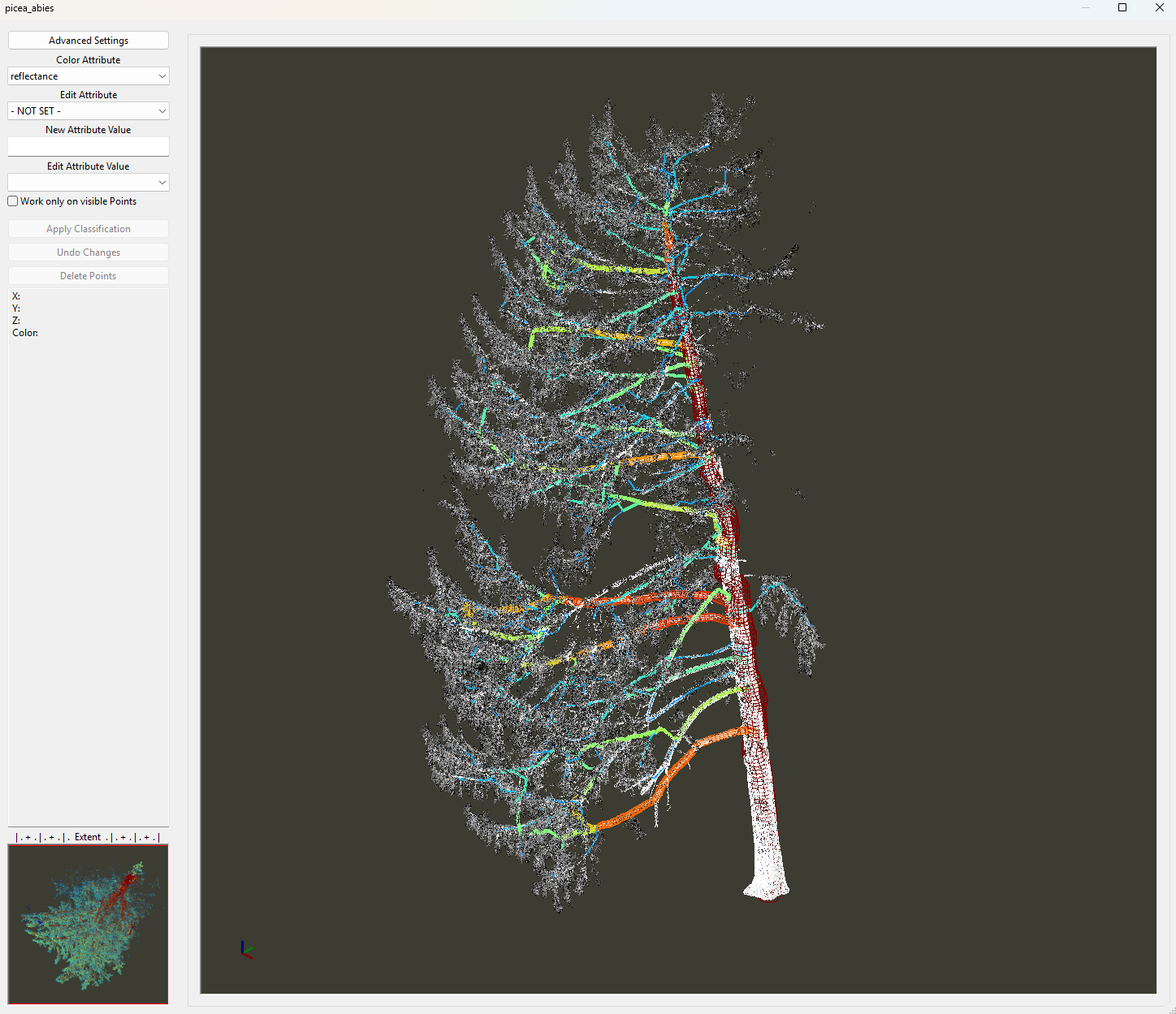
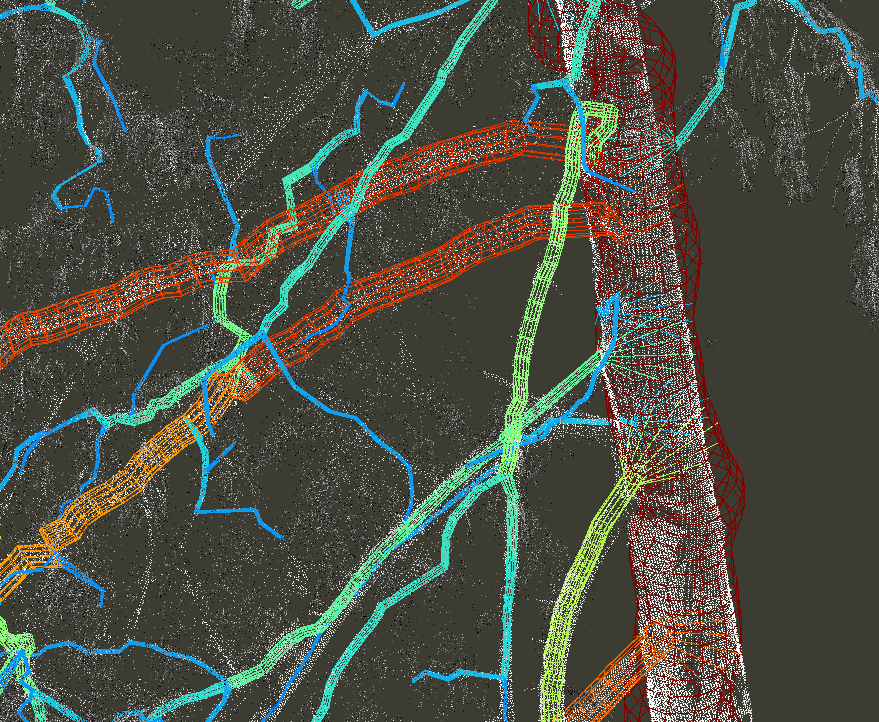
You may notice that the reconstructed trunk geometry is slightly offset from the point cloud and appears somewhat irregular or wavy.
Run Tree Shape Metrics 3D – With Fine Adjustment
To improve the geometric accuracy of the reconstructed trunk, we run the Tree Shape Metrics 3D tool again, this time enabling fine adjustment.
Tool: Tree Shape Metrics 3D
Geoprocessing → LIS Pro 3D → Forestry → Point Cloud // Tools → LIS Pro 3D → Forestry
| Parameter | Setting |
|---|---|
| Data Objects | |
| Point Clouds | |
| >> Point Cloud | picea_abies |
| Intensity | reflectance |
| Deviation | deviation |
| Tree ID | treeid |
| < Point Cloud | Point Cloud |
| Shapes | |
| >> Tree Positions | picea_abies_tree_positions |
| Tree ID | treeid |
| Trunk Diameter | trunk_diameter |
| Slice Height | slice_height |
| > Stem Axes | <not set> |
| << Tree Metrics | Tree Metrics |
| Options | |
| Copy Existing Attributes | 🗹 |
| Diameter Factor | 1.5 |
| Attribute Suffix | |
| Intensity and Deviation Processing | |
| Minimum Intensity Value | -10 |
| Maximum Deviation Value | 14 |
| Value Range Normalization | -10;0 |
| Scale Factor | 4 |
| Region Growing | |
| Search Radius | 0.05 |
| Bridge Distance | 0.3 |
| Iterations | 10 |
| Skeletonization | |
| Node Stepping | 0.1 |
| Branching Distance | 0.05 |
| < Skeleton | Skeleton |
| < Simplified Skeleton | Simplified Skeleton |
| < Pipe Model | Pipe Model |
| < Diameter Rings | <not set> |
| Number of Prism Faces | 12 |
| Minimum Number of Children | 10 |
| Minimum Modelling Diameter | 0.02 |
| Fork Ratio | 90 |
| Minimum Fork Diameter | 0.15 |
| Sigma (Smoothing) | 2 |
| Direction Detection Length | 1 |
| DBH Reference Height | 1.3 |
| Branch Radius | pipe model approach |
| Model Fine Adjustment | |
| Adjustment Mode | adjust leading axes and branch bases |
| Adjustment Stepping | 1 |
| Adjustment Start | 1 |
| Trunk Base Height | 1 |
| Cross-Section Mode | circular cross-sections |
| Circular Crosssection Method | circle fitting + quantile radius |
| Refine Branch Nodes | 🗹 |
| Adjustment - Circle Fitting Parameters | |
| Search Radius Compactness | 0.15 |
| Minimum Compactness | 70 |
| Circle Fitting Tolerance | 6 |
| Resolution of Circle Fit | 0.01 |
| Diameter Correction Factor | 1 |
| Goodness of Fit | 90 |
| Circle Completeness | 40 |
| Taper Tolerance | 20 |
| Apply Thinning | 🗹 |
| Log Classification |
After running the tool, you can see that the reconstructed model is now better aligned with the point cloud.
However, some misalignment may still be visible in the upper crown. This is typical of TLS datasets, where point density often decreases and data gaps become more frequent toward the upper canopy.
To improve reconstruction stability, particularly for monopodial trees with a straight, dominant main stem, we recommend a two-step approach: reconstruct the trunk first, followed by the remaining branching structure.
Click below to learn about the basic principles of trunk reconstruction using Tree Trunk Slicing.
Basic Principles
Tree Trunk Slicing is an optional tool designed primarily for tall trees with relatively straight stems. It allows us to reconstruct the main stem geometry before processing the remaining tree structure.
The basic idea is to derive a pipe model of the trunk alone. For each tree, the tool generates a continuous stem model.
Using the provided treeid attribute, the tool processes each tree segment individually.
For each tree, horizontal slices are extracted at regular intervals from near ground level toward the tree top.
The tool uses many of the same parameters as Tree Trunk and Diameter Detection. However, instead of estimating the stem diameter only at breast height, it attempts to estimate diameters along the entire trunk.
These measurements are then used to reconstruct the trunk’s medial axis and derive a stem taper model.
Parameters
Most parameters are familiar from the Tree Trunk and Diameter Detection tool. Refer to the corresponding tutorial section for more detailed explanations.
Slice Definition
Slice Height Range(e.g., 0.3–20.0 m)Slice SteppingSlice ThicknessSlice Connection Distance
Prefiltering
Minimum Point CountMinimum CompactnessSearch Radius(for compactness calculation)
Quality Control
Points on CircleGoodness of FitCircle CompletenessMinimum Detections
Radius Fine-Tuning
Percentile Radius: Used for robust radius estimation.
Output
The tool generates:
- A series of vertically stacked fitted circles representing trunk cross-sections.
- The reconstructed medial axis of each tree trunk.
- An initial stem pipe model for each tree.
The reconstructed trunk axes can optionally be provided as input to the Tree Shape Metrics 3D tool to improve the stability of the subsequent tree reconstruction.
This is particularly useful for tall trees, where the main stem may be sparsely sampled or completely occluded in the upper canopy. The derived trunk axis provides prior geometric information that can help guide the reconstruction through these regions.
Run Tree Trunk Slicing
Now, we run the Tree Trunk Slicing tool to reconstruct the main stem geometry before refining the remaining branching structure.
Tool: Tree Trunk Slicing
Geoprocessing → LIS Pro 3D → Forestry → Point Cloud // Tools → LIS Pro 3D → Forestry
| Parameter | Setting |
|---|---|
| Data Objects | |
| Point Clouds | |
| >> Point Cloud | picea_abies |
| DZ | dz_grd |
| Tree ID | treeid |
| Intensity | reflectance |
| Deviation | deviation |
| Options | |
| Copy existing Attributes | 🗹 |
| Input Tree Tops (optional) | |
| > Known Tree Top Positions | <not set> |
| Output Stems | |
| << Output Stem Positions | <create> |
| < Point Cloud Slice | <not set> |
| Attribute Suffix | |
| < Stem Axes | <create> |
| < Pipe Model | <create> |
| Stem Detection | |
| Slice Height Range | 1;20 |
| Slice Stepping | 0.2 |
| Connection Distance | 0.2 |
| Slice Thickness | 0.2 |
| Minimum Intensity | -8 |
| Maximum Deviation | 14 |
| Search Radius | 0.1 |
| Minimum Point Count | 30 |
| Minimum Compactness | 70 |
| Stem Diameter Estimation | |
| Stem Diameter Range | 0.1;2 |
| Circle Fitting Tolerance | 20 |
| Filtering | |
| Points on Circle | 0 |
| Goodness of Fit | 95 |
| Circle Completeness | 40 |
| Minimum Detections per Stem | 20 |
| Percentile Radius | 25 |
| Apply Correction Function | ☐ |
The tool analyzes 96 horizontal slices and attempts to estimate the stem diameter and center position at each slice height.
After running the tool, three output datasets are generated:
picea_abies_axes: A line shapes layer representing the reconstructed medial axis of the trunk. Note that this dataset has the same name as the branch axes layer generated earlier byTree Shape Metrics 3D.picea_abies_crosssections: A point shapes layer containing the center positions of the detected stem cross-sections. It also stores quality metrics for each fitted circle, such asCircle CompletenessandGoodness of Fit, at the corresponding slice height.picea_abies_stem_pipes: A polygon shapes layer representing the reconstructed stem-only pipe model, which can be inspected alongside the point cloud.
View the Stem Pipes in 3D
Tool: Point Cloud Editor
Geoprocessing → LIS Pro 3D → Point Cloud Editor // Tools → LIS Pro 3D → Point Cloud Editor
| Parameter | Setting |
|---|---|
| Data Objects | |
| Point Clouds | |
| >> Point Cloud | picea_abies |
| Intensity | reflectance |
| RGB | <not set> |
| Shading | <not set> |
| Classification | <not set> |
| Random | <not set> |
| Normal Vector (X) | <not set> |
| Report Attribute 1 | <not set> |
| Report Attribute 2 | <not set> |
| Grids | |
| > Elevation Grids | No objects |
| > Color Grids | No objects |
| Shapes | |
| > Shapes | picea_abies_stempipes |
| Color | diameter_mean |
| Options | |
| Work on Copy of Point Cloud | ☐ |
| Background Color | #3C3C32 |
| Continue Digitizing | ☐ |
The picea_abies_stem_pipes dataset visualizes the reconstructed trunk axis and the fitted diameters at each slice height as a polygonal mesh.
If the reconstructed trunk axis is sufficiently accurate, we can use the picea_abies_axes dataset, which represents the medial axis as a line shapes layer, to guide the reconstruction of the complete tree structure.
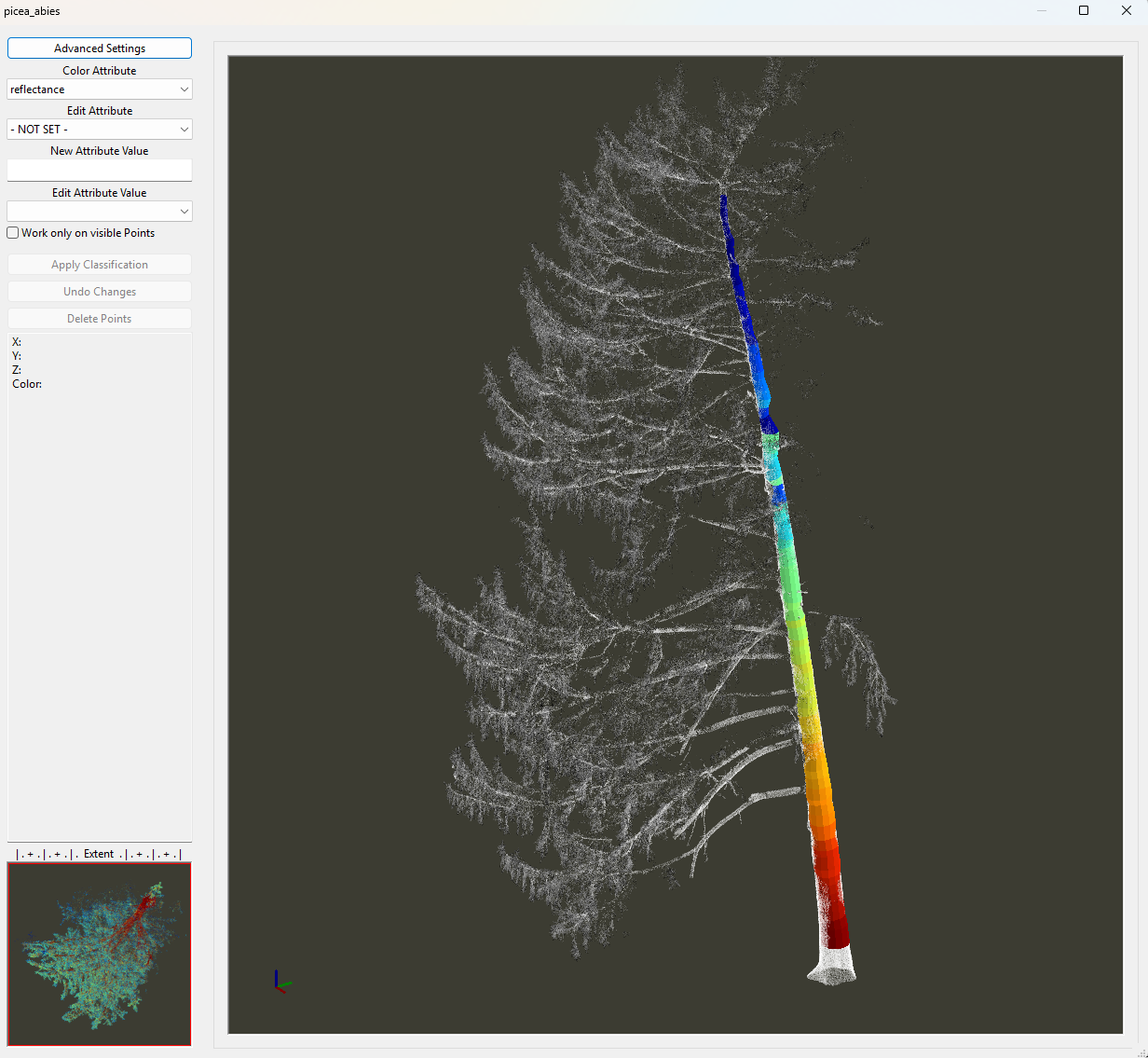
To do this, we run the Tree Shape Metrics 3D tool again and provide the previously generated picea_abies_axes dataset from Tree Trunk Slicing as the trunk axis input.
This allows the algorithm to prioritize the reconstructed main stem when deriving the remaining branching structure.
Run Tree Shape Metrics 3D – With Trunk Axis
Tool: Tree Shape Metrics 3D
Geoprocessing → LIS Pro 3D → Forestry → Point Cloud // Tools → LIS Pro 3D → Forestry
| Parameter | Setting |
|---|---|
| Data Objects | |
| Point Clouds | |
| >> Point Cloud | picea_abies |
| Intensity | reflectance |
| Deviation | deviation |
| Tree ID | treeid |
| < Point Cloud | <create> |
| Shapes | |
| >> Tree Positions | picea_abies_tree_positions |
| Tree ID | treeid |
| Trunk Diameter | trunk_diameter |
| Slice Height | slice_height |
| > Stem Axes | picea_abies_axes |
| Tree ID | treeid |
| Stem Diameter | diameter_mean |
| Average Axis Distance | avg_axis_distance |
| Stem Direction | stem_direction |
| Analysis Length | analysis_length |
| << Tree Metrics | <create> |
| Options | |
| Copy Existing Attributes | 🗹 |
| Diameter Factor | 1.5 |
| Assign Axis | 🗹 |
| Consider Axis Diameter | 🗹 |
| Extend Stem | ☐ |
| Prioritize Stem | 🗹 |
| Attribute Suffix | |
| Intensity and Deviation Processing | |
| Minimum Intensity Value | -10 |
| Maximum Deviation Value | 14 |
| Value Range Normalization | -10;0 |
| Scale Factor | 4 |
| Region Growing | |
| Search Radius | 0.05 |
| Bridge Distance | 0.3 |
| Iterations | 10 |
| Skeletonization | |
| Node Stepping | 0.1 |
| Branching Distance | 0.05 |
| < Skeleton | <create> |
| < Simplified Skeleton | <create> |
| < Pipe Model | <create> |
| < Diameter Rings | <not set> |
| Number of Prism Faces | 12 |
| Minimum Number of Children | 10 |
| Minimum Modelling Diameter | 0.02 |
| Fork Ratio | 90 |
| Minimum Fork Diameter | 0.15 |
| Sigma (Smoothing) | 2 |
| Direction Detection Length | 1 |
| DBH Reference Height | 1.3 |
| Branch Radius | pipe model approach |
| Model Fine Adjustment | |
| Adjustment Mode | adjust leading axes and branch bases |
| Adjustment Stepping | 1 |
| Adjustment Start | 1 |
| Trunk Base Height | 1 |
| Cross-Section Mode | amorphous cross-sections (trunk base) |
| Circular Crosssection Method | circle fitting + quantile radius |
| Refine Branch Nodes | 🗹 |
| Adjustment - Circle Fitting Parameters | |
| Search Radius Compactness | 0.15 |
| Minimum Compactness | 70 |
| Circle Fitting Tolerance | 6 |
| Resolution of Circle Fit | 0.01 |
| Diameter Correction Factor | 1 |
| Goodness of Fit | 90 |
| Circle Completeness | 40 |
| Taper Tolerance | 20 |
| Apply Thinning | 🗹 |
| Log Classification |
The existing reconstruction results are updated after running the tool.
For this run, we set Cross-Section Mode to amorphous cross-sections (trunk base).
This option allows the tool to account for noncircular cross-sections in the lower part of the trunk.
We will explore this option in more detail below.
Let’s inspect the updated reconstruction in the Point Cloud Editor again.
Tool: Point Cloud Editor
Geoprocessing → LIS Pro 3D → Point Cloud Editor // Tools → LIS Pro 3D → Point Cloud Editor
| Parameter | Setting |
|---|---|
| Data Objects | |
| Point Clouds | |
| >> Point Cloud | picea_abies |
| Intensity | reflectance |
| RGB | <not set> |
| Shading | <not set> |
| Classification | <not set> |
| Random | <not set> |
| Normal Vector (X) | <not set> |
| Report Attribute 1 | <not set> |
| Report Attribute 2 | <not set> |
| Grids | |
| > Elevation Grids | No objects |
| > Color Grids | No objects |
| Shapes | |
| > Shapes | picea_abies_pipe |
| Color | RadiusModel |
| Options | |
| Work on Copy of Point Cloud | ☐ |
| Background Color | #3C3C32 |
| Continue Digitizing | ☐ |
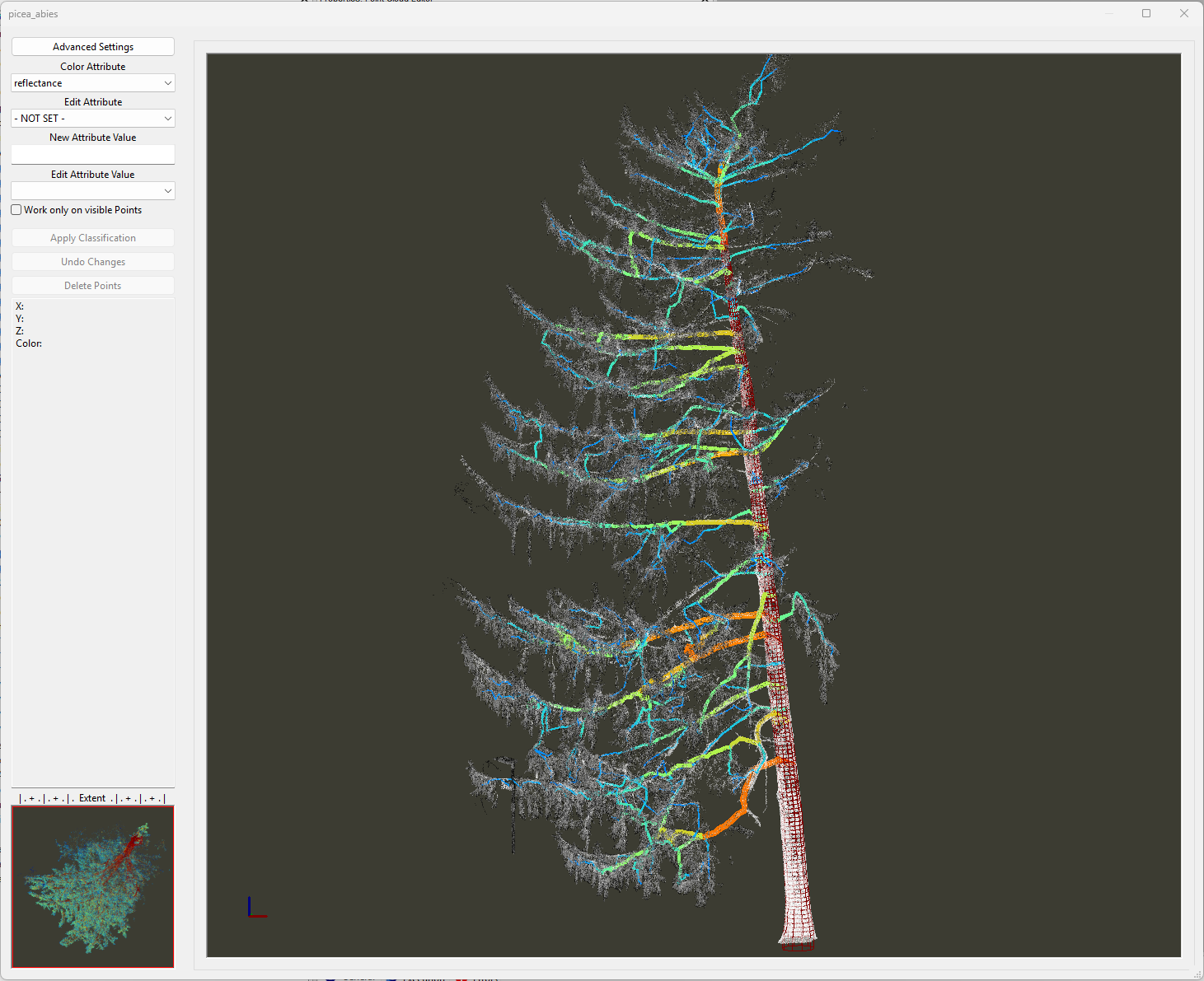
The reconstructed pipe model now follows the observed stem geometry more closely, particularly in areas where the previous reconstruction deviated from the point cloud.
Log Classes
Another output of the Tree Shape Metrics 3D tool is the classification of stem sections into logs based on their length and straightness.
In the Point Cloud Editor, open Advanced Settings. In the 3D Shapes Layer section set the Color Field to SweepClass and Mode Color Range to Minimum/Maximum.
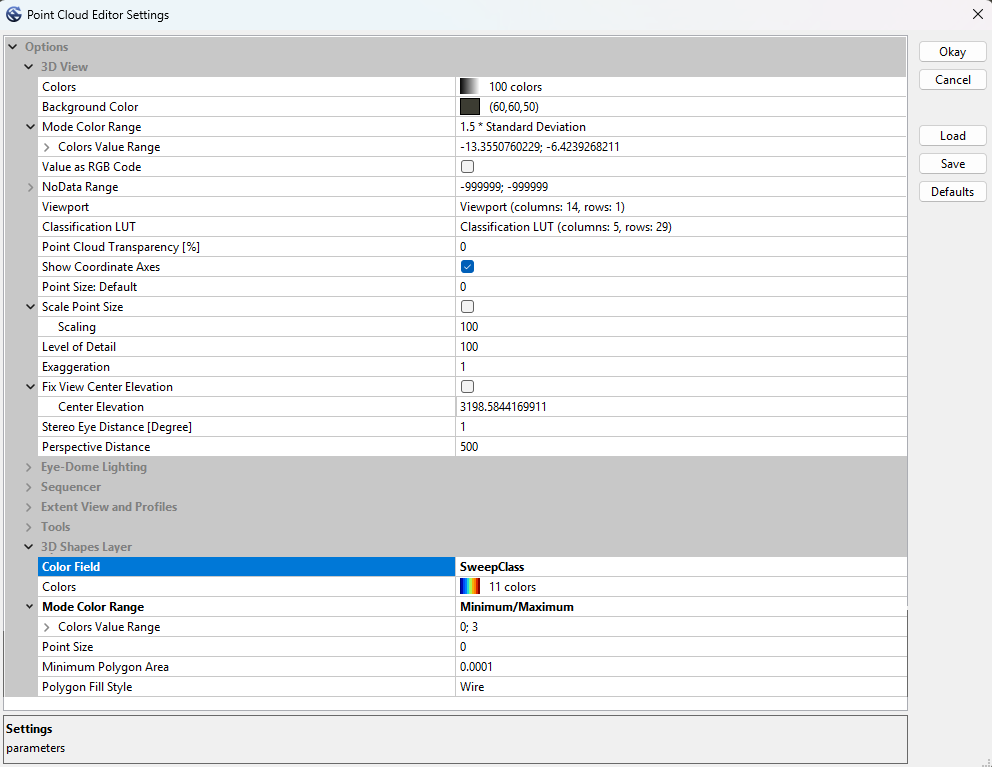
Click Okay to close the dialog.
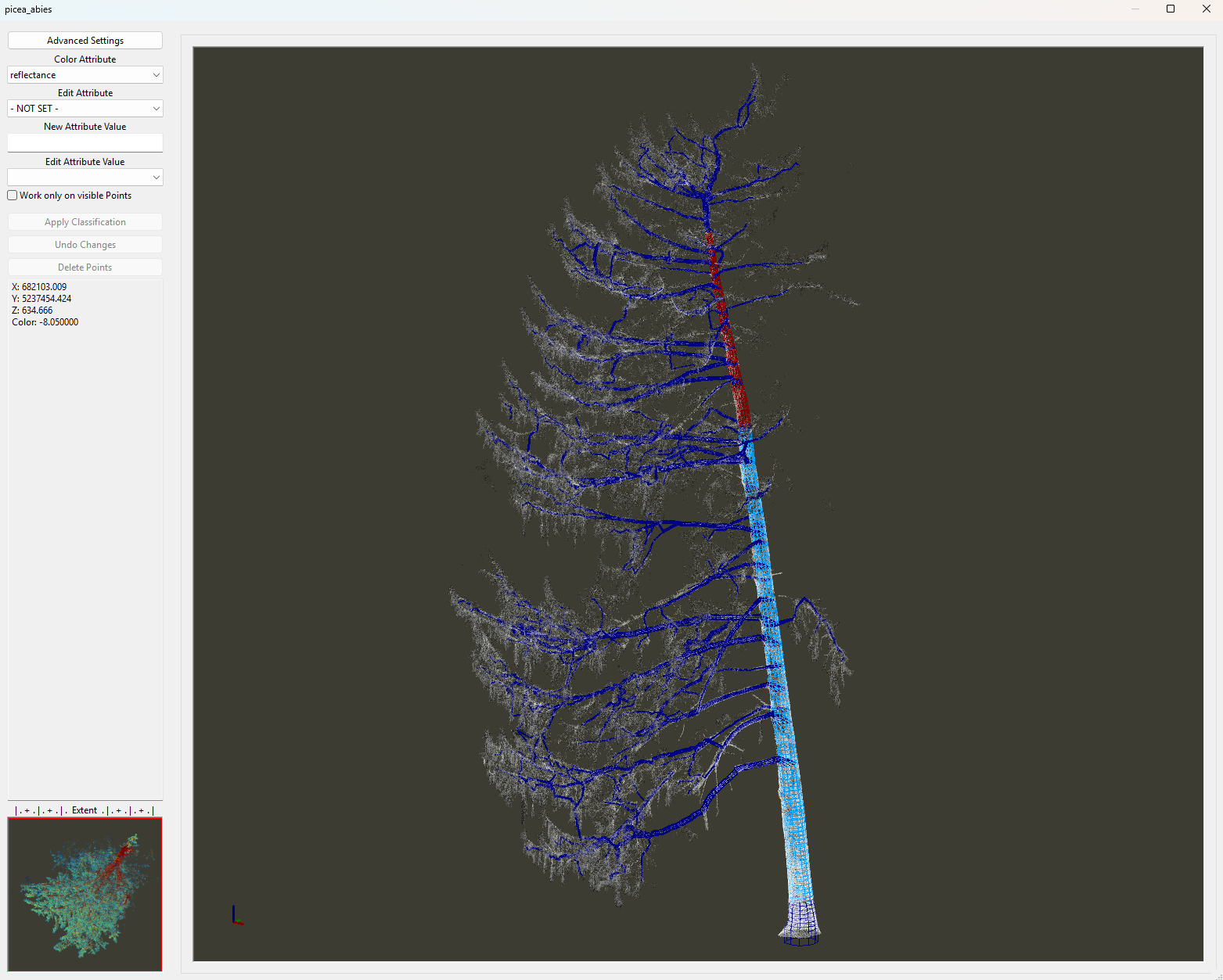
All branches in the reconstructed model are colorized dark blue, indicating a SweepClass value of 0 (no usable log).
The main stem is divided into two log sections, excluding the lowest and uppermost parts of the tree.
Logs are classified by length (long or short) and straightness, resulting in four classes:
- Class 1: Long logs with the best straightness.
- Class 2: Long logs with moderate straightness.
- Class 3: Short logs with good straightness.
- Class 4: Short logs with moderate straightness.
To configure the log classification parameters, expand the Log Classification settings at the bottom of the Tree Shape Metrics 3D parameter interface.
Tool: Tree Shape Metrics 3D
Geoprocessing → LIS Pro 3D → Forestry → Point Cloud // Tools → LIS Pro 3D → Forestry
| Parameter | Setting |
|---|---|
| Log Classification | |
| Long Log Classification | |
| Long Log Length | 6 |
| High-Quality Straightness Tolerance | 8 |
| Moderate-Quality Straightness Tolerance | 5 |
| Short Log Classification | |
| Short Log Length | 4 |
| Moderate-Quality Straightness Tolerance | 5 |
| Acceptable-Quality Straightness Tolerance | 3 |
The goal is to identify logs with target lengths of 6 m (long logs) and 4 m (short logs), with long logs preferred over short logs.
Log straightness is evaluated relative to the smaller end diameter (SED), measured at the upper end of the respective log.
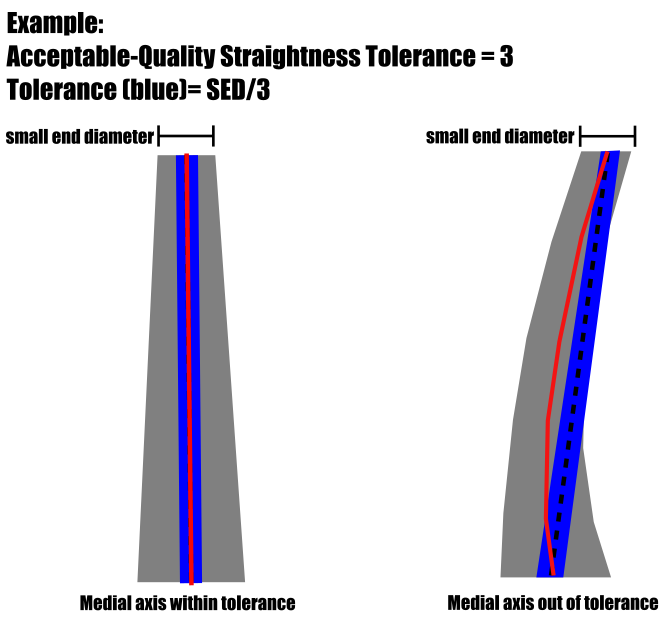
For example, an Acceptable-Quality Straightness Tolerance of 3 defines the maximum allowable sweep for an acceptable-quality short log.
The sweep limit is calculated by dividing the smaller end diameter (SED, in meters) by the specified tolerance value. In this example, the maximum allowable sweep is SED / 3. A log qualifies as acceptable-quality if its maximum deviation from a straight line is below this threshold. The same principle applies to the other log classes, using their respective tolerance settings.
For an SED of 9 cm, the trunk’s medial axis may deviate from a straight line by no more than 3 cm.
The algorithm attempts to identify the longest suitable log section. In this example, it identifies a continuous 12 m section that meets the high-quality straightness criterion, potentially allowing two 6 m logs to be obtained from it.
Rerun Tree Shape Metrics 3D with Different Log Classes
Let’s run Tree Shape Metrics 3D again, this time slightly adjusting the two target log lengths in the Log Classification settings.
Tool: Tree Shape Metrics 3D
Geoprocessing → LIS Pro 3D → Forestry → Point Cloud // Tools → LIS Pro 3D → Forestry
| Parameter | Setting |
|---|---|
| Log Classification | |
| Long Log Classification | |
| Long Log Length | 8 |
| High-Quality Straightness Tolerance | 8 |
| Moderate-Quality Straightness Tolerance | 5 |
| Short Log Classification | |
| Short Log Length | 2 |
| Moderate-Quality Straightness Tolerance | 5 |
| Acceptable-Quality Straightness Tolerance | 3 |
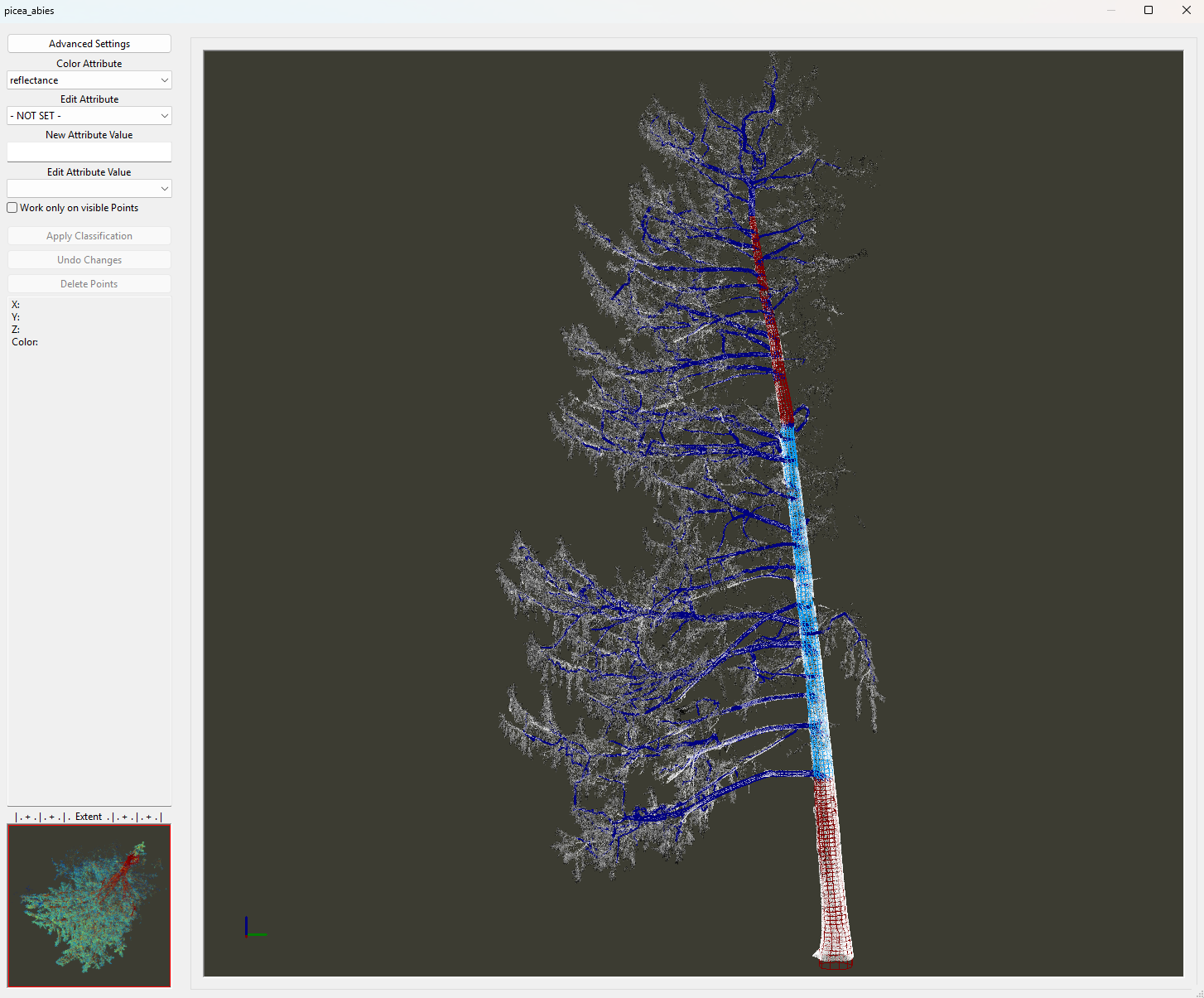
The updated classification identifies one 8 m log and two additional logs, each longer than 2 m.
Get Tree and Stem Info
Let’s create tabular data from the information we have derived for the tree.
Tool: Extract Tree Information 3D
Geoprocessing → LIS Pro 3D → Forestry → Point Cloud // Tools → LIS Pro 3D → Forestry
| Parameter | Setting |
|---|---|
| Data Objects | |
| Shapes | |
| >> Tree Metrics | picea_abies_metrics |
| Tree ID | treeid |
| DBH | DBH |
| Tree Height | tree_height |
| Wood Volume | <not set> |
| >> Branches | picea_abies_axes |
| > Stem Axes | picea_abies_axes |
| Tree ID | treeid |
| Straightness | straightness |
| Tables | |
| << Tree Information | <create> |
| << Stem Information | <create> |
| < Branches Information | <create> |
| Options | |
| Metadata | |
| Population Name | LISPro3D trials |
| Stratum Name | picea abies |
| Plot Name | Rapoldi Park |
| DBH Height | 1.3 |
| Branch Analysis | |
| Analyze Branches | 🗹 |
| Define Height Range | 🗹 |
| Height Range | 0;20 |
| Above Ground Biomass | |
| Calculate Biomass | 🗹 |
| Basic Wood Density | 0.38 |
| Tree Crown Information | |
| Add Crown Information | ☐ |
We recommend using the Global Wood Density Database to estimate biomass from the total wood volume using species-specific wood density values.
Fischer, F. J., Chave, J., Zanne, A., Jucker, T., Fajardo, A., Fayolle, A., Ferreira de Lima, R. A., Vieilledent, G., Beeckman, H., Hubau, W., De Mil, T., Wallenus, D., Aldana, A. M., Alvarez-Davila, E., Alves, L., Apgaua, D. M. G., Arcanjo, F., Bastin, J.-F., Bilous, A., … Zieminska, K. (2026): Global Wood Density Database v.2 (GWDD v.2) [Data set]. Zenodo. https://doi.org/10.5281/zenodo.18262736
As a result, we obtain three tables:
picea_abies_metrics_infopicea_abies_metrics_stempicea_abies_metrics_branches
Tree Information
The picea_abies_metrics_info dataset contains basic tree information, such as DBH and tree height, together with derived metrics such as total wood volume, aboveground biomass, and estimated stored CO₂ per tree.

Stem Description
Based on the log classification, the picea_abies_metrics_stem table describes the stem as a series of vertical sections.
Starting at ground level (Position = 0), the table reports the start and end positions of the detected stem sections. For each position, the corresponding stem diameter is provided at the specified height above ground.
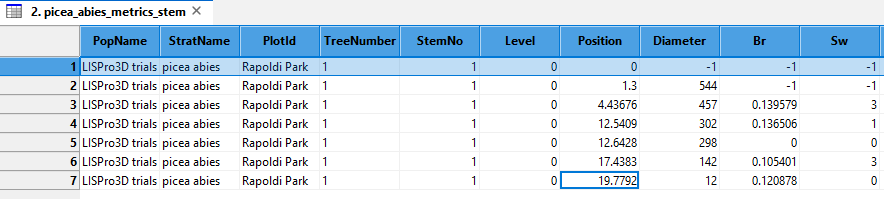
An additional position is included at breast height (1.3 m by default, depending on the user-defined breast height), where the derived DBH is reported.
In this example, the following stem sections are identified:
| No. | Height above ground |
|---|---|
| 1 | 0–4.44 m |
| 2 | 4.44–12.54 m |
| 3 | 12.54–12.64 m |
| 4 | 12.64–17.54 m |
| 5 | 17.54–19.78 m |
For each section, the table also provides information about the maximum detected branch diameter (Br) and sweep class (Sw).
These attributes can help identify trees with fewer or smaller branches and straighter stems, which may be useful when assessing potential sawlog quality.
| No. | Branch diameter (Br) [m] |
Sweep class (Sw) |
|---|---|---|
| 1 | 0.14 | Moderate-quality short log |
| 2 | 0.14 | High-quality long log |
| 3 | 0.00 | No log |
| 4 | 0.10 | Moderate-quality short log |
| 5 | 0.12 | No log |
If a tree has multiple leading axes, for example due to a fork, all detected leading axes are included in the stem description table.
Branch Description
Finally, the picea_abies_metrics_branches table provides information about the individual branches along the tree stem.
Branches are sorted by insertion height and reported together with their insertion angles (relative to the stem axis) and cardinal angles (branch direction relative to north).
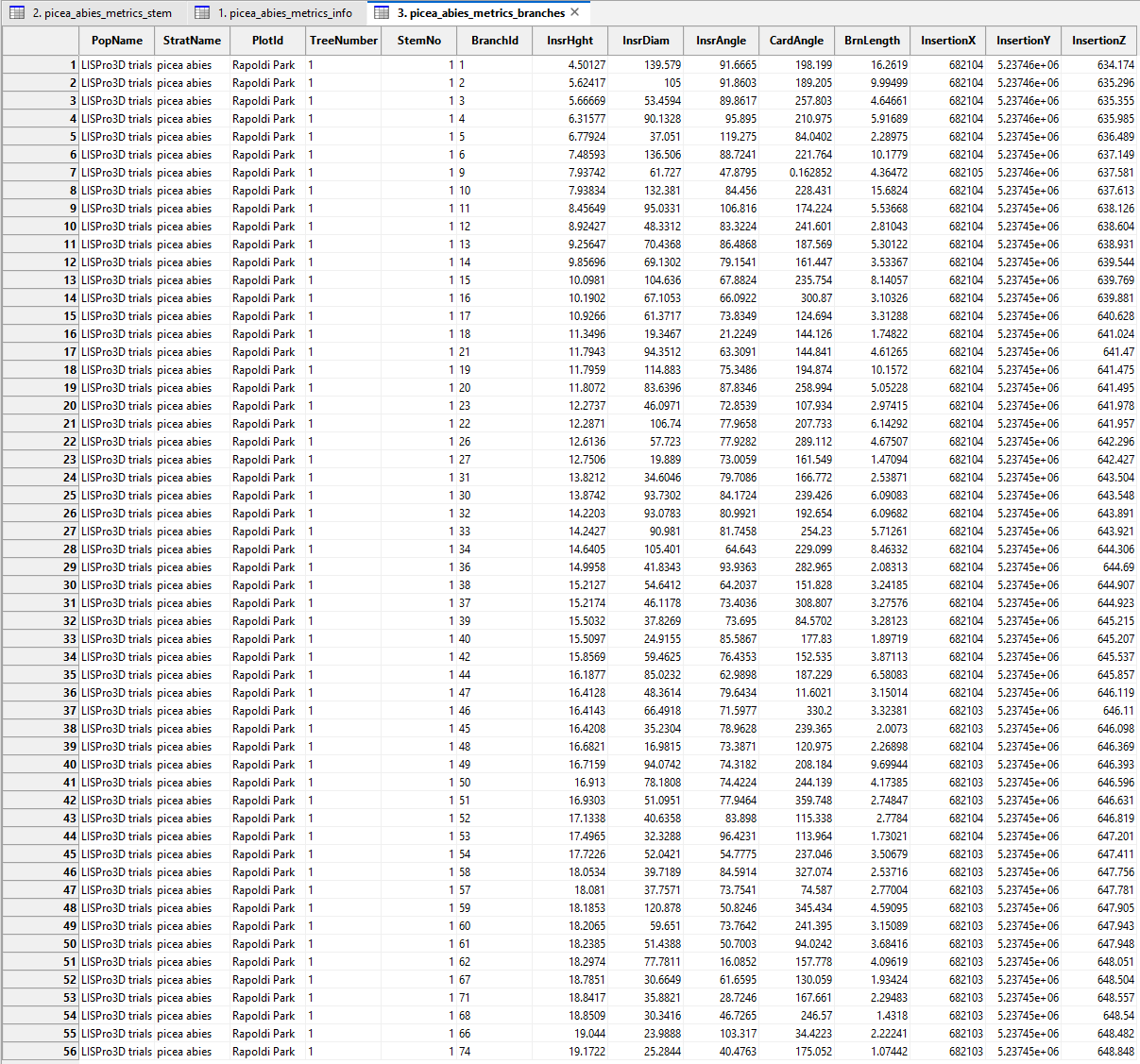
Reconstructing a Solitary Park Tree
So far, we have focused on reconstructing the geometry of a conifer with a relatively straight, dominant main stem. However, older deciduous trees often have much more complex structures, including broad crowns, large spreading branches, and irregular trunk shapes.
In this final example, we will explore how Tree Shape Metrics 3D handles these challenges using a solitary Norway maple (Acer platanoides) growing in a park. We will pay particular attention to the reconstruction of noncircular trunk cross-sections and the branching structure.
Open an Empty Project
To conclude our detailed exploration of the Tree Shape Metrics 3D tool, we will start with a new, empty project.
Select File > Project > New Project.
Load Deciduous Tree into GUI
In the prepared trees folder, you will find the following datasets for the Norway maple:
Deciduous Tree
acer_platanoides.sg-pts-zacer_platanoides_tree_positions.cpgacer_platanoides_tree_positions.dbfacer_platanoides_tree_positions.mshpacer_platanoides_tree_positions.prjacer_platanoides_tree_positions.shpacer_platanoides_tree_positions.shx
Load acer_platanoides.sg-pts-z and acer_platanoides_tree_positions.shp into the empty project.
The point cloud represents a solitary park tree with a broad, irregular crown and a complex branching structure.
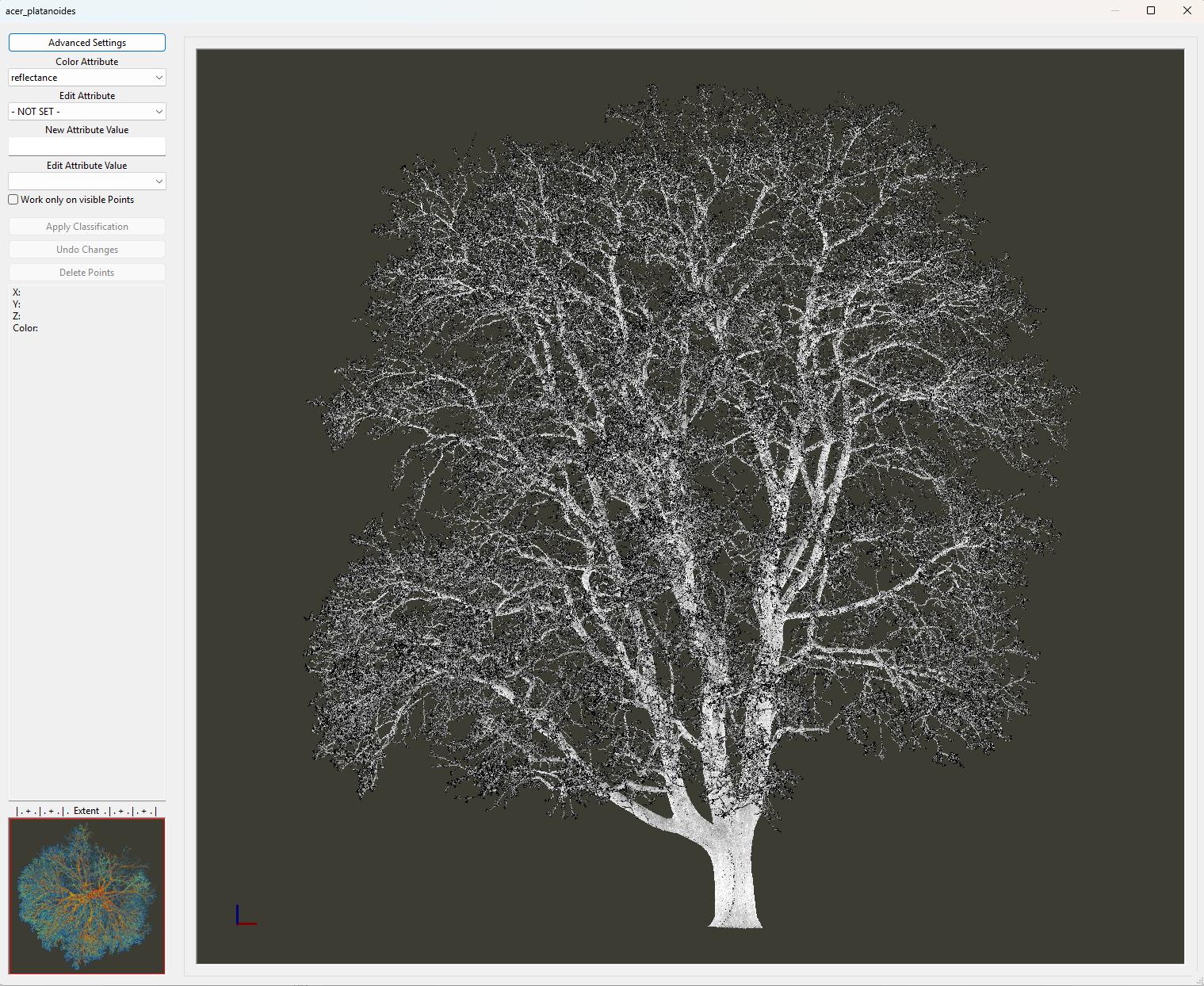
Run Tree Shape Metrics 3D Tool (with Fine Adjustment)
Tool: Tree Shape Metrics 3D
Geoprocessing → LIS Pro 3D → Forestry → Point Cloud // Tools → LIS Pro 3D → Forestry
| Parameter | Setting |
|---|---|
| Data Objects | |
| Point Clouds | |
| >> Point Cloud | acer_platanoides |
| Intensity | reflectance |
| Deviation | deviation |
| Tree ID | treeid |
| < Point Cloud | Point Cloud |
| Shapes | |
| >> Tree Positions | acer_platanoides_tree_positions |
| Tree ID | treeid |
| Trunk Diameter | trunk_diameter |
| Slice Height | slice_height |
| > Stem Axes | <not set> |
| << Tree Metrics | <create> |
| Options | |
| Copy Existing Attributes | 🗹 |
| Diameter Factor | 1.5 |
| Attribute Suffix | |
| Intensity and Deviation Processing | |
| Minimum Intensity Value | -8 |
| Maximum Deviation Value | 14 |
| Value Range Normalization | -8;0 |
| Scale Factor | 4 |
| Region Growing | |
| Search Radius | 0.05 |
| Bridge Distance | 0.3 |
| Iterations | 10 |
| Skeletonization | |
| Node Stepping | 0.1 |
| Branching Distance | 0.05 |
| < Skeleton | <create> |
| < Simplified Skeleton | <create> |
| < Pipe Model | <create> |
| < Diameter Rings | <create> |
| Number of Prism Faces | 12 |
| Minimum Number of Children | 10 |
| Minimum Modelling Diameter | 0.02 |
| Fork Ratio | 60 |
| Minimum Fork Diameter | 0.15 |
| Sigma (Smoothing) | 2 |
| Direction Detection Length | 1 |
| DBH Reference Height | 1.3 |
| Branch Radius | pipe model approach |
| Model Fine Adjustment | |
| Adjustment Mode | adjust leading axes (trunk, main forks) |
| Adjustment Stepping | 1 |
| Adjustment Start | 2 |
| Trunk Base Height | 3 |
| Cross-Section Mode | circular cross-sections |
| Circular Crosssection Method | circle fitting |
| Refine Branch Nodes | 🗹 |
| Adjustment - Circle Fitting Parameters | |
| Search Radius Compactness | 0.15 |
| Minimum Compactness | 70 |
| Circle Fitting Tolerance | 12.5 |
| Resolution of Circle Fit | 0.01 |
| Diameter Correction Factor | 1 |
| Goodness of Fit | 90 |
| Circle Completeness | 60 |
| Taper Tolerance | 20 |
| Apply Thinning | 🗹 |
| Log Classification |
The park tree has an impressive architecture and a large trunk diameter at its base. Its trunk geometry is particularly complex, with highly irregular, noncircular cross-sections near the base and around the main fork.
Representing such a large tree using only circular cross-sections can oversimplify its geometry and may lead to inaccurate reconstruction results.
As you can see, the reconstructed branch axes do not align particularly well with the point cloud, especially around the main fork.
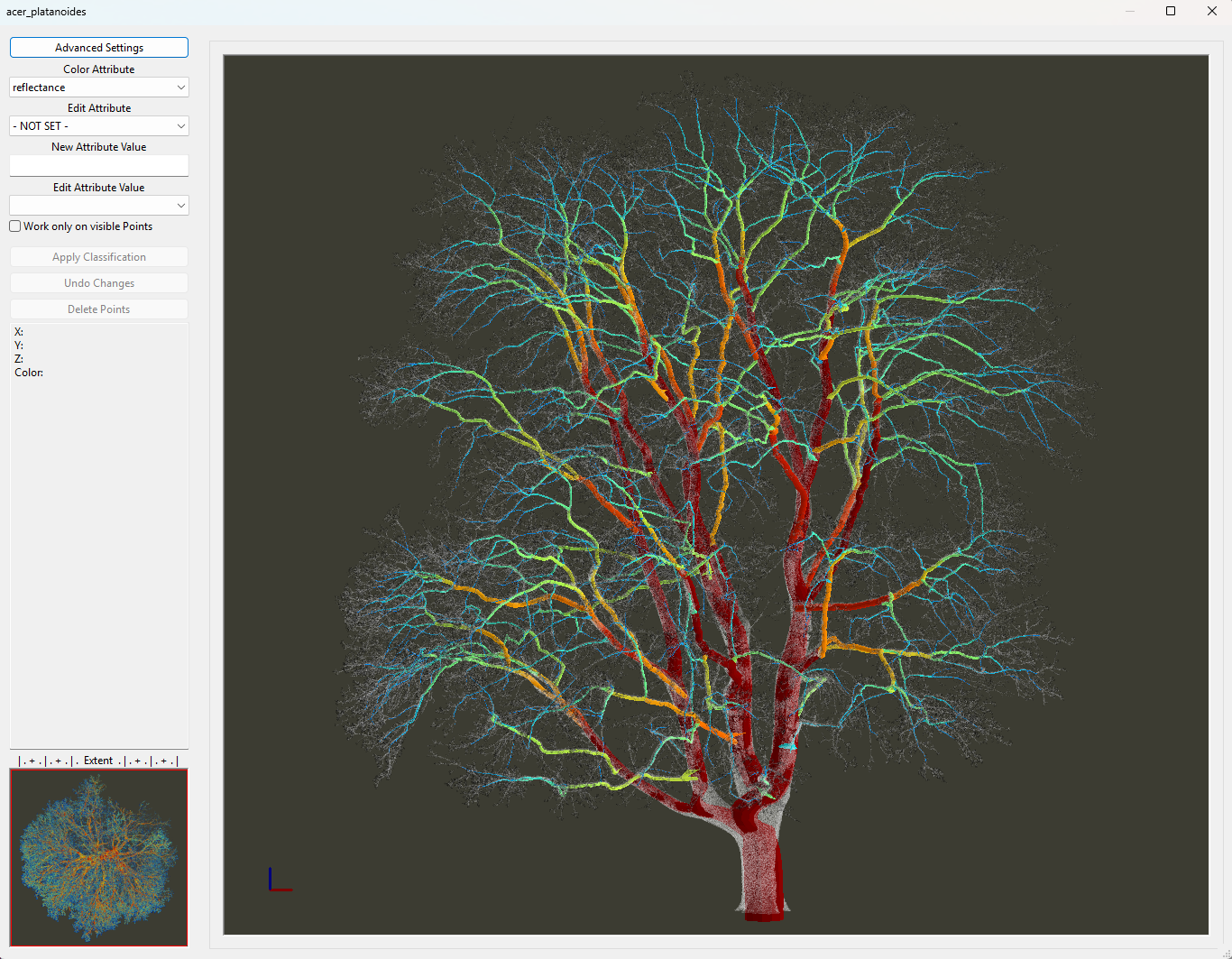
To improve the fit, we can use an approach based on amorphous cross-sections, allowing the reconstructed model to better represent the irregular geometry observed in the point cloud.
Tree stems may deviate considerably from circular cross-sections, particularly near the trunk base due to root flaring and buttressing, and around major forks, where large branch junctions create complex and irregular geometries.
Basic Principle
In these cases, Tree Shape Metrics 3D allows us to use amorphous cross-section modeling, either at the trunk base (below a specified reference height) or along the main axes of the tree.
Instead of representing the tree using circular cross-sections, the tool uses polygonal cross-sections defined by a set of vertices.
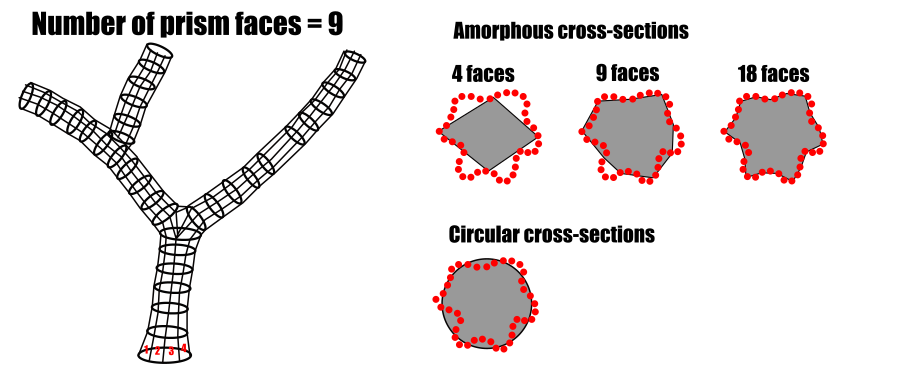
As a result, the reconstructed axes are represented by prism-like shapes rather than cylinders. The number of prism faces plays an important role in determining how accurately the model captures the actual stem geometry.
Number of Prism Faces
The following illustration shows an irregular cross-section represented by red points.
A circular cross-section provides a poor fit to the observed geometry. Similarly, amorphous cross-sections with too few prism faces (4 or 9) cannot adequately represent the irregular shape.
Increasing the number of prism faces to 18 produces a much better fit in this example.
Run Tree Shape Metrics 3D with Amorphous Trunk Base
Tool: Tree Shape Metrics 3D
Geoprocessing → LIS Pro 3D → Forestry → Point Cloud // Tools → LIS Pro 3D → Forestry
| Parameter | Setting |
|---|---|
| Data Objects | |
| Point Clouds | |
| >> Point Cloud | acer_platanoides |
| Intensity | reflectance |
| Deviation | deviation |
| Tree ID | treeid |
| < Point Cloud | Point Cloud |
| Shapes | |
| >> Tree Positions | acer_platanoides_tree_positions |
| Tree ID | treeid |
| Trunk Diameter | trunk_diameter |
| Slice Height | slice_height |
| > Stem Axes | <not set> |
| << Tree Metrics | Tree Metrics |
| Options | |
| Copy Existing Attributes | 🗹 |
| Diameter Factor | 1.5 |
| Attribute Suffix | |
| Intensity and Deviation Processing | |
| Minimum Intensity Value | -8 |
| Maximum Deviation Value | 14 |
| Value Range Normalization | -8;0 |
| Scale Factor | 4 |
| Region Growing | |
| Search Radius | 0.05 |
| Bridge Distance | 0.3 |
| Iterations | 10 |
| Skeletonization | |
| Node Stepping | 0.1 |
| Branching Distance | 0.05 |
| < Skeleton | Skeleton |
| < Simplified Skeleton | Simplified Skeleton |
| < Pipe Model | Pipe Model |
| < Diameter Rings | Diameter Rings |
| Number of Prism Faces | 12 |
| Minimum Number of Children | 10 |
| Minimum Modelling Diameter | 0.02 |
| Fork Ratio | 60 |
| Minimum Fork Diameter | 0.15 |
| Sigma (Smoothing) | 2 |
| Direction Detection Length | 1 |
| DBH Reference Height | 1.3 |
| Branch Radius | pipe model approach |
| Model Fine Adjustment | |
| Adjustment Mode | adjust leading axes (trunk, main forks) |
| Adjustment Stepping | 1 |
| Adjustment Start | 2 |
| Trunk Base Height | 3 |
| Cross-Section Mode | amorphous cross-sections (trunk base) |
| Circular Crosssection Method | circle fitting |
| Refine Branch Nodes | 🗹 |
| Adjustment - Circle Fitting Parameters | |
| Search Radius Compactness | 0.15 |
| Minimum Compactness | 70 |
| Circle Fitting Tolerance | 12.5 |
| Resolution of Circle Fit | 0.01 |
| Diameter Correction Factor | 1 |
| Goodness of Fit | 90 |
| Circle Completeness | 60 |
| Taper Tolerance | 20 |
| Apply Thinning | 🗹 |
| Log Classification |
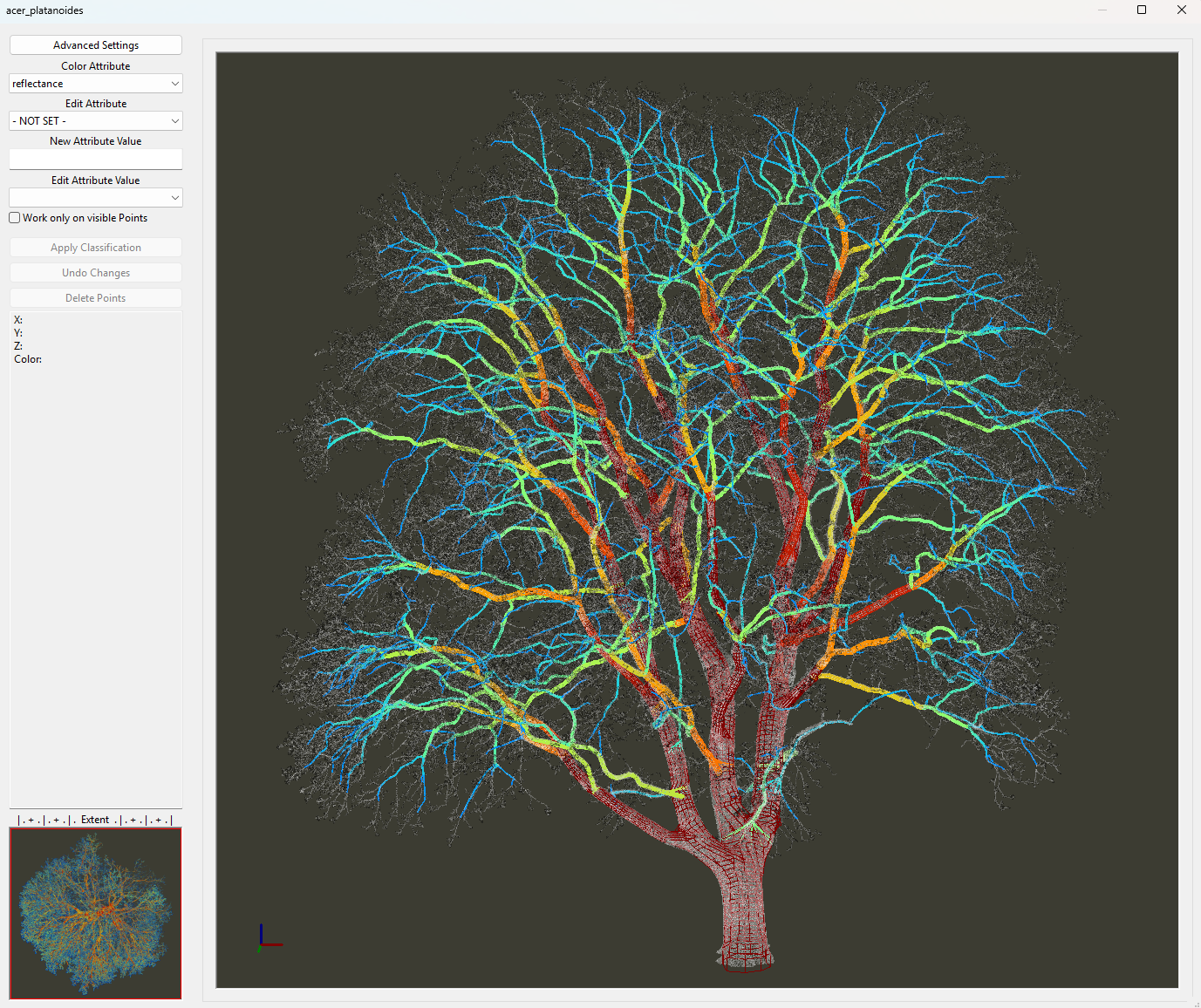
We can see that the reconstructed model now aligns much more closely with the point cloud, particularly around the trunk base and main fork.
Viewing the Basic Results
Besides the pipe model (acer_platanoides_pipe), which is primarily intended for visualization, the detailed geometric and structural information is stored in three additional datasets:
acer_platanoides_ringsacer_platanoides_axesacer_platanoides_skel
Rings Dataset
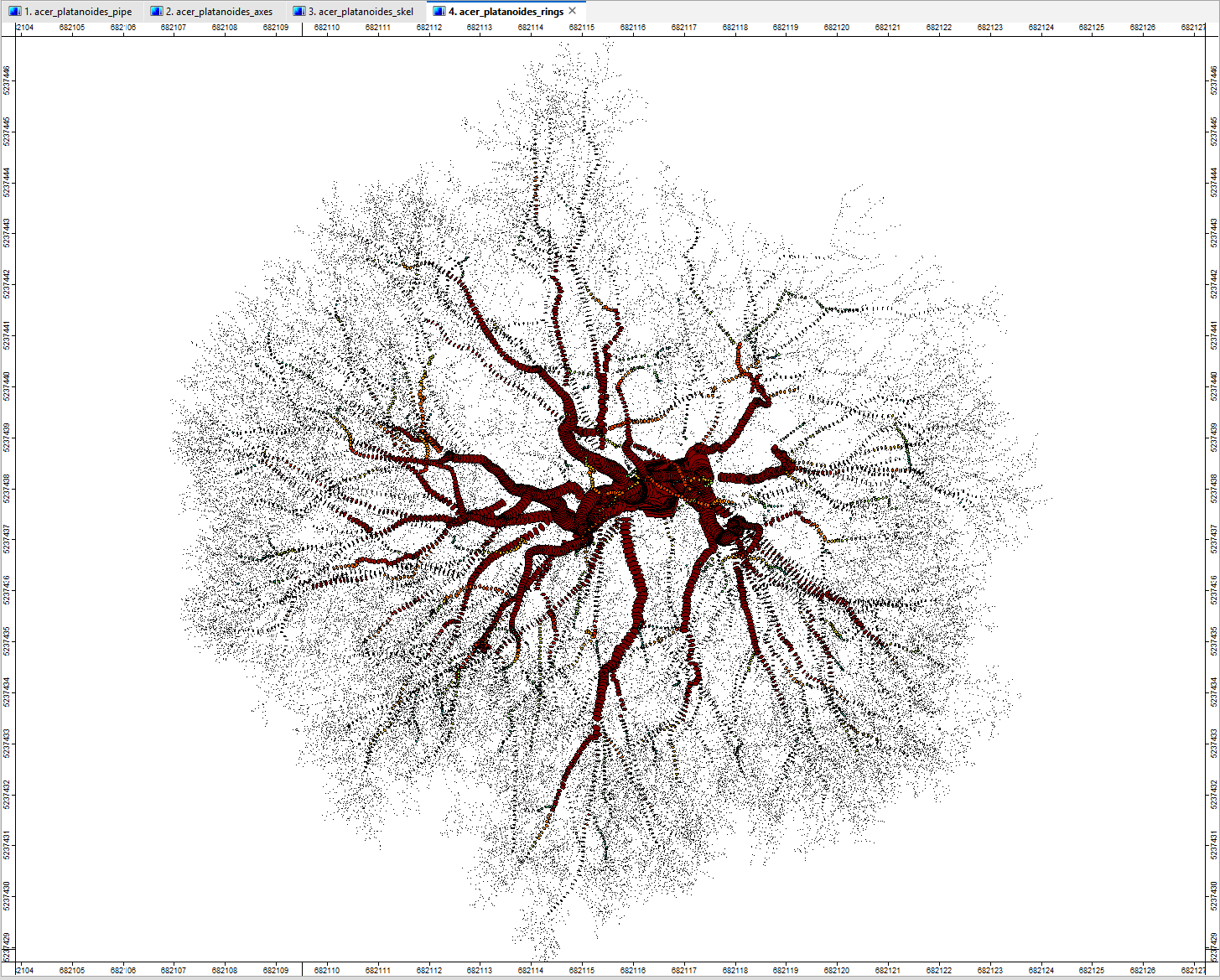
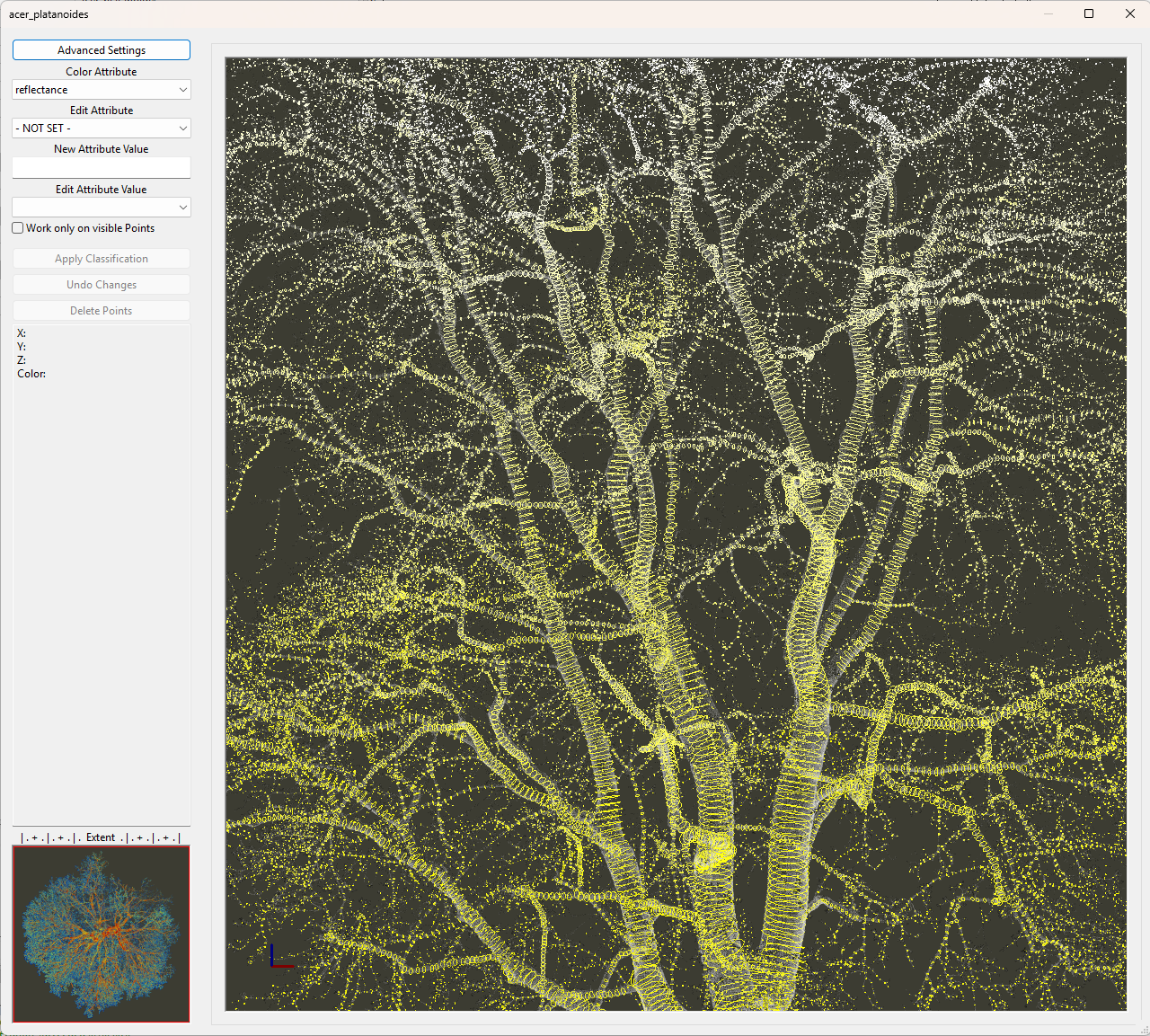
The acer_platanoides_rings dataset represents the reconstructed tree geometry as a series of local stem and branch cross-sections.
The spacing between these cross-sections is controlled by the Node Stepping parameter of the tool. Each ring describes the size and shape of the stem or branch at its respective position.
Axes Dataset
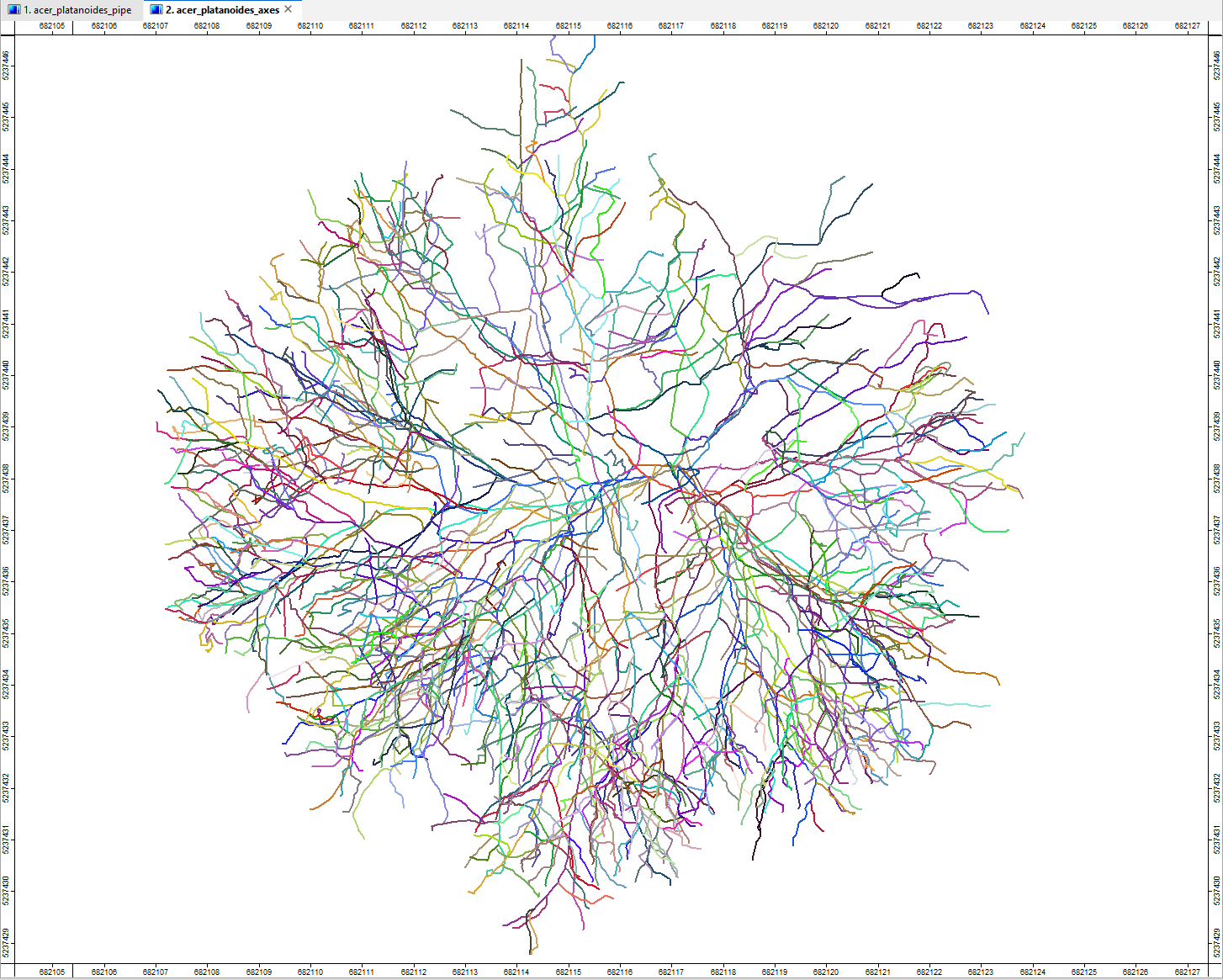
The acer_platanoides_axes dataset is a line shapes layer representing each branch of the tree as an individual feature.
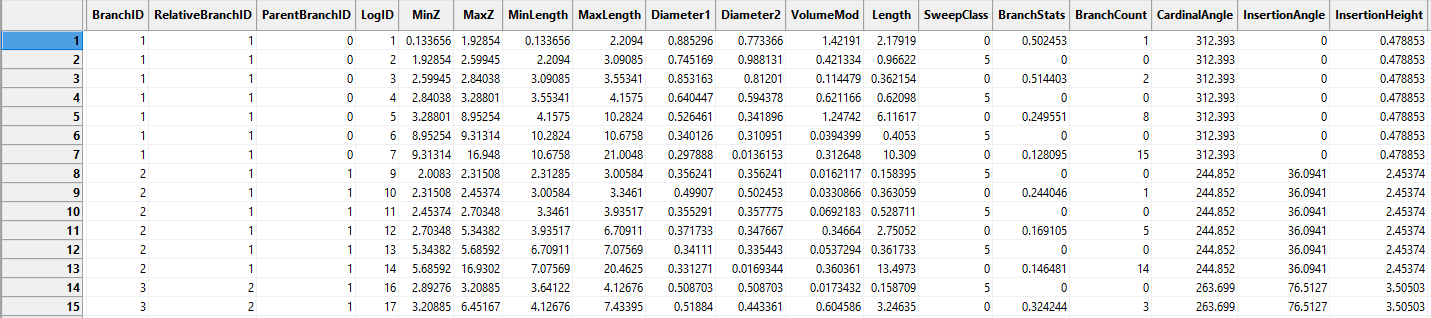
It allows us to analyze the tree structure at the branch level, including attributes such as branch ID and parent branch ID, which describe the hierarchical relationships between branches.
These attributes are complemented by geometric information such as branch diameter, insertion angle, and straightness.
The corresponding attribute table provides access to this information for each reconstructed branch.
Skeleton Dataset
The skeleton dataset is primarily intended for detailed scientific analysis of the reconstructed tree structure.
For most applications, the main geometric and hierarchical information is already summarized in the acer_platanoides_metrics shapes layer.
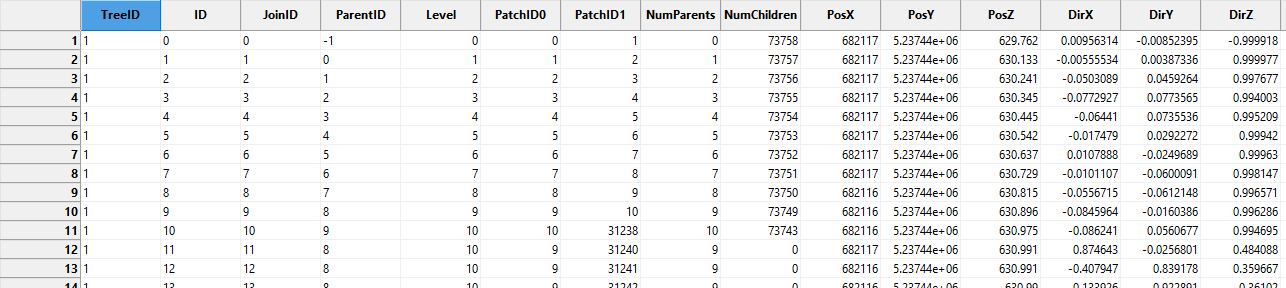
The acer_platanoides_skel dataset represents the complete tree skeleton as a graph reconstructed by the tool.
The graph consists of short, connected edges whose lengths are controlled by the Node Stepping parameter. In this example, the parameter is set to 0.1 m, resulting in edges of approximately 0.1 m in length.
Each edge represents a short section of the medial axis and can store geometric information such as length, diameter, volume, and direction.
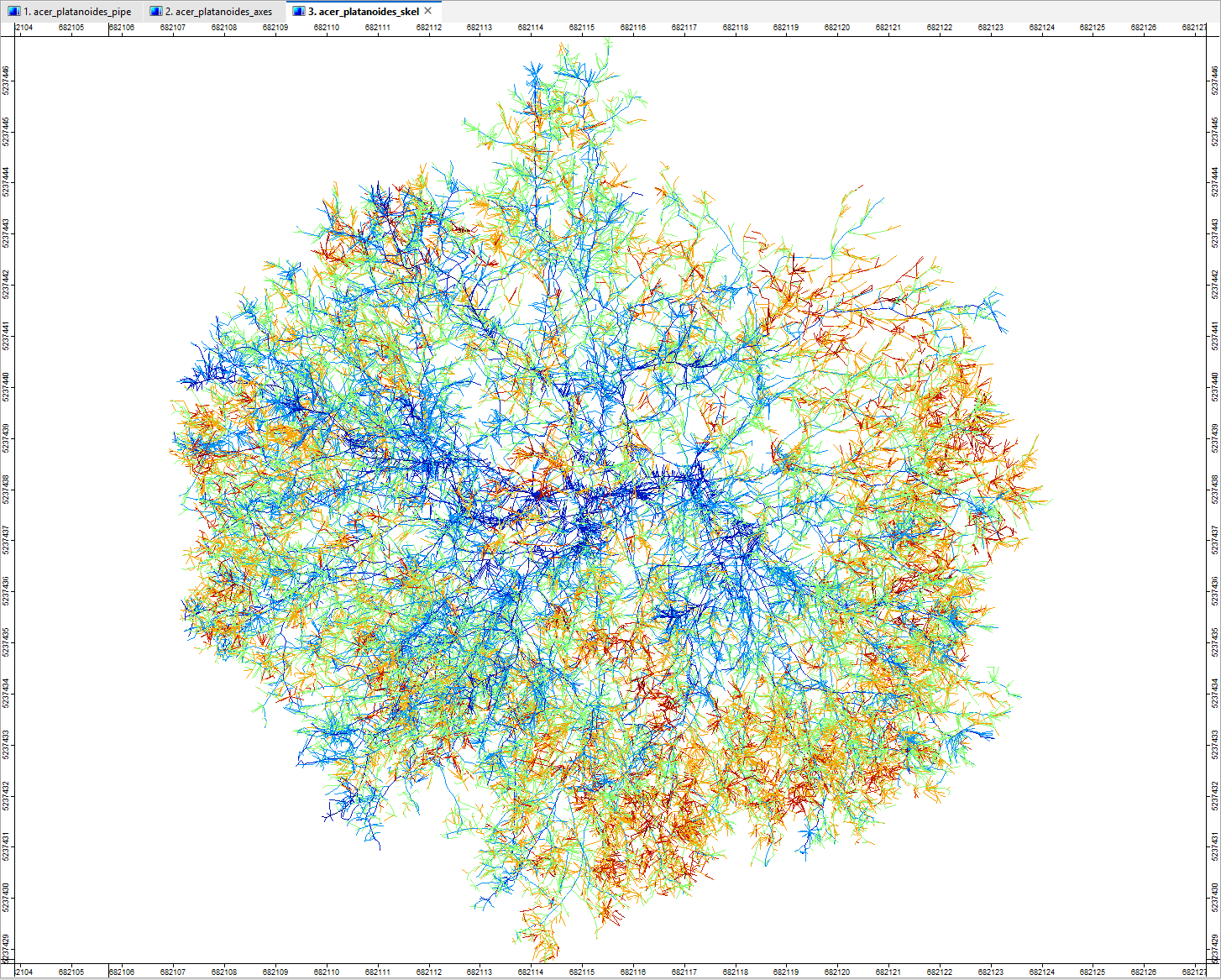
The edges are connected through nodes. Although shapes format does not inherently support topological relationships, the skeleton uses a pseudo-topological structure to describe the hierarchical organization of the tree.
Each edge is represented by a 3D line segment. The first vertex of a child edge coincides with the second vertex of its parent edge, establishing a geometric connection between them.
These relationships are also stored explicitly through a unique ID for each edge and a corresponding ParentID referencing its parent edge.
Together, these attributes allow us to trace the branching structure and analyze the connectivity of the reconstructed tree skeleton.
Generate Basic Tree Information
In addition to these detailed reconstruction outputs, we can extract key tree metrics and structural information from the reconstructed datasets and organize them into summary tables.
Tool: Extract Tree Information 3D
Geoprocessing → LIS Pro 3D → Forestry → Point Cloud // Tools → LIS Pro 3D → Forestry
| Parameter | Setting |
|---|---|
| Data Objects | |
| Shapes | |
| >> Tree Metrics | acer_platanoides_metrics |
| Tree ID | treeid |
| DBH | DBH |
| Tree Height | tree_height |
| Wood Volume | WoodVolume |
| Crown Diameter | crown_diameter |
| Crown Area | crown_area |
| Crown Bottom Height | CrownBottom |
| Crown Maximum Radius | <not set> |
| >> Branches | acer_platanoides_axes |
| > Stem Axes | <not set> |
| Tables | |
| << Tree Information | <create> |
| << Stem Information | <create> |
| Options | |
| Metadata | |
| Population Name | LISPro3D Trials |
| Stratum Name | acer platanoides |
| Plot Name | Rapoldi Park |
| DBH Height | 1.3 |
| Branch Analysis | |
| Analyze Branches | ☐ |
| Above Ground Biomass | |
| Calculate Biomass | 🗹 |
| Basic Wood Density | 0.54 |
| Tree Crown Information | |
| Add Crown Information | 🗹 |
We recommend to use the Global Wood Density Database to calculate biomass from the total woodvolume:
Fischer, F. J., Chave, J., Zanne, A., Jucker, T., Fajardo, A., Fayolle, A., Ferreira de Lima, R. A., Vieilledent, G., Beeckman, H., Hubau, W., De Mil, T., Wallenus, D., Aldana, A. M., Alvarez-Davila, E., Alves, L., Apgaua, D. M. G., Arcanjo, F., Bastin, J.-F., Bilous, A., … Zieminska, K. (2026): Global Wood Density Database v.2 (GWDD v.2) [Data set]. Zenodo. doi.org/10.5281/zenodo.18262736
As a result, we obtain two tables:
acer_platanoides_metrics_infoacer_platanoides_metrics_stem
Tree Information
The acer_platanoides_metrics_info dataset contains basic tree information, such as DBH and tree height, together with derived metrics such as total wood volume, aboveground woody biomass, and estimated stored CO₂ per tree.
Based on these calculations, the tree contains approximately 5 t of aboveground woody biomass, corresponding to approximately 9 t of stored CO₂.

Stem Description
Hierarchical Encoding of Tree Branching Architecture
This particular tree is not especially suitable for identifying long, straight logs. Its main axes are divided into numerous short sections due to major forks and geometric irregularities, resulting in individual logs with limited straightness.
However, this example is particularly useful for illustrating how the branching architecture of a tree is encoded.
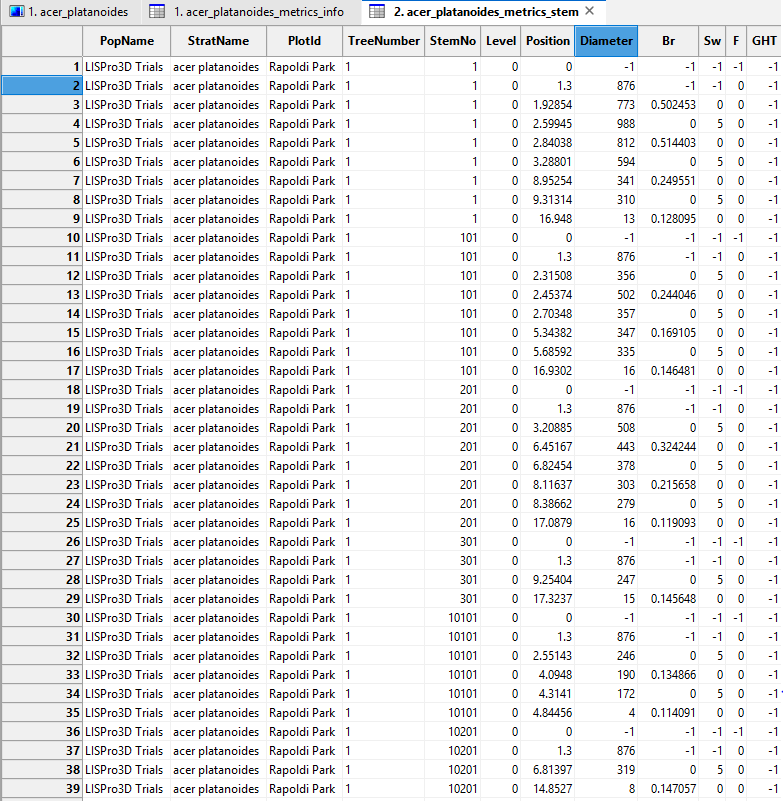
Each axis classified as leading is assigned a unique StemNo, which encodes its hierarchical level and parent–child relationships within the tree graph.
The encoding follows a hierarchical numbering scheme in which each level is represented by a two-digit identifier. Each child axis inherits its parent’s identifier and adds a new two-digit number to identify its position among the parent’s child axes.
Consequently, the identifier grows by two digits with each additional hierarchical level:
- Level 1 (2 digits): Main trunk
- Level 2 (4 digits): Primary branches originating from the main trunk
- Level 3 (6 digits): Secondary branches originating from primary branches
The following examples illustrate the encoding:
| Tree component | StemNo |
Hierarchical level |
|---|---|---|
| Main trunk | 01 |
1 |
| First child of the main trunk | 0101 |
2 |
| Second child of the main trunk | 0201 |
2 |
| First child of the first child | 010101 |
3 |
| Second child of the second child | 020201 |
3 |
For example, 020201 can be interpreted as 02 → 02 → 01, representing the second child axis of the second child axis of the main trunk.
When StemNo is stored or displayed as a numeric value, leading zeros are omitted (e.g., 020201 becomes 20201). However, the hierarchical structure can be recovered by restoring the leading zero to obtain an even number of digits.
For consistent representation, StemNo should preferably be treated as a character string rather than a numeric variable.
Summary
In this tutorial section, we explored advanced applications of the Tree Shape Metrics 3D tool using two trees with very different growth forms and reconstruction challenges.
Coniferous trees with a dominant, relatively straight stem: Using a Norway spruce (Picea abies), we examined how stem reconstruction can be improved by combining
Tree Trunk SlicingwithTree Shape Metrics 3D. We also explored stem straightness analysis, log classification, and the identification of potentially usable sawlogs based on their length and allowable sweep.Old, solitary broadleaf trees with complex stem geometry: Using a Norway maple (Acer platanoides), we demonstrated how amorphous cross-sections can improve the reconstruction of irregular trunk bases and major forks. We also examined the resulting rings, branch axes, and tree skeleton, including the hierarchical representation of branching architecture and the derivation of wood volume and aboveground woody biomass estimates.
Together, these examples demonstrate how Tree Shape Metrics 3D can be adapted to different tree architectures and analytical objectives, ranging from stem quality assessment and potential sawlog identification to detailed structural analysis and biomass estimation.